Script Planner Assistant▸
 AI Apps
 AI News

Toolify AI: An AI Tool Directory and Listing Site
Toolify AI: An AI Tool Directory and Listing SiteIntroduction
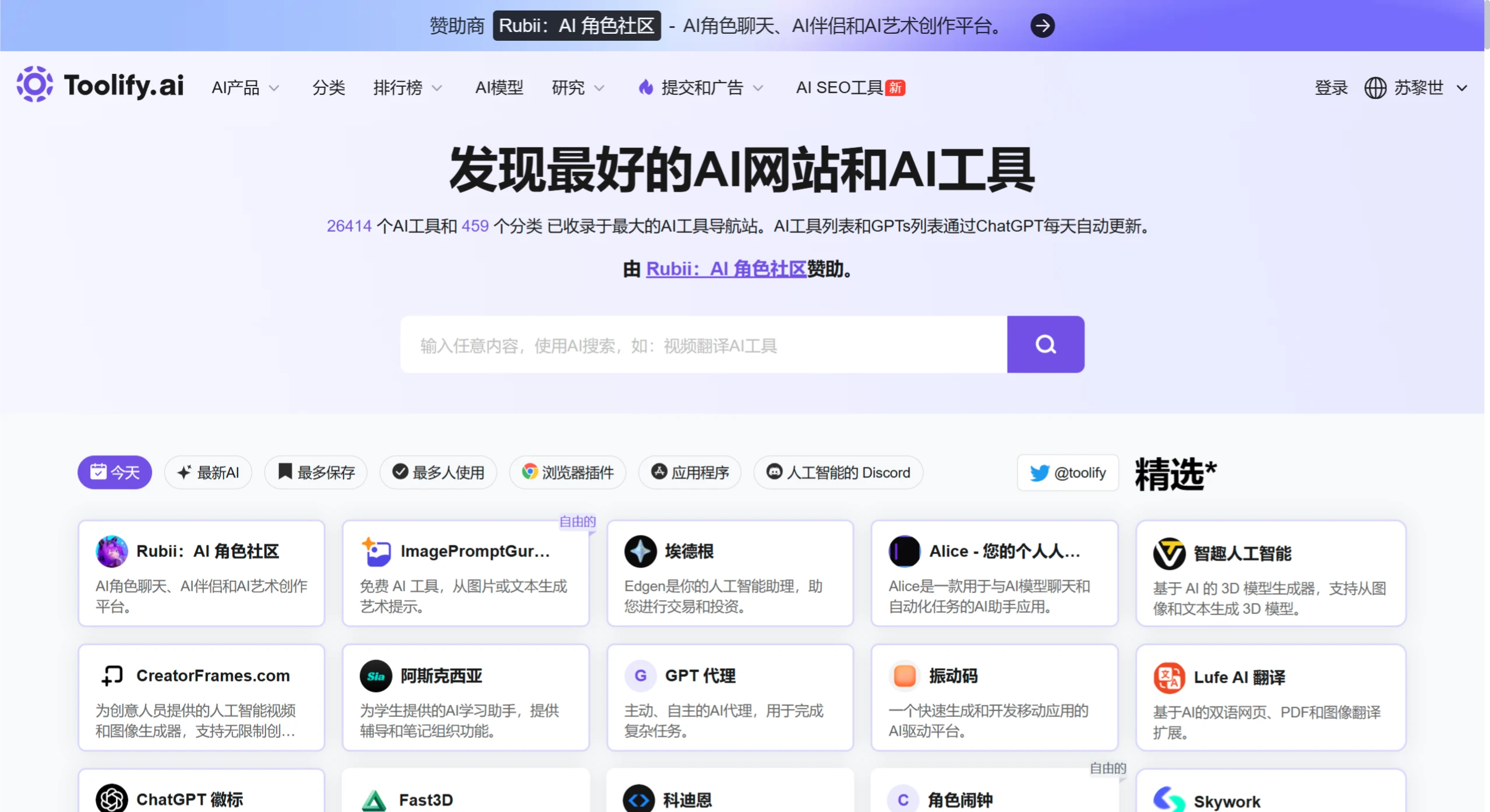
Toolify ai is an AI tools navigation and listing website dedicated to providing users with various AI solutions, helping them find the AI tools and services that suit them best.
Toolify AI has over 18,500 AI tools and services, covering more than 230 categories, including text writing, image editing, video creation, code development, voice processing, business marketing, AI detection, chatbot development, design and art, life assistance, education, and more. The platform is constantly updated so that users can access the latest AI tools.
ToolifyAI organizes and ranks tools by monthly popularity, category, region, source, and revenue. It also features boards such as "New AI Tools," "Most Saved," and "Most Used" to make browsing and searching easy. In addition, users can submit their own AI tools to the platform for promotion for $99.
Core Features
Precise Search: Filter by tool name, category (such as "AI Chatbots"), or feature (such as "Image to Video").
Detailed Display: Each tool's page includes an overview, tags, visit count, user reviews, pricing, and other information. Some tools can be accessed directly.
Multi-dimensional Rankings: Recommend popular tools based on "Most Used," "Newest Releases," "High Revenue," etc., such as "ChatGPT," "Midjourney," and more.
Community Interaction: Users can submit tools, leave reviews and ratings, forming collective feedback.
How to Use ToolifyAI
Visit the Website: Open a browser and enter the URL https://www.toolify.ai/zh/ to access the official site.
Register and Log In: Click "Favorites" or "Login" at the top of the page. You can sign in with a Google account, or click "Register" below to sign up with your email.
Browse Tools:
Browse by Category: There are major categories at the top of the homepage. Click one to expand major categories on the left side, while the right side displays subcategories and related tools. For example, click "Image" to see subcategories such as "AI Emoji Generator" and browse tools.
View Rankings: Click "Rankings" and filter by AI category keywords. You can view tools sorted by monthly popularity (such as highest traffic, most saved, etc.). Select a category and click "View This Report" to proceed.
Use the Search Function: Enter keywords in the search box at the top of the page.
Select a Tool: When you find a tool you like, click its name or the corresponding box. An "Open Website" button will appear at the top of the page; click it to be redirected to the tool's official website. Scroll down on the tool's introduction page to view detailed information.
Favorite a Tool: When you come across a frequently used or interesting tool, click the "Favorite" button to save it for easy access later.
Community Interaction: Connect with other enthusiasts and professionals through AI Discord, and share experiences and get the latest AI updates.
Submit a Tool: If you have your own AI tool you want to promote, pay $99 and follow the website's instructions to submit it.
Use Cases
Developers: Find open-source tools or APIs for projects.
Designers: Access efficient AI design tools, such as image generation and video editing tools.
Business Users: Choose office automation or data analysis solutions.
Students and Educators: Access AI-assisted tools related to learning and teaching.
Strengths and Weaknesses
Strengths:
Large Tool Collection: As of July 2025, it lists over 26,000 AI tools across more than 450 categories, meeting diverse needs.
Fast Updates: Powered by ChatGPT, it automatically updates the tool list and GPT Store apps daily, allowing users to access the latest tools and developments in a timely manner.
User-Friendly: The interface is clean and supports category browsing and search. Tools come with detailed descriptions, and some include user reviews for better understanding.
Multilingual: Supports Simplified Chinese, English, Korean, Japanese, and more, allowing users worldwide to use it without barriers.
Strong Interaction: Users can submit tools for promotion, and the AI Discord community makes communication easy.
Weaknesses:
Inconsistent Tool Quality: Due to the large number of tools, it's hard to guarantee that every one is high-quality and practical; tools with poor actual performance may be listed.
Lack of In-depth Reviews: It only provides tool links and basic descriptions, without in-depth reviews and performance benchmarks. Users may need to spend time testing tools themselves.
Insufficient Category Depth: Although the categories are broad, certain specific fields lack fine-grained subcategories, which may make it inconvenient to locate very specialized tools.
Frequently Asked Questions
Question: As an AI navigation website, what are Toolify.ai's core strengths?
Answer: Comprehensive categories make it easy to search; smart recommendations and search match needs quickly; user reviews and ratings help users choose; the real-time tool library tracks tech trends; competitor comparisons help understand strengths and weaknesses; a one-stop platform saves time, with a professional team that lowers the barrier to use.
Question: Compared with similar competitors, what makes Toolify.ai unique?
Answer: Its overall advantages are more prominent. Although other competitors each have their own features—such as FutureTools.io's clean interface and AI Tools Club's focus on open-source and free tools—Toolify.ai excels in smart recommendations and user interface, suiting a broader user base. It lists a large number of tools (23,362) and categories (233), boasts nearly 2 million monthly unique visitors, and covers a wide global user base.
Question: How do different user groups use Toolify.ai to meet their needs?
Answer: Developers find open-source tools or APIs; designers access image generation, video editing, and other tools; business users choose office automation or data analysis solutions; students and educators find AI-assisted tools related to learning and teaching. The platform's categories and smart recommendations help all types of users quickly find the tools they need.