Script Planner Assistant▸
 AI Apps
 AI News

PaperMe: Create and Print Custom Paper for Free
PaperMe: Create and Print Custom Paper for FreeIntroduction
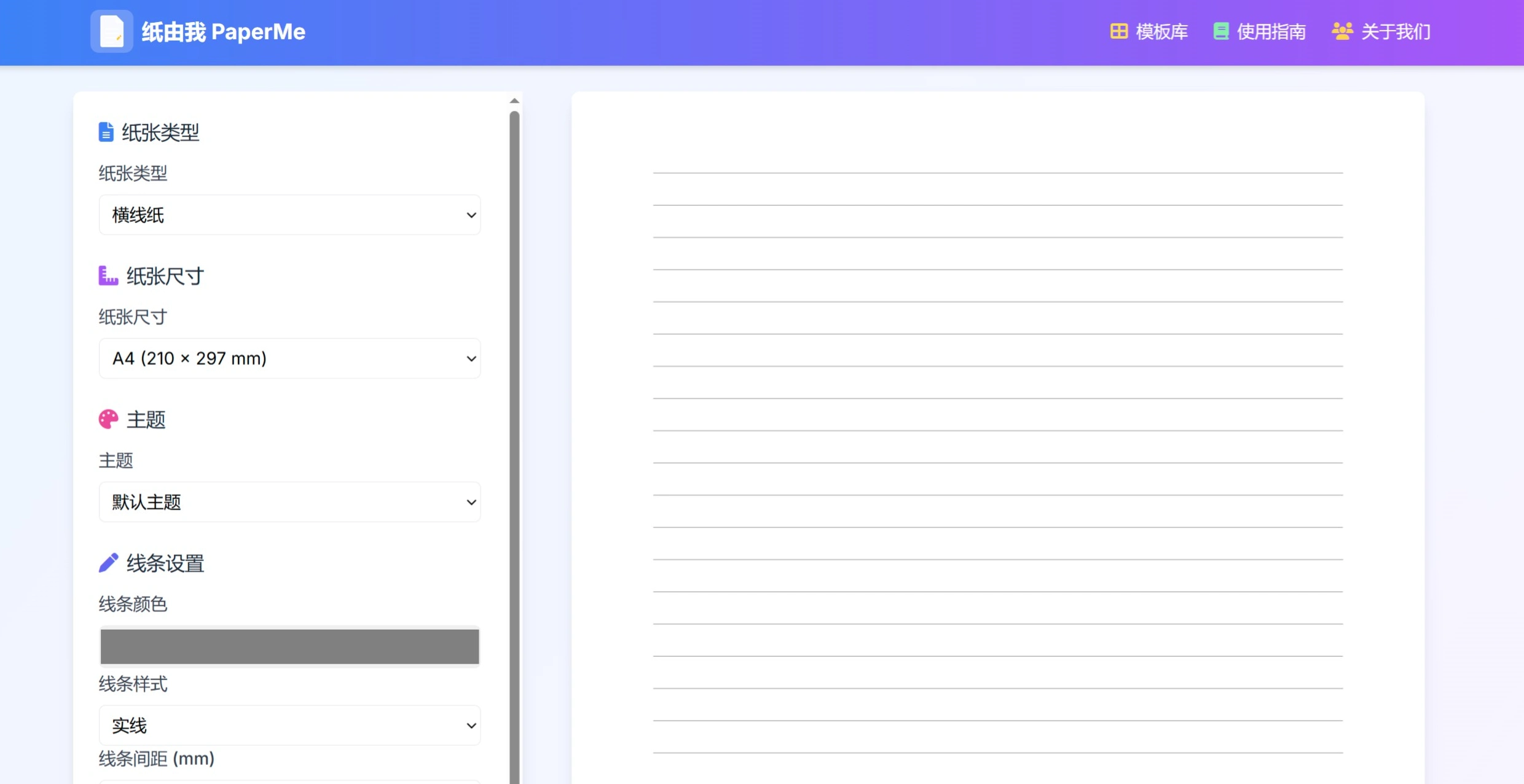
"PaperMe" is a free online paper template customization platform. Users can choose basic templates such as lined, grid, and dot grid paper from the "Template Library", or pick from professional templates like music paper and calligraphy paper. They can also customize settings such as paper type, size, line color, line spacing, line thickness, paper background, and paper watermark. It supports exporting and importing settings files in JSON format to manage templates, and the generated PDF files can contain up to 100 pages. The website automatically adapts to devices such as phones and tablets, and users can refer to template setting examples and printing tips when operating. It supports a variety of international standard paper sizes, such as A3 to A5, as well as Letter, Legal and other sizes, and allows custom sizes.
Features
Rich variety of paper types: More than ten templates including lined paper, grid paper, dot grid paper, music paper, calligraphy paper, and Cornell notes, meeting the needs of various occasions.
Flexible customization: Paper type, paper size, line settings, line color, line style, line spacing, line thickness, paper background settings, and paper watermark can be freely set. Multiple international standard paper sizes are supported, and custom paper sizes are also available.
Real-time preview: When users adjust parameter settings, a real-time preview is available on the right side so users can check the effect in time.
One-click PDF generation: After settings are completed, a single click generates a high-quality PDF file for easy saving or direct printing.
Completely free: Just open the website to use it, no hidden charges, no registration required.
Use Cases
Study notes: Students can print lined paper for calligraphy practice, grid paper for math exercises, and dot grid paper for journals to improve learning efficiency.
Daily accumulation: Can be used for writing diaries, making plans, and recording to-do items.
Artistic creation: Includes painting, calligraphy practice, project planning, and other uses.
Office needs: Can print meeting notes, planning sheets, and creative draft paper to improve work efficiency.
Usage Flow
Select a template: You can click the "Template Library" on the homepage to choose basic templates (lined paper, grid paper, dot grid paper, blank paper) or professional templates (music paper, calligraphy paper, Cornell notes, isometric grid).
Personalized settings: After selecting a template, you can use the left-side control panel to set the paper type, paper size (standard A sizes or custom), line settings (color, spacing, thickness, style), background settings (color, pattern), watermark settings (text, transparency, angle, etc.), and the preview on the right updates in real time.
Generate and print: Once satisfied, click "Generate PDF" to create a PDF with up to 100 pages. Download it and you can print directly. It is recommended to use quality printing paper; double-sided printing is possible. For color templates, pay attention to ink usage or use double-sided printing to save paper.
Template Management Features
Export settings: After completing settings in the control panel, click "Export Settings" at the bottom to download a JSON file, named in the format "paper-settings - current month and date.json". The file name can be changed (for example, math-notes - grid-paper - blue.json).
Import settings: Click the "Import Settings" button, select a previously saved JSON file, and you can preview it directly and generate a PDF, or continue editing.
Template Creation Tips
Categorize by occasion: Can be divided into a study notes series (subject-specific papers), a work documents series (note-taking, project planning, etc.), a creative series (drawing, journals, etc.), and a seasonal theme series (templates in different colors for each season).
Advanced steps: Start with a basic template that is as close to your needs as possible, then adjust paper size, paper type, margins (leave room for binding and hole punching), set line color and thickness, add background and watermark, perform a test print of one page, and export and rename after modifications are complete.
FAQ
Q: Is online use on mobile phones supported?
A: The responsive website design supports mobile phones, tablets, and PC.
Q: Is there a limit on the maximum number of PDF pages?
A: Up to 100 pages can be generated at a time, and multiple PDFs can be merged afterward.
Q: Can line thickness and color be modified?
A: Adjust them in the "Line Settings" section, and the preview updates in real time.
Q: Can settings files be shared with others?
A: Yes, they can.
Q: Are edited settings files saved?
A: It is recommended to import, modify, and export again through the website interface.
Q: Can a company LOGO be added?
A: Currently, text watermarks are supported on the HTML side, with plans to later optimize to support image watermarks.
Can they all be used for free?: They can all be used for free.