Script Planner Assistant▸
 AI Apps
 AI News

Julius AI: AI Data Analysis & Visualization Tool
Julius AI: AI Data Analysis & Visualization ToolIntroduction
Julius AI is a powerful artificial intelligence data analysis tool for data analysis and visualization, developed by Casera Labs. Founded in 2022 and headquartered in San Francisco, it was created by Rahul Sonwalkar, who holds a bachelor's degree in Computer Science from the University of Texas at Dallas and previously worked at Uber and Facebook. The project originated in Y Combinator S22.

Julius AI Features
Natural Language Interaction: Users can ask Julius AI questions directly in natural language through the chat box, and it will automatically generate analysis and visualization results, making data analysis effortless.
Rapid Data Parsing: It can quickly process and analyze large datasets and deliver results in a short period of time.
Data Visualization: It can generate graphs and figures such as bar charts, line charts, pie charts, histograms, heatmaps, scatter plots, interactive charts, and GIF animations, helping users understand data patterns and complex changing trends.
Deep Insights and Analysis: It can analyze and visualize more data quickly, providing expert-level analysis and predictive information, and supports complex statistical models and predictive capabilities, such as regression and clustering analysis.
Automated Report Generation: It automatically generates reports suitable for any data analysis needs, such as math, physics, and chemistry problems. Reports can be exported in CSV or Excel format for easy sharing and further use.
Multiple Format Support: It supports multiple data formats, such as CSV, Excel, Google Sheets, PDF, and images, and can easily read and interpret documents.
Multilingual Support: It supports multiple languages for use across different regions and fields.
User-Friendly Interface: It explains, analyzes, and visualizes complex data in an easy-to-understand way, allowing beginners to use it with ease.
Advanced Model Integration: It can access advanced large models such as GPT-4, GPT-4o, and Claude-3, as well as the internet, to add insights and provide relevant source links to reduce hallucinations.
Advanced Reasoning Capabilities: It can think and generate detailed, comprehensive responses, and can be extended to fields such as e-commerce and job hunting—for example, pulling Amazon shipping product pages or LinkedIn profiles.
Model Lab Feature: This is a generative AI that can access all the latest AI models and the internet. It can be regarded as an answer engine that answers questions with relevant source links and without hallucinations.
Other Features: It can process images and videos to help extract useful information; allows users to directly upload email worksheets and provides suggested visualizations; can create complete web applications (HTML, CSS, and JS) with just a single prompt; integrates with AI models such as GPT-4 and Claude, and can access the internet for deeper insights.
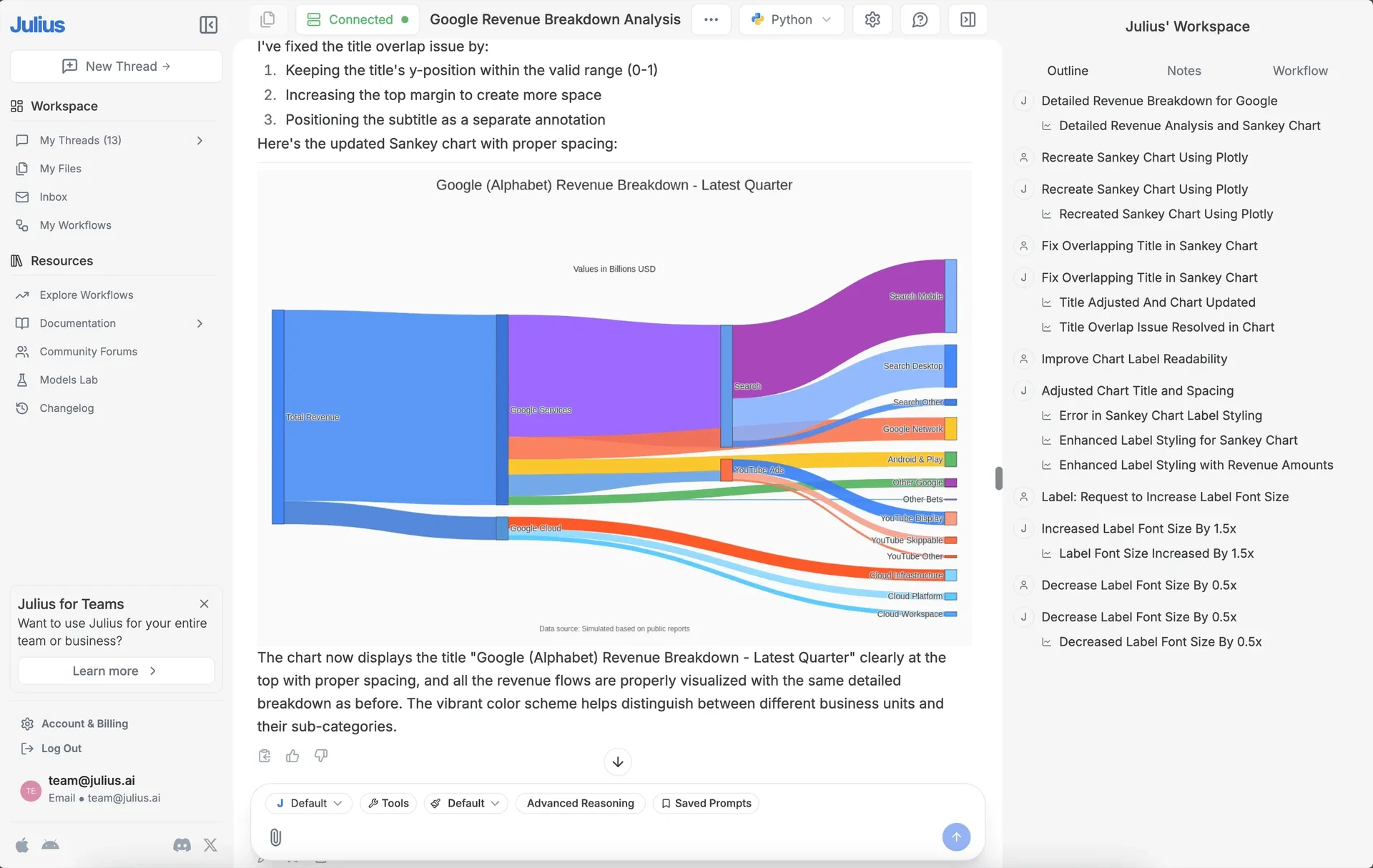
How to Use Julius AI
Sign Up and Log In: Visit Julius AI's official website (Julius AI official website), click the start trial button to create a free account, and log in to access the main page.
Upload Data: Click the clip button (file upload button) on the left side of the dialog box to upload from different file upload buttons. After uploading the file, it will be visible. If you want Julius AI to provide answers only from a specific data subset, drag and select the specific area of the spreadsheet; by default, it reads the entire spreadsheet. Multiple files can be uploaded at the same time.
Configure Options: After uploading the file and before conversing with the data, you can enable or disable some options. Click the default button to select the large model you want to use; click the Button props to enable or disable web search, run code, perform data analysis simultaneously, and Model chat (not recommended); it is recommended to enable Advanced Reasoning so that the AI can build an appropriate plan to accomplish the task; select Python or R in the upper right; you can also configure Chat settings options, where you can provide prompts for Julius AI to follow.
Submit Requests: Enter your requirements in natural language, and Julius AI will begin to understand the data file by loading and reviewing it through Python code. Users can also modify the code along the way, and Julius AI will make corresponding adjustments. Finally, it can provide automated visual graphs.
Julius AI Use Cases
Business Analysis: Helps enterprises analyze sales data, market trends, customer feedback, etc., to support decision-making, such as optimizing inventory management and developing more effective marketing strategies.
Academic Research: Helps students or researchers with data analysis, modeling, and report writing, saving time and improving processing efficiency.
Education: Provides students with an easy-to-use data analysis tool to help them better understand complex data and improve hands-on skills and analytical thinking.
Healthcare: Used for medical data analysis and health trend forecasting, such as automatic image recognition to assist doctors in diagnosing and analyzing medical imaging data, and analyzing patient genetic data to provide a basis for personalized treatment.
Human Resources: Used for recruitment data analysis and employee performance evaluation to help businesses better manage human resources.
Julius AI Pricing Plans
Free Version: Send up to 15 messages per month. Files uploaded under the Free and Basic plans will be deleted within one hour.
Standard Plan: $40 per month, with unlimited messages, retained conversation context, and the ability to input more complex data.
Team Plan: $46 per member per month, including all Standard Plan features and unified input billing for the longest historical data.
Annual Payment: On average, it may be cheaper.