
 Script Planner Assistant▸
 AI Apps
 AI News

VHEER: Free Online AI Image Generator — No Sign-up
VHEER: Free Online AI Image Generator — No Sign-upIntroduction
What is Vheer?
Vheer is a free online image generation platform that requires no registration to use. It offers a variety of tools, such as text-to-image generation, converting one image into a different style, removing image backgrounds, extracting text from images, and generating AI prompts. These tools can be used to create anime avatars, professional headshots, tattoo designs, and more, and they support uploading images in JPG, PNG, and WebP formats. It's also very easy to use—simply choose a tool, upload your image, write your prompt, adjust the settings, and click once to generate the image. Once you're satisfied, you can download it.
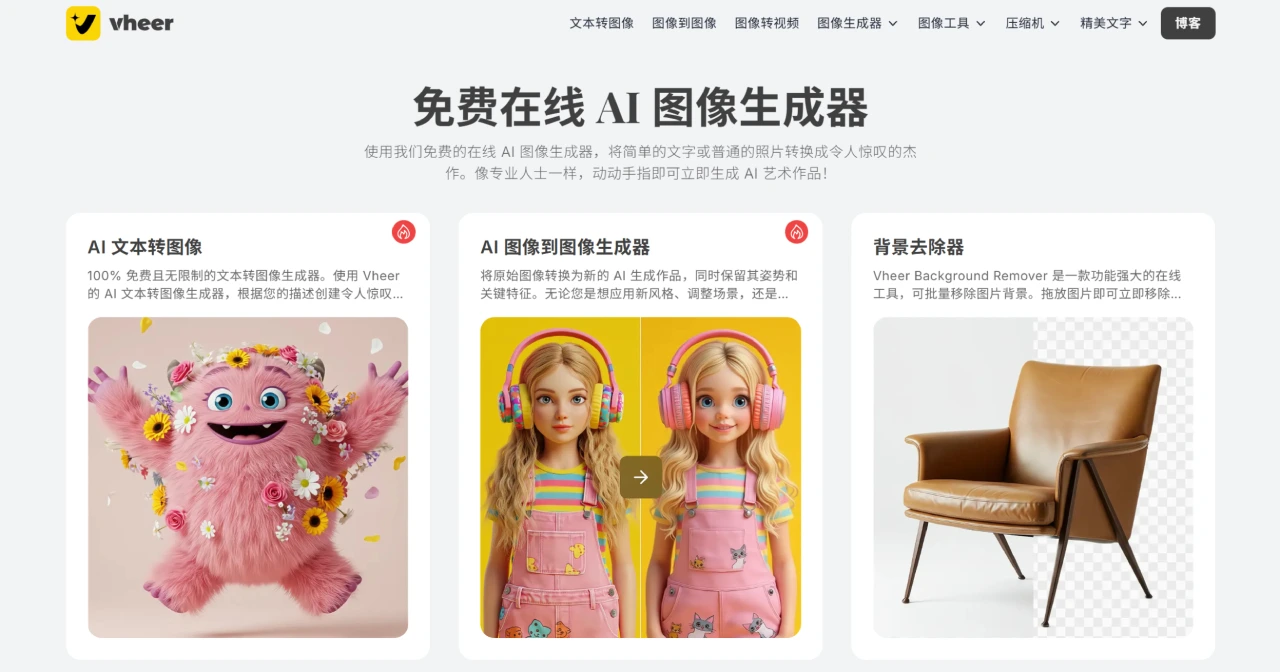
Vheer Features
Text-to-Image: Just describe the scene you want in words, and it can generate high-quality images with precise control over lighting and color, making it perfect for designing logos or game characters. You only need to input text—there are no file format restrictions.
Image Style Transfer: It can transform the style of an image into something else, such as turning a regular photo into anime, realistic, or cyberpunk style, while preserving the original pose and key features.
Background Processing: It can batch-remove image backgrounds, and you can also choose your own background color or make the background transparent.
Text Extraction: It can batch-extract text from images with high recognition accuracy, supports text extraction from images in multiple languages, and the extracted text can be edited.
Prompt Generation: It can convert images into detailed prompts, and the generated prompts can also be used on other platforms (such as Midjourney).
Vheer Signature Tools
AI Anime Avatar Generator: It can turn your selfies or avatar photos into anime-style artwork for free. You only need to upload a photo, write a prompt describing your preferred style (such as Chibi, Waifu, Classic, Shonen, Fantasy, Cyberpunk, Gothic, Realistic, Historical, or Romantic style), and you can generate anime avatars in various styles with no hidden fees or usage limits.
AI Professional Headshot Generator: It helps you turn your photos into professional business headshots, suitable for use on social media platforms (such as LinkedIn, Instagram, Facebook) or website profiles. This tool automatically replaces the background, adjusts lighting, and optimizes hairstyle and facial features to make your headshot look clean and professional.
AI Tattoo Generator: It helps you design unique tattoo patterns. You can turn your ideas into various body art, ranging from complex symbols to large detailed designs, and you can also customize tattoos for any body part (such as forearm, wrist, finger, or spine), trying out different styles and themes to create one-of-a-kind tattoo designs.
AI Image Generator: It generates high-quality images through text descriptions, which can be used in social media posts, blog articles, ad banners, videos, or TikTok, among others. This tool is based on the latest fine-tuned models and can quickly generate images with rich details, excellent lighting, and color.
How to Use Vheer
Choose a tool: Select the corresponding function module based on what you want to do (such as generating anime avatars or removing backgrounds).
Upload images: Supports single or batch uploading of images in JPG/PNG/WebP formats, with a recommended resolution of ≥1024x1024.
Enter prompts and settings:
Text-to-image: Describe the elements of the scene in detail, e.g., "a yellow house shaped like a banana, with round windows."
Style transfer: Choose an art style (e.g., "realistic", "gothic"), output ratio (1:1/4:3, etc.).
Generate and download: Click the "Generate" button, and results will be ready in 5-30 seconds. If you're not satisfied, you can adjust the prompt and regenerate unlimited times. Once satisfied, you can download with one click.
Frequently Asked Questions about Vheer
Q: Do I need design skills to use the anime avatar generator?
A: No design skills are required. Just upload a photo, write a style description, and the AI will automatically complete the transformation.
Q: Does the professional headshot generator support custom outfits?
A: Yes, it does. The AI model can generate headshots with different clothing styles based on prompts, such as formal wear or casual wear.
Q: What is the core competitiveness of the Vheer platform?
A: Completely free, no usage limits, and comprehensive features. It offers over 10 tools covering text-to-image generation, image style transfer, professional headshot design, and more. It is also based on advanced AI models, enabling high-precision image generation while protecting user data privacy.
Q: What scenarios are suitable for using Vheer's professional headshot generator?
A: It's suitable for professional scenarios such as workplace social platforms (e.g., LinkedIn), job resumes, corporate website displays, and online meeting avatars. The AI can automatically optimize the background, lighting, and facial features to make your headshot more professional.
Q: How does Vheer's AI Tattoo Generator achieve personalized design?
A: Users can customize their designs by inputting style keywords (e.g., "traditional Japanese", "watercolor style"), tattoo placement (e.g., "collarbone", "calf"), and thematic elements (e.g., "dragon", "starry sky"). The AI will generate multiple versions of designs for selection, and it also supports exporting high-definition images, making it easy to communicate and make adjustments with tattoo artists.














