
 Script Planner Assistant▸
 AI Apps
 AI News

IC Light AI: Control Image Lighting with Text Prompts or Reference Backgrounds
IC Light AI: Control Image Lighting with Text Prompts or Reference BackgroundsIntroduction
What is IC Light AI?
IC Light AI is an AI tool that controls image lighting through text prompts or reference background images. It supports 4 lighting angles including left light and right light, as well as multiple image sizes. It is suitable for portrait photography, social media, e-commerce, and other scenarios, and is currently available for free trial.
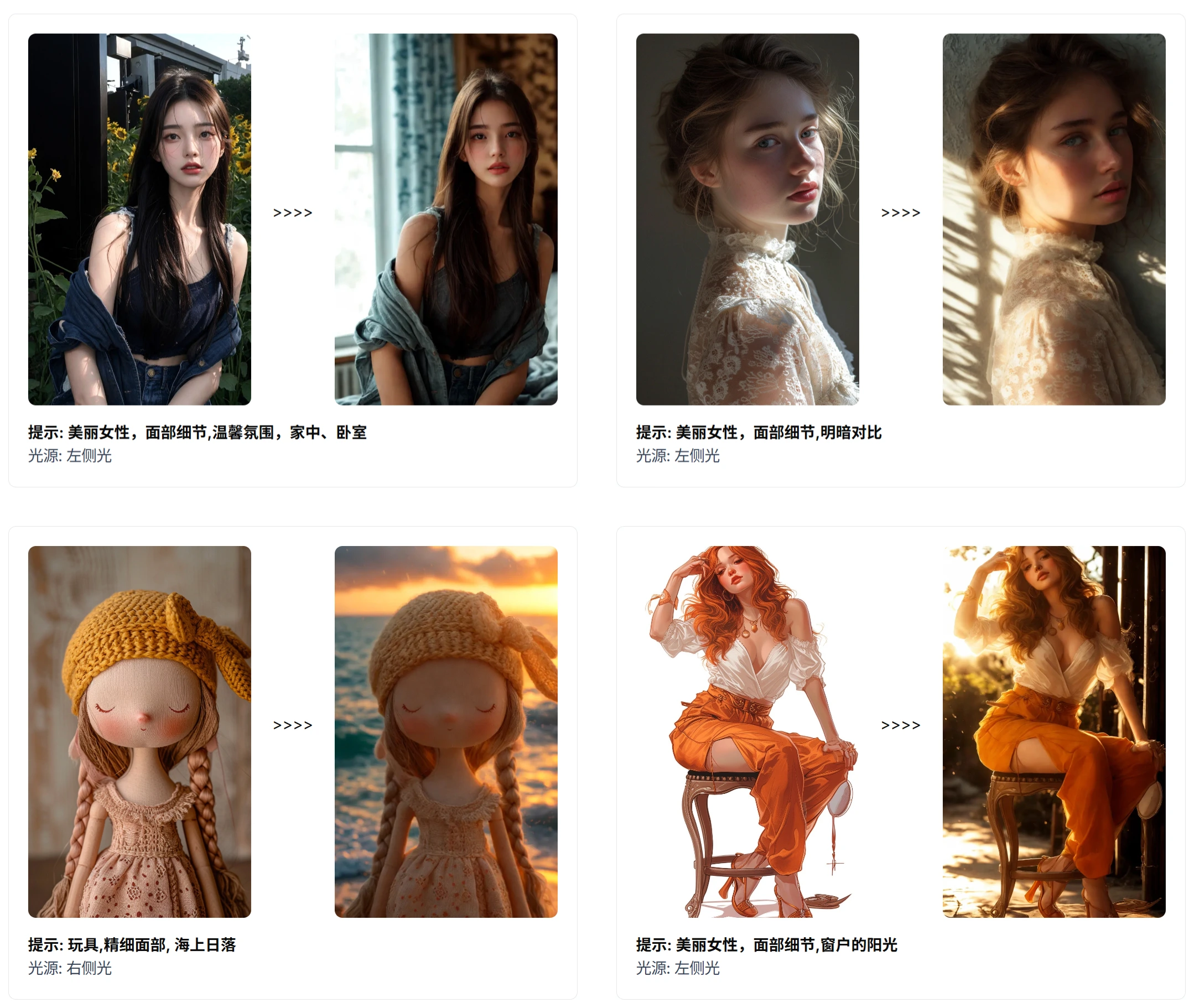
IC Light AI Features
Multiple lighting modification methods: It provides two methods—text-conditioned lighting and background-conditioned lighting. Text-conditioned lighting allows users to describe the desired lighting using natural language, such as "warm sunset glow," and IC Light AI will adjust the portrait lighting accordingly. Background-conditioned lighting analyzes the lighting in a reference background image and applies it to the portrait, ensuring consistent lighting between the portrait and the background.
Supports multiple image sizes: Supports various sizes where both image width and height can be 256, 320, 384, 448, 512, 576, 640, 704, 768, 832, 896, 960, 1024.
Rich selection of lighting angles: Currently supports four lighting options—left light, right light, top light, and bottom light—with plans to add more in the future.
Generates high-quality images: Users need to provide clear, complete, and high-resolution original images to ensure the generation of high-quality images.
Convenient and efficient operation: Users can easily control the intensity, direction, and color of lighting in photos, achieving precise adjustments to match new environments. Image generation typically takes 10-20 seconds, and free use may require queuing.
Supports common image formats: Supports common image formats such as JPG, JPEG, PNG, and WEBP.
Flexible usage modes: Free trial is currently available, but modifying photo lighting and shadows requires substantial resources, and enhanced support services require purchasing credits.
IC Light AI Application Scenarios
Portrait photography: Professional portrait photographers can optimize portrait photos, enhance lighting effects, and improve photo appeal and quality.
Social media: Individuals or brands can improve the lighting of shared portrait photos, making them more attractive and engaging.
E-commerce: Helps improve the texture and quality of product portrait images, thereby increasing sales.
Family photography: Ordinary users can optimize family portrait photos to make them more artistic and aesthetically pleasing.
Professional post-processing: As part of a professional post-processing workflow, it optimizes portrait photo lighting effects and improves overall photo quality.
IC Light AI Tutorial Guide
1. Choose how to use it
Online use: Visit https://iclightai.com/zh to operate directly online.
Local use: If you need more advanced features or frequent use, you can download the IC-Light source code and run it locally (requires some technical foundation).
2. Upload images
On the website interface or in the local program, upload the portrait photo that needs lighting adjustment. Image formats supported by IC Light AI include JPG, JPEG, PNG, and WEBP.
Make sure the image you upload is clear and complete, with resolution as high as possible.
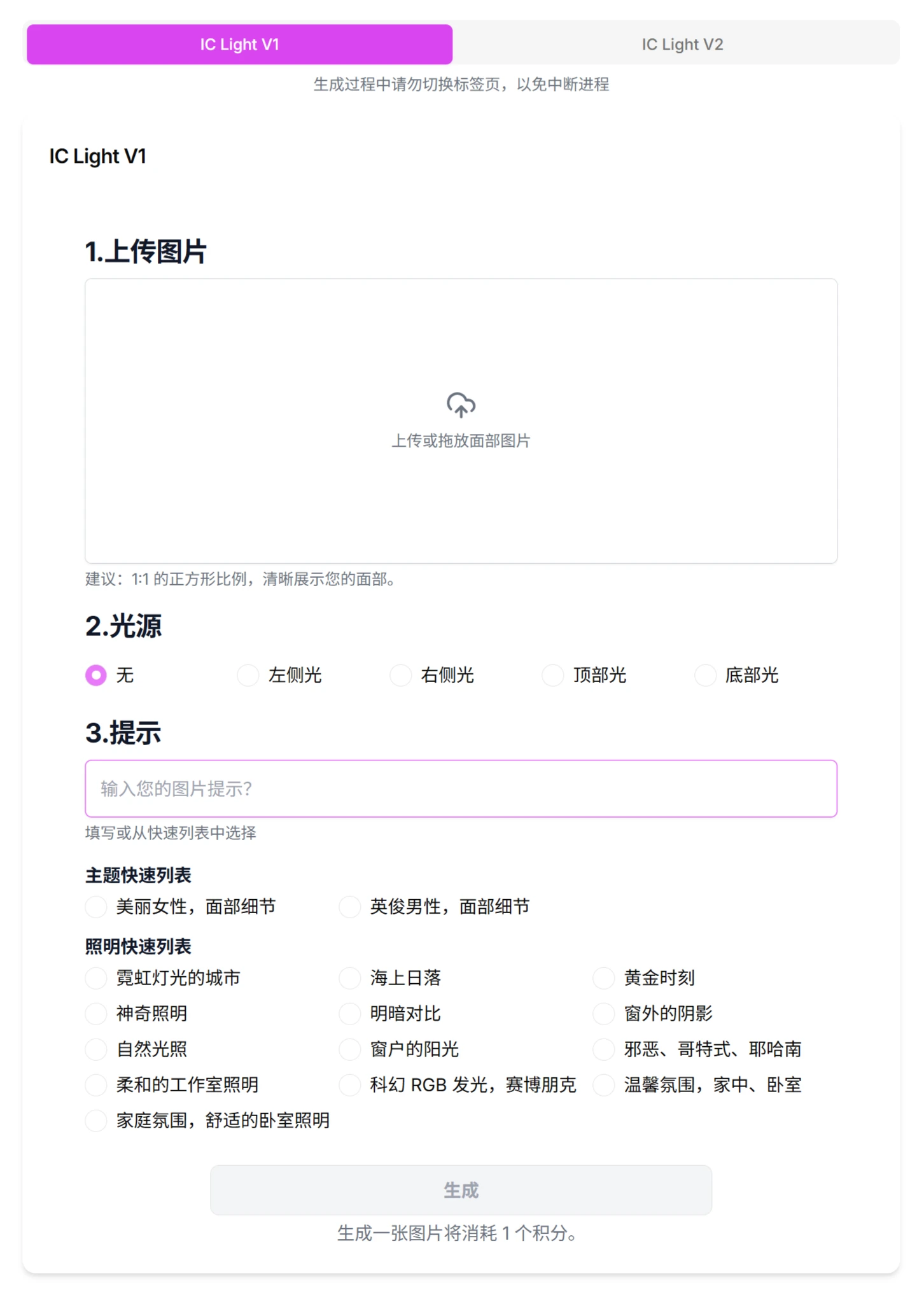
3. Choose the lighting adjustment method
Text-conditioned lighting:
Enter a natural language description in the text box, detailing the lighting effect you want. For example:
"Warm sunset glow"
"Cool-toned moonlight"
"Soft indoor lighting"
IC Light AI will adjust the portrait's lighting according to your description.
Background-conditioned lighting:
Upload a reference background image with the ideal lighting effect.
IC Light AI will analyze the lighting in the reference background image and apply it to your portrait photo, ensuring consistency between the portrait and background lighting.
4. Select lighting angle (optional)
If needed, you can choose the direction of the lighting, such as left light, right light, top light, or bottom light. This helps further precisely adjust the lighting effect.
5. Generate images
Click the "Generate" or "Relight" button, and IC Light AI will begin processing the image.
Image generation typically takes 10-20 seconds. If using the free version, you may need to queue up, and the wait time will be slightly longer.
6. View and download
The generated image will be displayed on the interface, where you can view the effect. If you are satisfied with the result, you can click the "Download" button to save the processed image locally.
FAQ
Q: How does IC Light AI achieve lighting adjustment?
A: Through two methods—text-conditioned lighting (parsing natural language descriptions to adjust lighting) and background-conditioned lighting (analyzing the lighting of a reference image and applying it to the target portrait)—based on deep learning technology for precise control.
Q: What lighting angles and image sizes are supported in the current version?
A: Lighting angles include left light, right light, top light, and bottom light; image sizes support widths and heights from 256-1024 pixels (specific list: 256, 320, 384, 448, 512, 576, 640, 704, 768, 832, 896, 960, 1024).
Q: What is IC Light AI's pricing model and generation efficiency?
A: Free trial is provided, and enhanced services require purchasing credits; image generation typically takes 10-20 seconds, and free users may experience longer queuing times.
About IC-Light
IC-Light (Imposing Consistent Light) is a technique for manipulating image lighting, developed by Zhang Lvmin, the author of ControlNet, and others. It captures the lighting information from the background image to train the model, and based on this information, re-adjusts the lighting of the main subject, and finally fine-tunes the overall image to make the foreground subject consistent with the background environment's lighting, thereby blending the two together.
Open source address:https://github.com/lllyasviel/IC-Light
Related articles:
RelightVid: Adjusting video lighting based on user-input text descriptions














