
 Script Planner Assistant▸
 AI Apps
 AI News

Chalk.ist: An Open-Source Code Screenshot Tool by Idered
Chalk.ist: An Open-Source Code Screenshot Tool by IderedIntroduction
What is Chalk.ist?
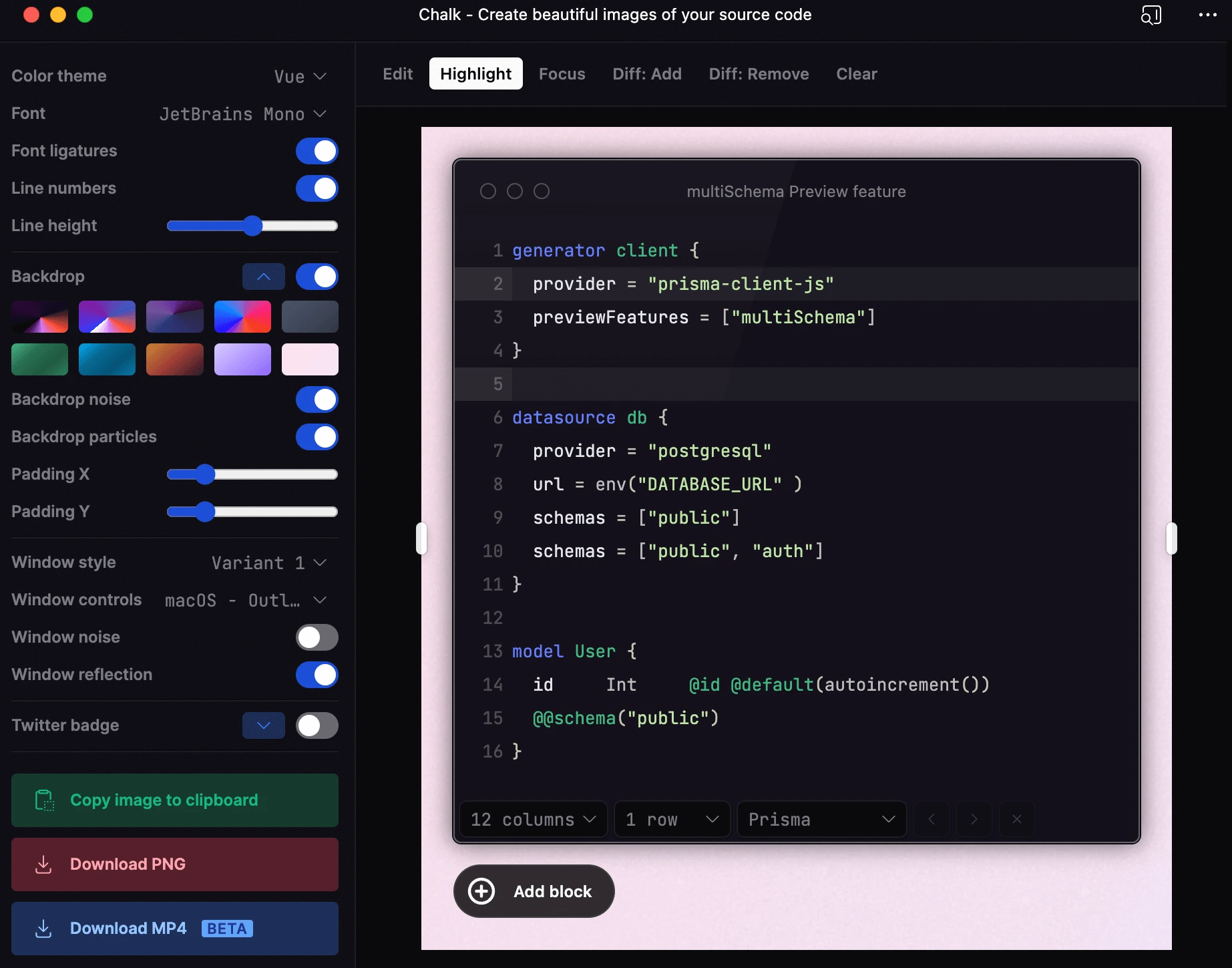
Chalk.ist is an open-source code screenshot tool created by Idered. It mainly helps developers turn code into attractive images. Users simply paste their code, choose a theme and style, and can quickly create beautiful code screenshots. It supports multiple programming languages. It is suitable for blog writing, PPT presentations, social media sharing, and other scenarios.
Chalk.ist Features
Intuitive interface: On the left side there is a panel with a large number of adjustable parameters such as theme, font, background, and format. Various gradient backgrounds look great, and users can explore and adjust them on their own to meet different users' personalized needs for code display styles.
Highly customizable:
Code detail adjustment: You can adjust code details such as font, font size, line spacing, and letter spacing according to your preference, and you can also choose different code highlighting styles to make the code clearer and easier to read.
Window style customization: Supports customizing window styles, including window background, title bar, window shadow, etc., making screenshots more professional.
Various decoration options: Supports line decorations, background noise, background particles, and many other decoration options to enhance the visual effect of code screenshots.
Rich themes: Includes a series of ready-made themes and allows users to create their own themes. Multiple built-in themes and styles are available, so you can freely choose the code color scheme that best fits your style.
Convenient and efficient: In just a few simple steps, you can turn code into a beautiful image, perfect for sharing on any social media, saving time and effort.
Preset saving supported: Users can save current settings as a preset for quick access and use later. Common styles can be quickly applied for the next screenshot, saving time and effort.
Easy to share: Users can export beautified code screenshots as PNG or SVG format and easily share them on social media or embed them in blogs.
Superior performance: Built with Vue 3, it's fast.
Technical Architecture
Frontend: Built on Vue.js, providing rich interaction and UI configuration options.
Backend: Mainly powered by Nuxt.js, supporting dynamic routing and server-side rendering capabilities.
Style handling: Implemented through TailwindCSS, which is flexible and efficient. In addition, the project also provides a /healthcheck API endpoint that can be used to monitor the service's health status.
Chalk.ist Tutorial
Visit the Chalk.ist website: Go to https://chalk.ist/.
Choose a code theme: Select your favorite code theme on the website. It offers a variety of preset themes and custom themes to meet the needs of different users.
Paste the code: Paste the code you want to beautify into the editor, where you can see a real-time preview of the code.
Customize the style: Customize the code style as needed, including window style, background color, font, line number display, etc. You can also adjust parameters like border, shadow, and transparency of the window to make the screenshot more attractive.
Export the screenshot: After customization is complete, click the "Export" button to save the beautified code screenshot locally. You can choose to export it as PNG or SVG format.
Deployment
http://chalk.ist/ uses Nuxt.js for front-end and back-end development and supports rapid deployment on Vercel, which is very convenient. If you want to run it locally, refer to the following steps:
Clone the project: Run the command git clone https://github.com/Idered/chalk.ist in the terminal.
Install dependencies: Use the pnpm install command to install the project dependencies.
Start the development environment: Run the pnpm run dev command to start Chalk.ist locally.
Open-source address: https://github.com/Idered/chalk.ist
Related Information:















