
 Script Planner Assistant▸
 AI Apps
 AI News

MiaoJiDuo: Kuaishou's AI Note-Taking App with Built-in Chat
MiaoJiDuo: Kuaishou's AI Note-Taking App with Built-in ChatIntroduction
What is Miaojiduo?
Miaojiduo APP is an AI note-taking tool launched by Kuaishou that lets you take notes while chatting. Its main features include note management such as saving, categorizing, and searching. Users can complete note creation and organization by chatting with the built-in intelligent assistant "Miaozi". For example, fragmented content can be sent to Miaozi to convert it into a note, and sending a webpage link will automatically crawl the content into a note. In addition, it has a to-do reminder function. In a conversation, users can create a to-do in the format of "reminder + reminder time + task", and reply with specific commands to view the to-do list.

Miaojiduo Features
AI Note Function: It can save important note content with one click, collect and organize notes from life and learning anytime, and easily record moments of inspiration. Users can take notes in various ways, such as direct input, voice input, etc., to meet the needs of different scenarios.
Intelligent Assistant: It has a built-in intelligent assistant named "Miaozi". Users can complete note creation and organization by chatting and interacting with Miaozi. For example, you can send fragmented text, images, files, etc. to Miaozi, long-press the chat message and select "Save to Note" to convert it into a note; send a webpage link, and Miaozi will automatically crawl the webpage content to generate a note. You can also ask Miaozi to directly record text into notes. Sending images or files will automatically save them to notes for long-term storage.
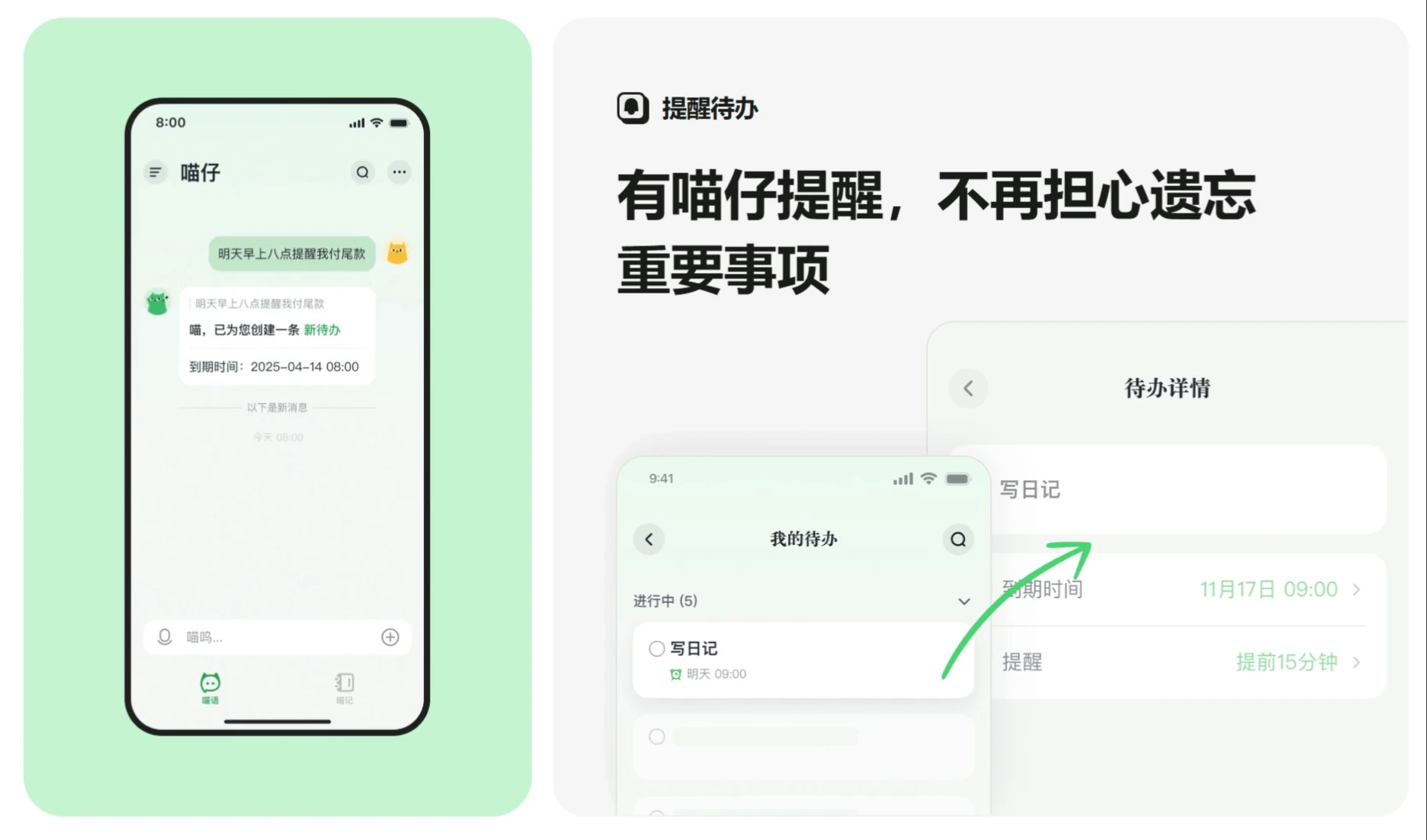
To-Do Reminders: Enter "Reminders" in a chat with Miaozi + reminder time + task" to create a to-do. Reply with "My To-Dos" or "To-Do List" to view all future to-dos to be reminded, helping users manage their time and tasks and avoid forgetting important matters.
Note Management: Users can set tags for notes to achieve efficient management, making it easy to quickly categorize and retrieve notes. They can also search for needed notes at any time to quickly locate them, improving information retrieval efficiency.
Personalized Experience: Users can customize the AI assistant's appearance, adopt a cute cat-themed AI assistant, and enhance intimacy through interactive conversations, adding fun to use and enjoying more attentive service.
Miaojiduo Use Cases
Learning Scenarios: Students can use it to organize class notes and review materials, making it easy to record and search.
Work Scenarios: Office workers can use it to plan schedules, manage to-dos, and improve work efficiency.
Life Scenarios: Record moments, inspirations, or to-dos in life, making life more organized.
How to use Miaojiduo?
I. Note Management
Note Saving
Send Content: You can directly send text, images, files, etc. to Miaozi for saving.
Convert Chat to Note: In a chat with Miaozi, long-press the message and tap "Save to Note" to convert the message into a note.
Auto Record: When sending text, use the format "Record + note content", and Miaozi will automatically record it as a note.
Webpage Clipping: Send a webpage hyperlink, and Miaozi will automatically crawl the webpage content and save it as a note.
Tagging
Quick Categorization: After converting a chat message into a note, you can ask Miaozi to help tag it for easier later categorization and search.
Search Notes
Direct Inquiry: Ask Miaozi about the content of a note, and it will provide an answer based on its memory.
II. Reminders & To-Dos
Create a To-Do
Enter Command: In a chat, enter "Reminder + reminder time + task" to create a to-do.
Convert Message to To-Do: Long-press a chat message, select "Create To-Do", and convert the message content into a to-do.
View To-Dos
View All: Reply with "My To-Dos" or "To-Do List", and Miaozi will list all future to-dos to be reminded.
View Today: Reply with "Today's To-Dos" or "Today's Reminders", and Miaozi will list all of the day's to-dos (including those already reminded).
Snooze Reminders
Delay Reminder: When a to-do is due, if you can't handle it, you can reply with "Snooze x" or "Delay x" to have Miaozi remind you again after the specified number of minutes (default is 3 minutes if not specified).
Miaojiduo APP Download
Android Version: The Android version of Miaojiduo can be found in multiple app stores or download websites.
iOS Version: Users can download it via the App Store.
Related News:















