Script Planner Assistant▸
 AI Apps
 AI News

Awesome MCP ZH:专为中文用户精心整理的 MCP 资源合集
Awesome MCP ZH:专为中文用户精心整理的 MCP 资源合集Introduction
What is Awesome MCP ZH?
Awesome MCP ZH is a collection of MCP resources built for Chinese-speaking users, covering MCP basics, usage tips, clients, servers, and community resources. Awesome MCP ZHwas created by 云中江树 (Yun Zhongjiangshu), with the goal of helping users quickly get started with MCP.
What is MCP?
MCP (Model Context Protocol) is an open-source communication standard launched by Anthropic in November 2024. It enables AI to seamlessly connect with external tools, data, and systems, and is considered the standard protocol for connecting large language models with software applications.
MCP is often referred to as the "super network cable" for AI, helping AI accomplish more complex tasks such as querying databases, sending emails, and generating code.
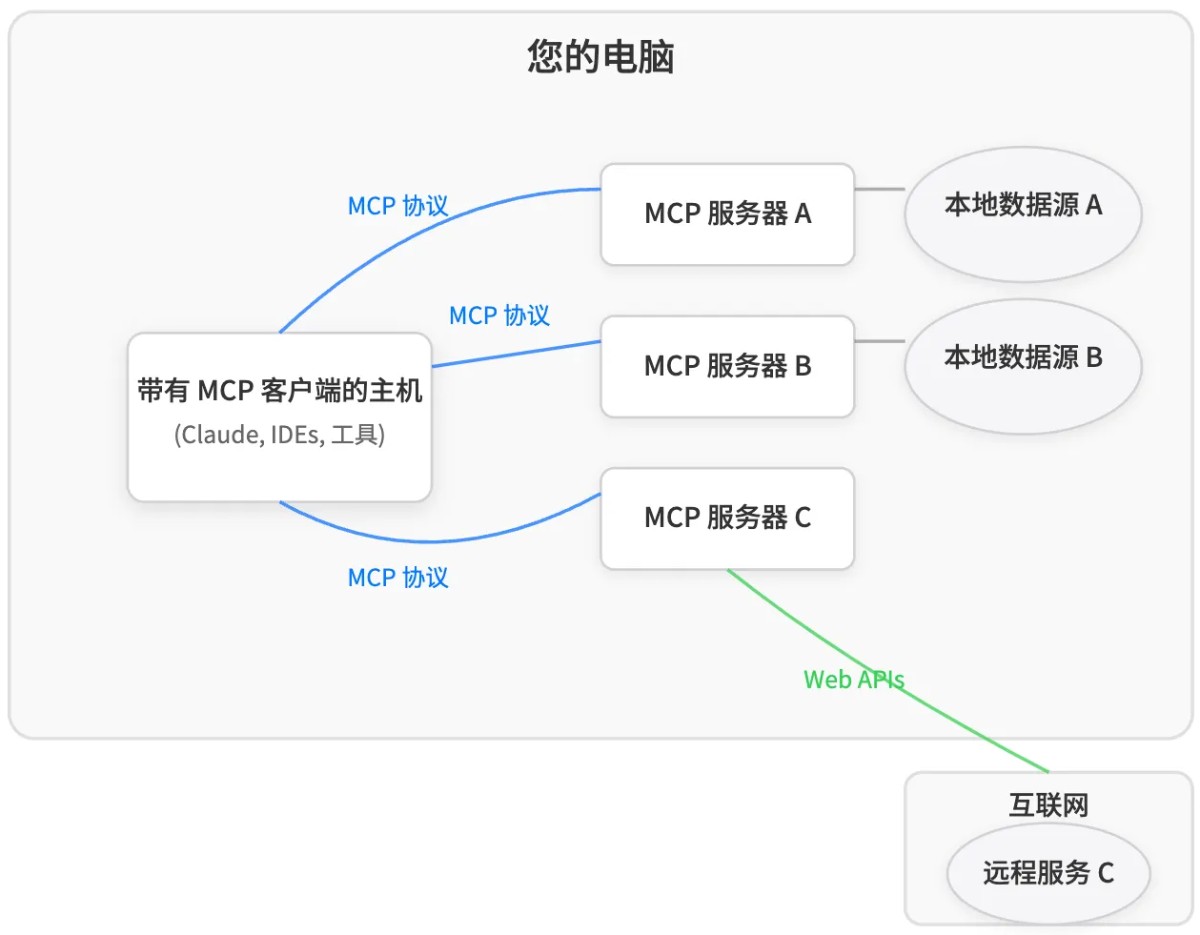
What Can MCP Do?
Connect to external tools: for example, send messages via Slack, manage code with GitHub, or create 3D models with Blender.
Query data: directly access computer files, database records, and even retrieve real-time information from the web.
Complete complex tasks: for example, while writing a webpage, AI can simultaneously look up code, generate images, and debug the page.
Human-AI collaboration: AI can ask the user for input while completing a task, and continue execution after the user confirms.
Recommended MCP Clients
Claude Desktop: Anthropic's official client, suitable for general users, no coding required.
Cherry Studio: an emerging client that supports visual configuration and is easy to operate.
5ire: a modern AI assistant and MCP client, suitable for both developers and non-developers.
Cursor: a code editor that supports multiple features, such as writing code, sending Slack messages, and generating images.
DeepChat: supports multi-model cloud services and local model deployment, suitable for multiple platforms.
ChatWise: powerful and privacy-focused, supporting multimodal chat and web search.
Curated List of MCP Servers
The page provides a list of MCP servers categorized by different application scenarios:
Browser automation and web interaction: for example, microsoft/playwright-mcp and browserbase/mcp-server-browserbase.
Development and code execution: for example, yzfly/mcp-python-interpreter and pydantic/pydantic-ai/mcp-run-python.
Version control: for example, modelcontextprotocol/server-github and modelcontextprotocol/server-git.
Database interaction: for example, ClickHouse/mcp-clickhouse and modelcontextprotocol/server-postgres.
Cloud platforms and service integration: for example, Cloudflare and alexei-led/aws-mcp-server.
Search: for example, Exa and Brave Search.
Communication and collaboration: for example, modelcontextprotocol/server-slack and Inbox Zero.
Finance and cryptocurrency: for example, Stripe and Thirdweb.
File systems and storage: for example, modelcontextprotocol/server-filesystem and Google Drive.
Data analysis and visualization: for example, yzfly/mcp-excel-server and GreptimeDB.
Productivity tools and integration: for example, PipedreamHQ/pipedream and Zapier.
Multimedia and content creation: for example, abhiemj/manim-mcp-server and burningion/video-editing-mcp.
Knowledge, memory, and RAG: for example, modelcontextprotocol/server-memory and Needle.
Security and analysis: for example, 13bm/GhidraMCP and Semgrep.
Other practical tools: for example, AgentRPC and APIMatic MCP.
MCP Resources and Learning
Official documentation: provides the MCP official site and Anthropic's introduction to MCP.
Open-source documentation: includes awesome-mcp-clients and awesome-mcp-servers.
Community resources: the GitHub MCP repository, the Reddit r/mcp community, and Discord discussion groups.
Tutorials: provides a quick start guide for MCP and a tutorial on using SQLite with Claude Desktop.
Analytical materials: includes a16z's in-depth interpretation of MCP and a comparative analysis of MCP and ANP.
MCP Development Guide
Building MCP servers with LLMs: introduces how to leverage large language models (such as Claude) to accelerate MCP development.
Preparing documentation: provides steps on how to gather and organize documentation materials.
Describing server requirements: guides users on how to clearly describe the functional requirements of a server.