
 Script Planner Assistant▸
 AI Apps
 AI News

OfficeAI Assistant: A Free AI Office Tool for Microsoft Office and WPS
OfficeAI Assistant: A Free AI Office Tool for Microsoft Office and WPSIntroduction
What is Officeai Assistant?
OfficeAi Assistant is a free intelligent AI office tool designed for Microsoft Office and WPS users. It can solve various problems users encounter when using Office or WPS, such as:
How to type the "check mark (√)" symbol.
How to add text before inserting a table.
How to choose the appropriate formula, etc.
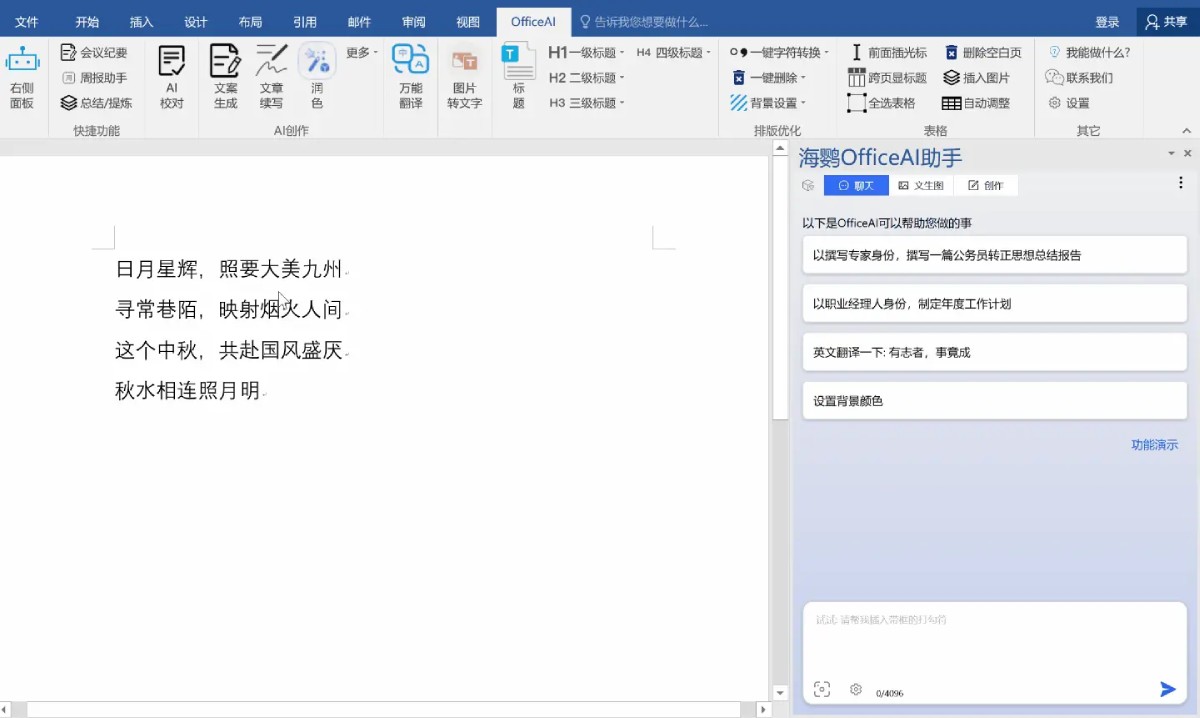
OfficeAI Assistant Feature Components
Office Add-ins:
WordAI Add-in: Used in Word or WPS Writer. It can organize weekly reports, write meeting minutes, summarize content, and polish copy.
ExcelAI Add-in: Used in Excel or WPS Spreadsheet. It can automatically complete complex formula calculations and function selections.
Main Program:
For daily conversations.
For fixing plugin issues.
Local Deployment Service:
Install as needed, not required.
When the local deployment feature is needed, it will start with the system.
Free AI Engines
Free AI large model engines: OfficeAI comes with two free models—Doubao (ByteDance) and ERNIE Bot (Baidu). ChatGLM (Zhipu) is available as an optional model.
Local deployment engine: Users can use their own APIKEY through the "Local Deployment" settings, or connect to locally deployed private large models via Ollama or LMStudio platforms—all free of charge.
OfficeAI Assistant Installation Environment:
Operating System: Windows 7/10/11 or higher versions.
Office Version: Office 2013/2016/2019/Office 365.
Language Support: Simplified Chinese, Traditional Chinese, and English.
OfficeAI Assistant is suitable for users who need to efficiently handle documents and spreadsheets, such as administrative staff, students, data analysis professionals, etc.















