Script Planner Assistant▸
 AI Apps
 AI News
MagicColor: Diffusion-Based Multi-Instance Line Art Auto-Coloring Framework by HKUST
MagicColor: Diffusion-Based Multi-Instance Line Art Auto-Coloring Framework by HKUSTIntroduction
What is MagicColor?
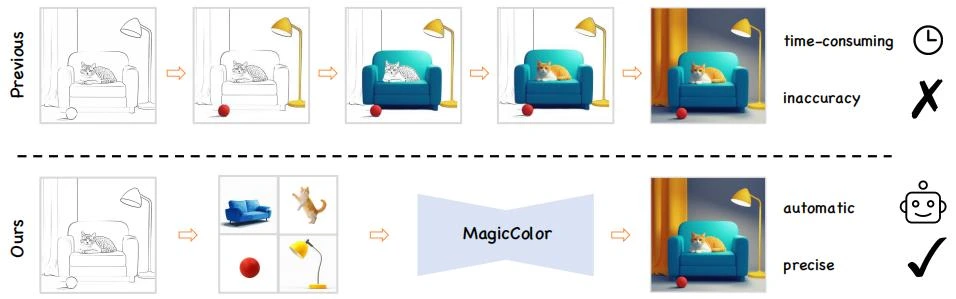
MagicColor is a multi-instance line art colorization framework based on diffusion models, proposed by The Hong Kong University of Science and Technology (Guangzhou). Users only need to upload a black-and-white line art and several reference images, and the system can automatically complete accurate and natural color filling within seconds while maintaining consistency across multiple instances. Compared with traditional methods, MagicColor achieves one-step colorization, greatly improving design efficiency.
MagicColor Core Features
One-click colorization: Users only need to provide line art images and reference images, and the system automatically completes the colorization.
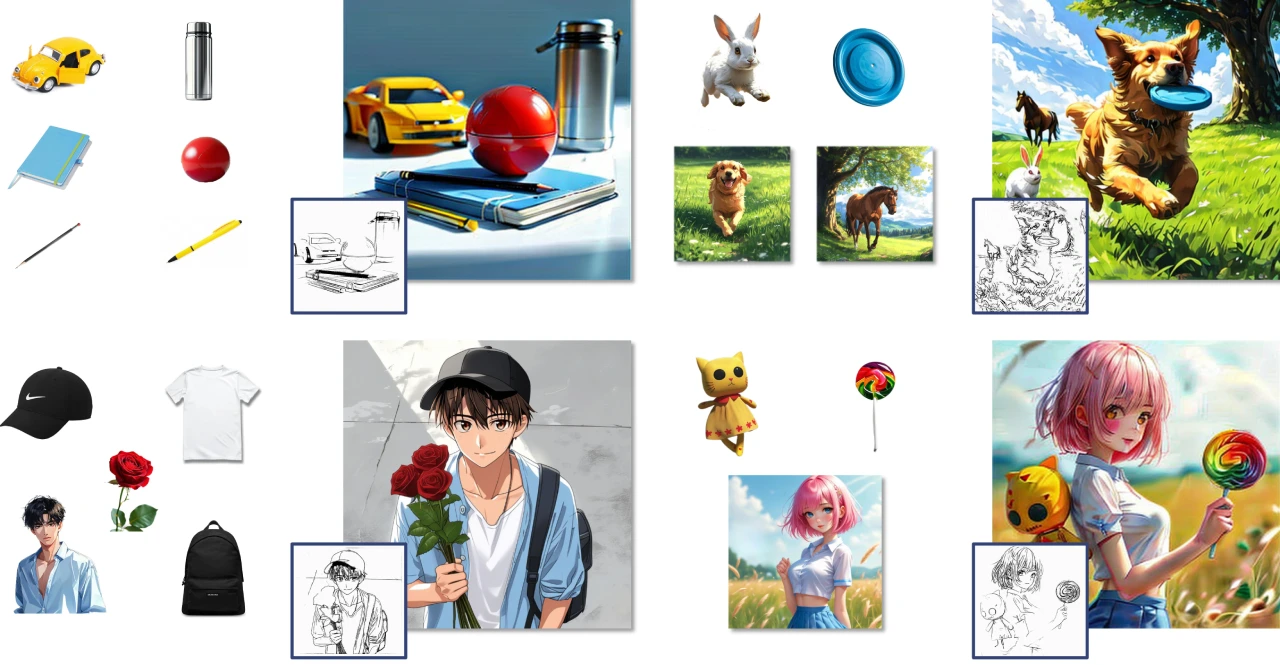
Multi-instance processing: Capable of automatically identifying and distinguishing multiple instances in the line art (such as multiple characters), and assigning appropriate colors to each instance.
Efficient generation: From upload to result generation takes only a few seconds, suitable for rapid creation scenarios.
MagicColor Technical Principles
Self-training strategy: Solves the issue of insufficient multi-instance training data.
Instance guider: Provides color information for each instance.
Edge loss and fine-grained color matching: Improves visual quality and the accuracy of color matching.
MagicColor Application Scenarios
Anime production: Quickly generate colored character images to enhance creative efficiency.
Game character design: Efficiently produce character images that match the style.
Advertising illustrations: Quickly generate high-quality illustrations.
MagicColor Advantages
Detail handling: Performs excellently in maintaining image edge sharpness and avoiding color confusion.
Flexibility: Supports reference images in various styles, such as real-life photos, anime screenshots, etc.
Rapid generation: From upload to completion takes only a few seconds, saving a lot of time.
MagicColor Installation and Usage
1. Environment Setup
1. Create a Python environment:
conda create -n MagicColor python=3.10
pip install -r requirements.txt
2. Clone the repository:
git clone https://github.com/YinHan-Zhang/MagicColor.git
cd MagicColor
2. Data Preparation
Prepare the dataset in the following format:
data/
├── dir_name
├── masks/
├── dir_name.jpg  # Line art image
├── dir_name_1.jpg  # Reference image 1
├── ...
Download the pretrained weights (see GitHub instructions).
3. Inference
Run the inference script:
cd scripts
bash multi_ref_infer.sh
4. Training
Run the training script:
cd scripts
bash multi_ref_train.sh
5. Interactive Interface
Launch the Gradio application:
cd inference
python gradio_app.py
MagicColor can automatically transform black-and-white line art into vividly colored images. It supports reference images in various styles such as real-life photos and anime screenshots, and supports PNG and JPG formats, greatly improving the efficiency of anime design and game character creation.