
 Script Planner Assistant▸
 AI Apps
 AI News

Automa: An Open-Source Low-Code/No-Code Browser Automation Tool
Automa: An Open-Source Low-Code/No-Code Browser Automation ToolIntroduction
What is Automa?
Automa is an open-source, low-code browser automation aitool that supports Chrome and Firefox. It enables users to easily create automation workflows through a visual interface, implementing features such as web operations, data scraping, and task scheduling. Users can record or manually edit workflows, support scheduled runs, triggered runs, and other conditions, and can also integrate with third-party services such as Google Sheets, making it applicable in scenarios like data collection and office automation.
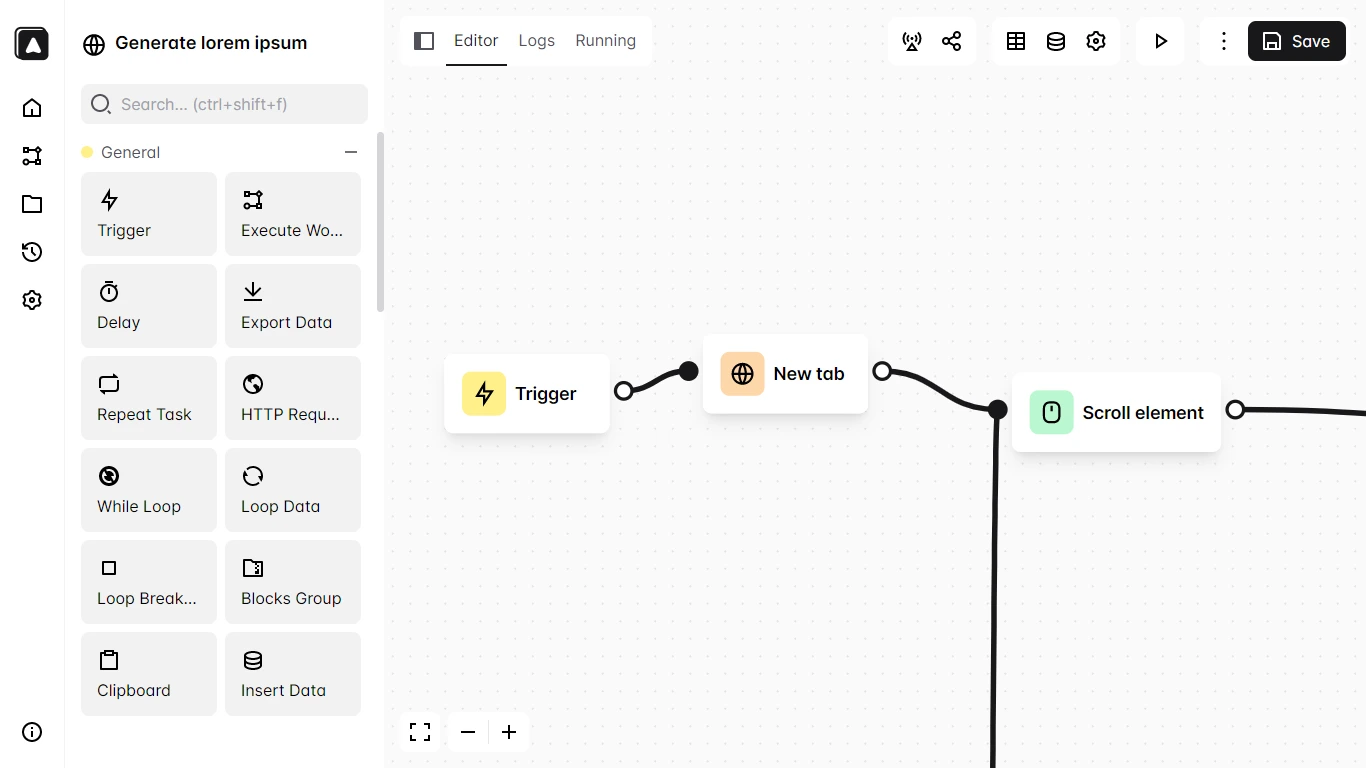
Automa Features
Web automation operations: Automatically perform actions on web pages such as clicking buttons, filling forms, scrolling pages, and entering text.
Data scraping and export: Extract text, tables, images, and other data from web pages, export them as CSV, JSON, and other formats, and also directly insert into Google Sheets.
Workflow recording and editing: Provides a visual workflow editor where users can automatically generate workflows by recording actions, or manually add and connect modules to build complex processes.
Task scheduling and triggering: Set trigger conditions for workflows, such as scheduled runs, running when visiting specific websites, running when receiving specific emails, etc.
Workflow sharing and reuse: Features a workflow marketplace where users can obtain workflows shared by other users and customize and reuse them as needed.
Screenshot and recording: Supports taking screenshots or recording videos of web pages, making it convenient to save page states or generate operation demonstrations.
Logs and history: Records workflow execution logs, allowing users to view historical execution records for debugging and optimizing workflows.
Third-party service integration: Supports integration with Google Sheets, Slack, Telegram, and other third-party services to achieve data synchronization and automated notifications.
Automa Tutorial
Installation
Chrome browser: Visit the Chrome Web Store and click the "Add to Chrome" button to install.
Firefox browser: Search for "Automa" in the Firefox Add-ons store to install.
Usage
Record a workflow: Click the Automa icon, select "Record workflow", and start recording actions such as creating a new tab, scrolling, clicking, and typing. After recording, you can select elements to retrieve text or attribute values.
Manually create a workflow:
Open the Automa panel, click "New workflow", and enter a name and description.
The editor contains a trigger block, which is the starting point of the workflow. You can set the running time.
Drag modules from the left-side module list onto the canvas, connect them to the trigger block, and customize the workflow as needed.
Run a workflow: After saving the workflow, click the play icon to run it.
View logs and results: After execution, you can view the execution logs and results, or export the data.
Share and reuse workflows: Save workflows to the workflow marketplace, or obtain workflows shared by others from the marketplace.
Automa Use Cases
Data collection: Batch scrape web page data, suitable for scenarios such as market research and competitive analysis.
Office automation: Automatically fill out forms, process emails, etc., to improve work efficiency.
Personal task management: Set up scheduled tasks, such as automatic backups and timed page refreshes.
Related Links
Automa official website:https://www.automa.site/
GitHub open-source repository:https://github.com/AutomaApp/automa
Chrome Web Store:https://chromewebstore.google.com/detail/automa/infppggnoaenmfagbfknfkancpbljcca?hl=zh-CN
Automa Chinese documentation:https://automa.wiki/














