Script Planner Assistant▸
 AI Apps
 AI News

self.so: Open-Source Project That Turns LinkedIn Profiles into Personal Websites
self.so: Open-Source Project That Turns LinkedIn Profiles into Personal WebsitesIntroduction
What is self.so?
self.so is an open-source project developed by Nutlope that converts your LinkedIn profile into a personal website. It automatically extracts user information from LinkedIn and generates a clean, attractive personal website, helping users better present their professional image and personal brand.
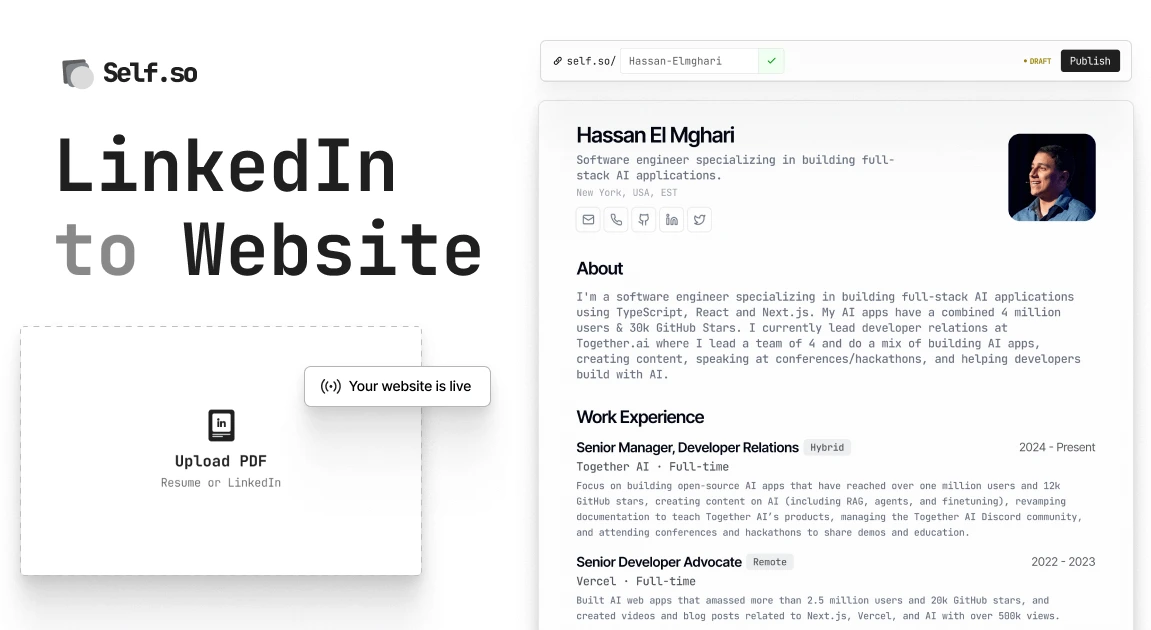
self.so Features
Automatic Information Extraction from LinkedIn: The project can scrape basic information, work experience, educational background, skills, and other data from LinkedIn without manual input.
Automatic Personal Website Generation: Based on the extracted information, it generates a personal website where users can customize the style and layout.
Clean and Attractive Design: Offers multiple themes and templates to ensure the generated website looks modern and professional.
Easy Customization: Users can modify the website's content and style through simple configuration files, and even add custom code.
Multi-language Support: Provides multi-language support for users from different regions.
Open Source and Free: The project is fully open-source, and users can modify and extend it according to their own needs.
self.so Use Cases
Personal Brand Building: Provides a professional online showcase platform for job seekers, freelancers, entrepreneurs, etc., helping them better present their abilities and experience.
Career Development: Through the personal website, users can more comprehensively showcase their career journey and achievements, attracting potential employers or partners.
Social Media Supplement: As a supplement to LinkedIn, it provides a freer showcase space where users can add more personalized content.
Personal Learning and Project Showcase: Students or developers can showcase their learning outcomes, project experience, and skills to enhance their personal competitiveness.
Installing self.so
Clone the Project: Clone the self.so project from GitHub to your local machine.
Configure Information: Modify the configuration file (usually config.yml) and enter your LinkedIn username, personal bio, skills, and other information.
Run the Project: Use the command line tools to run the project and generate the personal website code.
Deploy the Website: Deploy the generated website code to a platform that supports static website hosting (such as GitHub Pages, Netlify, etc.).
Customize Styles: If needed, you can customize the website's style and layout by modifying the CSS files.
self.so Usage Tutorial
Sign Up and Log In: Users first register an account on the website and authenticate through Clerk.
Resume Upload: Users can upload a PDF-format resume to the S3 storage bucket. After upload, the system conducts a security check to ensure content compliance.
Information Extraction and Display: The Qwen 2.5 72B model is used to extract relevant information from the resume and output it in a structured JSON format. The extracted information is placed on dynamic routes for users to view and publish.
Website Preview: Users can preview and edit their websites, with support for editing links and various sections of the website.
GitHub project address:https://github.com/nutlope/self.so