
 Script Planner Assistant▸
 AI Apps
 AI News

Motia: An Event-Driven AI Agent Framework Built for Developers
Motia: An Event-Driven AI Agent Framework Built for DevelopersIntroduction
What is Motia?
Motia is an AI agent framework designed for software engineers, aimed at helping developers quickly build, test, and deploy production-grade AI agents. It emphasizes code-first and event-driven approaches, supports multi-language development, and provides a visual interface, allowing developers to focus on business logic.
Motia Features
Event-driven architecture: Build flexible workflows by defining steps, flows, events, and topics.
Multi-language support: Supports multiple programming languages such as Python, TypeScript, and Ruby.
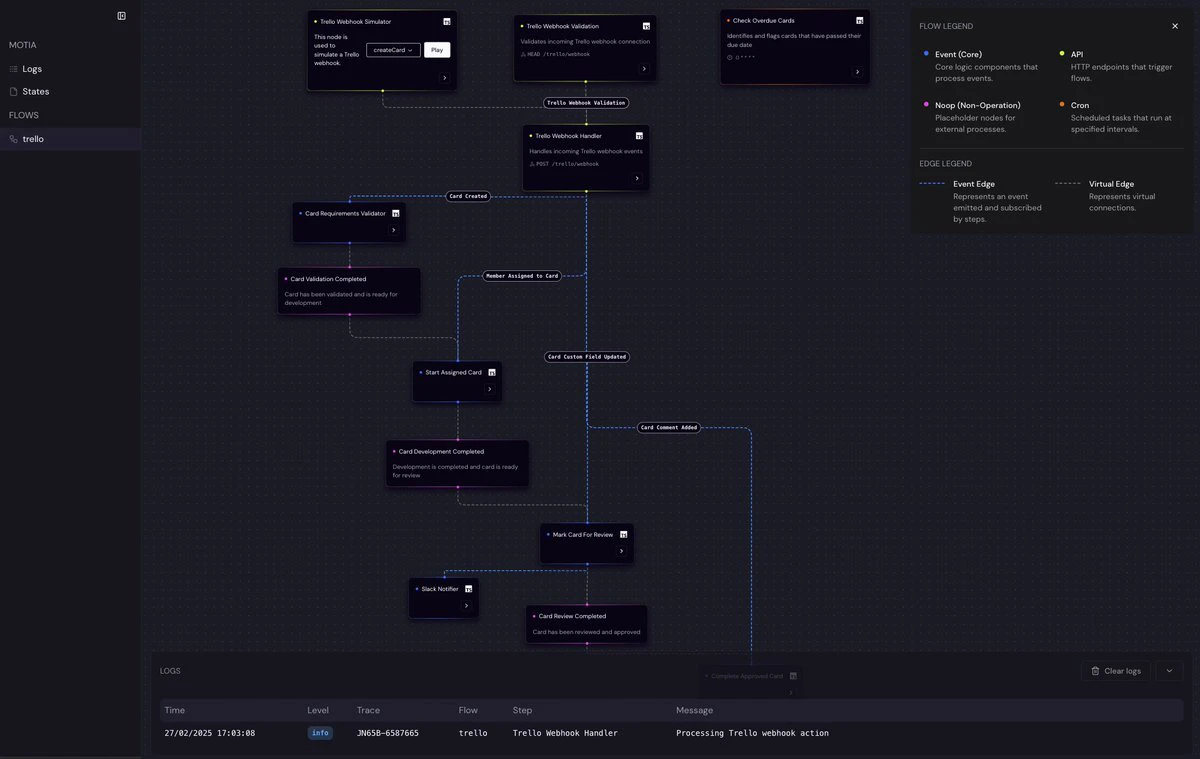
Visual workbench: Provides tools like flow visualization, real-time logs, and custom UIs.
Zero infrastructure burden: One-click deployment with no need for complex knowledge like Kubernetes.
Modular design: Improves agent reliability and maintainability through composable steps and runtime validation.
Motia Use Cases
Automated tasks: Such as GitHub issue and pull request management.
Complex decision systems: Such as financial analysis workflows.
Data processing pipelines: Such as AI image generation and evaluation.
Video content extension: Such as converting narrow-screen videos to wide-screen videos.
Motia Advantages
Zero infrastructure hassle - No Kubernetes expertise required. Deploy agents with a single command.
Truly code-first development - Write agent logic in familiar languages, not proprietary DSLs.
Unique multi-language support - Mix Python for ML, TypeScript for type safety, and Ruby for APIs in the same agent.
Composable steps with runtime validation - Build agents from modular, repeatable pieces with automatic input/output validation.
Built-in observability - Debug agent behavior with visual execution graphs and real-time logs.
Instant APIs and Webhooks - Expose agent capabilities via HTTP endpoints with no extra code.
Full control over AI logic - Use any LLM, vector store, or reasoning pattern without restrictions.
Flexible control - Easily switch between agent control and deterministic control within the same flow.
Quick Start
1. Create a new project using the following command:
npx motia create -n my-first-agent
(Replace my-first-agent with your desired project name)
2. Enter the new project directory.
3. Start the Motia development server.
4. Open Motia Workbench in your browser (typically http://localhost:3000) to view pre-built flows and sample steps.
5. Use curl or the Motia CLI to trigger sample API endpoints or events, and observe step execution and event flow in the Workbench logs.
With the few simple steps above, by using the Motia CLI and automated project creation, you can get started with Motia in minutes.
GitHub project:https://github.com/MotiaDev/motia














