
 Script Planner Assistant▸
 AI Apps
 AI News

eeChat: A Simple Local LLM Deployment Tool
eeChat: A Simple Local LLM Deployment ToolIntroduction
What is eeChat?
eeChat is a simple and easy-to-use tool for local deployment of large models, focused on data security, privacy protection, and an efficient AI conversation experience. It supports local deployment of open-source models such as DeepSeek-R1, DLlama 3, Phi-4, Mistral, and Gemma 3, and also supports remote large model API calls.
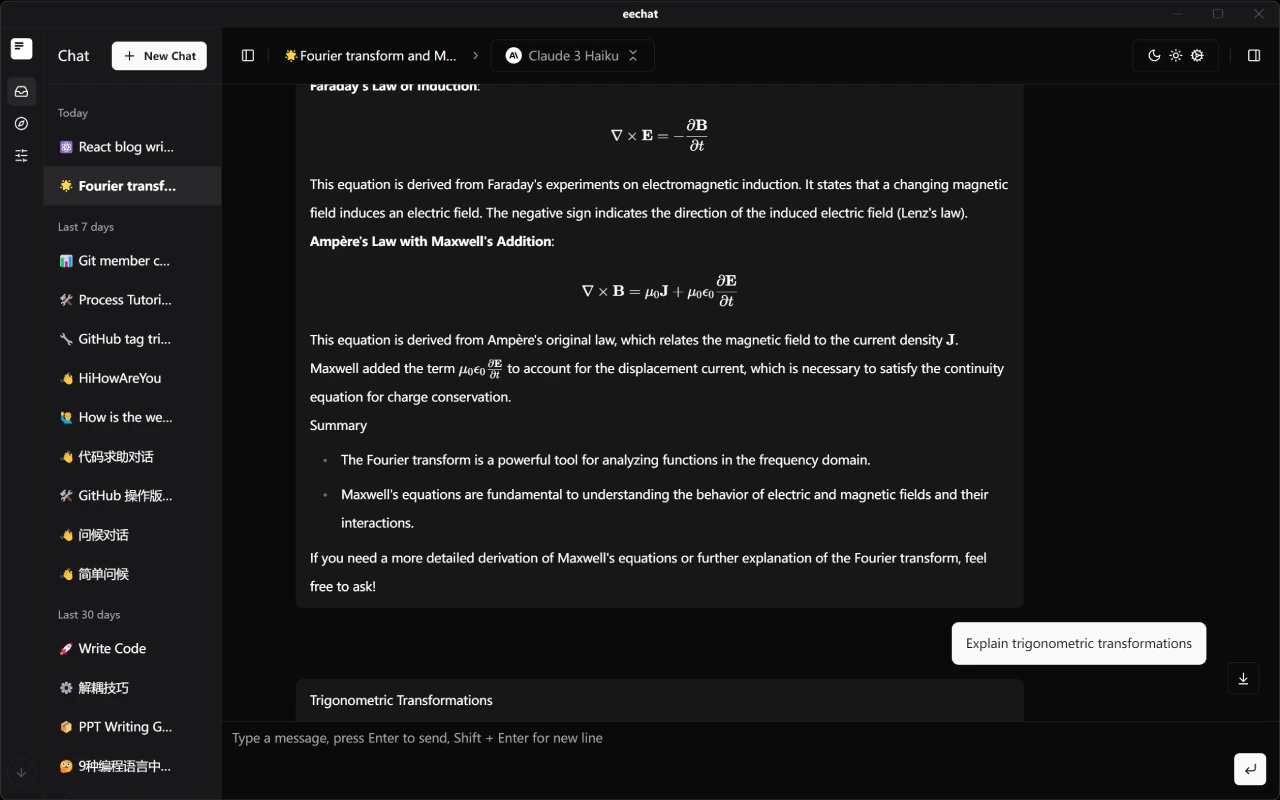
eeChat Core Advantages
Data Security and Privacy Protection
Local Model Support: Run AI models directly on your device without sending data to external servers. Maintain complete control over your data.
Offline Capability: No continuous internet connection required after the initial setup.
API Customization: Connect to your own AI model API or third-party services, with full control over data flow.
Exceptional Conversation Experience
Multi-Conversation Management: Easily create and manage multiple independent conversations.
History Tracking: Automatically save all conversation history for easy review and continuation.
Full Markdown Support: Accurately render Markdown formatting, including code blocks, tables, and mathematical formulas.
Smart Code Highlighting: Automatically detect and highlight code blocks in multiple programming languages.
Math Formula Rendering: Beautifully render complex mathematical equations and formulas through LaTeX support.
Personalization Options
Theme Switching: Built-in light and dark themes to suit different scenarios and preferences.
Prompt Management: Save and manage frequently used prompts to improve conversation efficiency.
Model Parameter Adjustment: Flexibly adjust parameters such as temperature and maximum output to get the best responses.
Powerful Extensibility
Plugin Ecosystem: Supports feature extensions to fulfill particular scenario requirements.
Custom Model Support: Configure and use custom local or remote AI models.
eeChat Main Features
Enhanced Intelligent Conversation
Contextual Understanding: The AI maintains context coherence in long conversations.
Multi-Turn Optimization: Enhances the interactive experience for complex queries.
Knowledge Base Integration: Connect to custom knowledge bases for more accurate domain-specific responses.
Developer-Friendly
Code Generation and Explanation: Supports optimized code generation capabilities for multiple programming languages.
API Documentation Generation: Helps developers quickly generate API documentation.
Debugging Assistance: Helps identify code issues and provides fix suggestions.
Productivity Tools
Document Summarization: Quickly summarize long document content.
Mind Map Generation: Transform complex concepts into structured mind maps.
Multi-language Translation: Supports high-quality translation between multiple languages.
eeChat Local Deployment
System Requirements
Windows 10/11 64-bit
macOS 10.15+
Linux (Ubuntu 18.04+, Debian 10+)
Minimum 4GB RAM
500MB available disk space
CUDA-supported GPU (optional) 8GB+ (Windows)
Installation Methods
Download Pre-built Package: Download the installer suitable for your system from the release page.
Build from Source
# 克隆仓库
git clone https://github.com/Lucassssss/eechat.git
cd eechat
# 安装依赖
npm install
# 以开发模式运行
npm run dev
# 构建应用程序
npm run build
GitHub Repository:https://github.com/Lucassssss/eechat














