
 Script Planner Assistant▸
 AI Apps
 AI News

Lark Base: Multi-Dimensional Table Tutorials
Lark Base: Multi-Dimensional Table TutorialsIntroduction
What is Feishu Bitable?
Feishu Bitable is an AI-driven spreadsheet and business system building platform launched by Feishu. The interface looks like a spreadsheet, but underneath it's a database—each column can have a field type set (text, number, date, single-select, person, attachment, etc.), ensuring data consistency.
The difference between Bitable and traditional Excel lies in "data stays the same, presentation changes freely"—the same dataset can be switched between Grid, Kanban, Calendar, Gantt, Gallery, and Form views without reorganizing. Business users can drag-and-drop to build CRM, inventory management, project management systems, etc., with no coding required.

Core Features of Feishu Bitable
Multi-view switching: Supports six views—Grid, Kanban, Calendar, Gantt, Gallery, and Form: Kanban is great for drag-and-drop task grouping, Calendar shows scheduling intuitively, Gantt manages project timelines, Gallery turns attachments into a card wall, and Forms are used for collecting external information:
AI field shortcuts: AI capabilities are wrapped into fields—just create a new column to batch perform smart classification, translation, summarization, information extraction, image recognition, and voice synthesis: for example, to tag 100 user comments, select the "Smart Tag" shortcut and the system auto-classifies:
AI formula generation: No need to memorize functions—describe your calculation need in natural language, and AI auto-generates the formula:
Dashboard & BI: Supports 50+ chart types (bar, line, pie, radar, funnel, sankey, etc.), can link 200+ tables for analysis, and aggregates tens of millions of rows per table in seconds: dashboards support filtering, scheduled sending, independent sharing, and full-screen presentation:
Automated workflows: Executes actions automatically based on trigger conditions, e.g., "when task status changes to Completed, notify the owner" or "if a customer isn't followed up for over 3 days, remind sales": in 2025, AI Agent nodes and "AI Workflow Generation" were added—describe your goal in natural language to generate a flow:
Data linking: One-way links, two-way links, and lookup references can be set up between tables for automatic cross-table matching: after selecting a product name in the sales table, unit price and cost auto-pull from the product table, and when product prices change, the sales table updates automatically:
Permission control: Supports row-level and column-level permissions, down to "who can see which column, who can edit which row": integrated with Feishu's org structure, new employees automatically inherit corresponding permissions:
App mode: Based on Bitable data, drag-and-drop to build user-facing operation interfaces—one app can link multiple tables: companies like Haizheng Animal Health, Hero Esports, and Douchang Tuan have used this solution to build management dashboards and asset management systems:
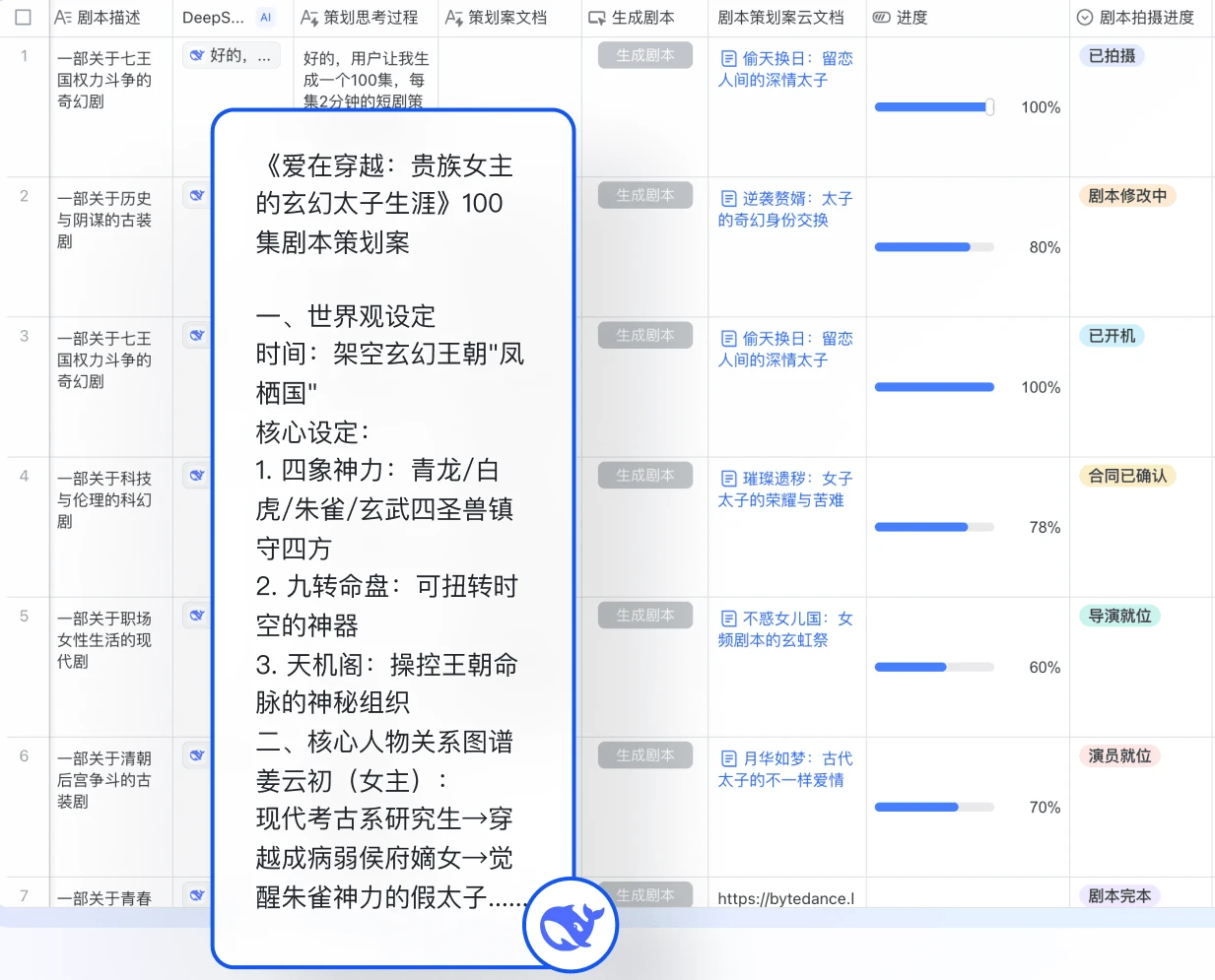
Bitable Use Cases
Project management: Gantt chart tracks task timelines, Kanban groups by owner or progress, Calendar shows milestones: combined with automation, delay risk auto-pushes notifications
CRM: After entering customer info, AI auto-organizes tags and summarizes communication highlights: sales pipeline, deal amount, and conversion rate are displayed in real time on dashboards, and sales reps in different regions only see their own data
Inventory & purchasing: Product info, stock quantities, and purchase orders are linked—stock below threshold auto-triggers replenishment reminders, and purchase approvals auto-route
Human resources: Employee info, hiring pipelines, and performance reviews are interconnected—interview scheduling auto-syncs to Calendar, and onboarding auto-progresses
Content operations: Topic selection, writing, review, and publishing all run on one table—Calendar view shows the publishing rhythm, and AI helps generate outlines and copy
Data collection & inspections: Forms collect external info, Gallery displays inspection photos, and abnormal data auto-pushes to the responsible person
Bitable Pros and Cons
Pros
Zero-code threshold—business users can build systems themselves without waiting for IT. AI features aren't just hype; field shortcuts, AI formulas, and AI workflows bring intelligence down to "just click to use." Deep integration with Feishu messages, Calendar, approvals, and org structure provides a complete collaboration chain. Permission control goes down to row and column level, meeting enterprise security needs. A single table supports tens of millions of rows of hot data, and dashboards return aggregated results from hundreds of millions of records in seconds. The free version covers most features, so individuals and small teams can get started without pressure.
Cons
Mindset differs from Excel—new users need to adapt to "fixed field types, separated views," which has a learning cost. Advanced features like automation flows, API calls, and large data volumes require paid plans. Tightly bound to the Feishu ecosystem—if your team doesn't use Feishu, standalone usage value drops significantly. Complex formulas and advanced data processing still lag behind Google Sheets or dedicated BI tools. Occasional lag occurs in mobile scenarios like field work or store use—test on real devices before selecting.
FAQ
Q: What's the difference between Bitable and Feishu Sheets?
A: Sheets is closer to Excel—good for financial calculations and free-form editing; Bitable is database-shaped with fixed field types, supports multiple views and automation, and is better suited for business management and process building.
Q: How long can I use the free version? What are the limits?
A: Basic features are free for the long term. The personal free version caps a single table at roughly 5,000 records. Advanced features like automation flows, API, and large data volumes require upgrading to Pro or Enterprise.
Q: Can I export data to Excel?
A: Yes, Excel import and export are supported.
Q: Can I edit on mobile?
A: Yes. The Feishu app supports viewing and editing, and views like Kanban and Calendar work on mobile too—but complex configuration is best done on PC.
Q: How much data can one Bitable store?
A: The free version supports about 5,000 rows per table; Enterprise supports tens of millions of rows per table, and dashboards aggregate hundreds of millions of records in seconds. For very large data, you can connect to a dedicated database via API.
Q: Can accidentally deleted data be recovered?
A: Yes, there's version history—you can roll back to a previous version to restore.
Q: Can I use Bitable without Feishu?
A: Bitable depends on Feishu's account system and org structure, so the standalone experience is incomplete. If your team doesn't use Feishu, consider other standalone products.
Q: Are AI field shortcuts paid?
A: Some basic AI capabilities are available on the free version; advanced AI features typically require an AI membership or Enterprise.
Bitable Tutorial
Create a table: Open the Feishu client or web version, go to "Cloud Docs" → "New" → "Bitable": you can start from scratch, or pick a template close to your needs from the template library (project management, CRM, recruiting, etc.)
Design fields: Set each column to the appropriate field type: basic fields include single-line text, multi-line text, number, date, single-select, multi-select, person, attachment, checkbox; advanced fields include formula, link, lookup, and AI field shortcuts: once a field type is set, that column's data format is fixed—this is key to data consistency
Enter data: Add records row by row: existing Excel data can be imported directly: person fields can @mention Feishu colleagues, and date fields can link to Feishu Calendar
Switch views: Click "+ New View" at the top-left to create Kanban, Calendar, Gantt, etc. on the same data: each view can independently set grouping, filtering, and sorting without affecting others
Build a dashboard: Click "New Dashboard" on the left, add chart components, choose data source and statistical dimensions, drag to adjust layout: you can set up scheduled auto-sends to specified groups or people
Configure automation: Go to "Automation" to set trigger conditions and actions, e.g., "when a record is created, send a Feishu message to the owner"
Set permissions: Right-click a field or record to set "Column Permissions" or "Row Permissions," controlling who can view and who can edit
How to get started quickly
If this is your first time, we recommend following this order:
Pick a "Project Management" template from the template library
Replace the sample data with your own real tasks
Switch to Kanban view and try dragging cards to change status
Create a Gantt view and check the timeline
Build a simple dashboard with two metric cards and one bar chart
Set up an automation: remind the owner 1 day before the task deadline
Feishu Multi-dimensional Table Official Tutorials
Beginner's Guide: Feishu provides detailed beginner and advanced tutorials for multi-dimensional tables from zero, covering how to create tables, field types, view features, automation flows, and more.
Zero-Basis Beginner & Advanced Tutorials for Multi-dimensional Tables
Quick Start Guide: Feishu's quick start guide details the features and operation steps of multi-dimensional tables, including creating tables, adding fields, setting views, automation rules, and more.
AI Field Shortcuts Tutorial: Introduces how to use the AI field shortcuts feature of Feishu multi-dimensional tables, such as information extraction, classification, summarization, contract information extraction, VAT invoice recognition, and more.
This AI Capability of Multi-dimensional Tables Lets Beginners Take the "Shortcut"
Automation Flow Tutorial: The automation feature of Feishu multi-dimensional tables helps users set trigger conditions and execution actions to achieve automated business processes.
Practical Course on Multi-dimensional Tables: Feishu provides a practical course on multi-dimensional tables, helping users build their own dedicated business tools from scratch.
A Table of Talents | Feishu Multi-dimensional Table Practical Course
Template Center: Feishu multi-dimensional tables offer hundreds of templates covering project management, customer management, sales performance management, and more scenarios.
Multi-dimensional Table vs. Competitors
| Dimension | Feishu Multi-dimensional Table | Airtable | Notion | DingTalk Multi-dimensional Table | Jiandaoyun | |||||||
|---|---|---|---|---|---|---|---|---|---|---|---|---|
| Positioning | AI business system building platform | Mainstream overseas multi-dimensional table | Knowledge base + database hybrid | Collaboration office scenario table | Low-code development platform | |||||||
| Learning Curve | Medium, requires adapting to database thinking | Medium, English interface | Steep, unique Block logic | Low, no barrier for DingTalk users | Easy, form-driven | |||||||
| AI Capabilities | Field shortcuts / AI formulas / AI workflows | Has AI features, limited access in China | Has AI assistant, weak in table scenarios | Basic AI capabilities | Has AI assistance, focused on processes | |||||||
| View Types | Table / Kanban / Calendar / Gantt / Gallery / Form / Dashboard | Similar, rich views | Table / Kanban / Calendar / Timeline | Table / Kanban / Calendar / Gantt | Form / Report / Dashboard / Kanban | Data Volume | Tens of millions of rows per table, billion-level aggregation | Enterprise version supports larger data | Average performance with large data volumes | Tens of thousands to hundreds of thousands | Depends on version | |
| Permission Control | Row and column level RBAC, refined to fields | Basic to enterprise-level permissions | Page-level permissions mainly | Basic permissions | Relatively complete organizational permissions | |||||||
| Ecosystem Integration | Deep integration with the entire Feishu suite | Slack / Google and other overseas ecosystems | Own ecosystem mainly | DingTalk ecosystem | DingTalk / WeCom / ERP, etc. | |||||||
| Pricing | Basic version free, Professional version from about 35 RMB/person/month | Free version 125MB storage, Plus $20/person/month | Personal version from $10/person/month | Basic features free | Pricing by user / feature module | |||||||
| Suitable For | Medium and large enterprises already using or planning to use Feishu | Overseas teams, multinational companies | Personal knowledge management, content teams | Existing DingTalk users | Those needing complex approval and deep customization |















