
 Script Planner Assistant▸
 AI Apps
 AI News

Monica Bots
Monica BotsIntroduction
What is Monica Bots?
Monica Bots is a versatile AI assistant platform built on advanced ai models (such as GPT-4, Claude, Gemini, etc.), enabling users to quickly create and deploy intelligent assistants (Bots). Monica Bots works across platforms, including browser extensions (Chrome, Edge, Safari), desktop (Windows, macOS), and mobile (iOS, Android). It integrates chatting, writing, translation, data analysis, AI drawing, and many other features, allowing even users without a technical background to easily build and manage their own AI applications.
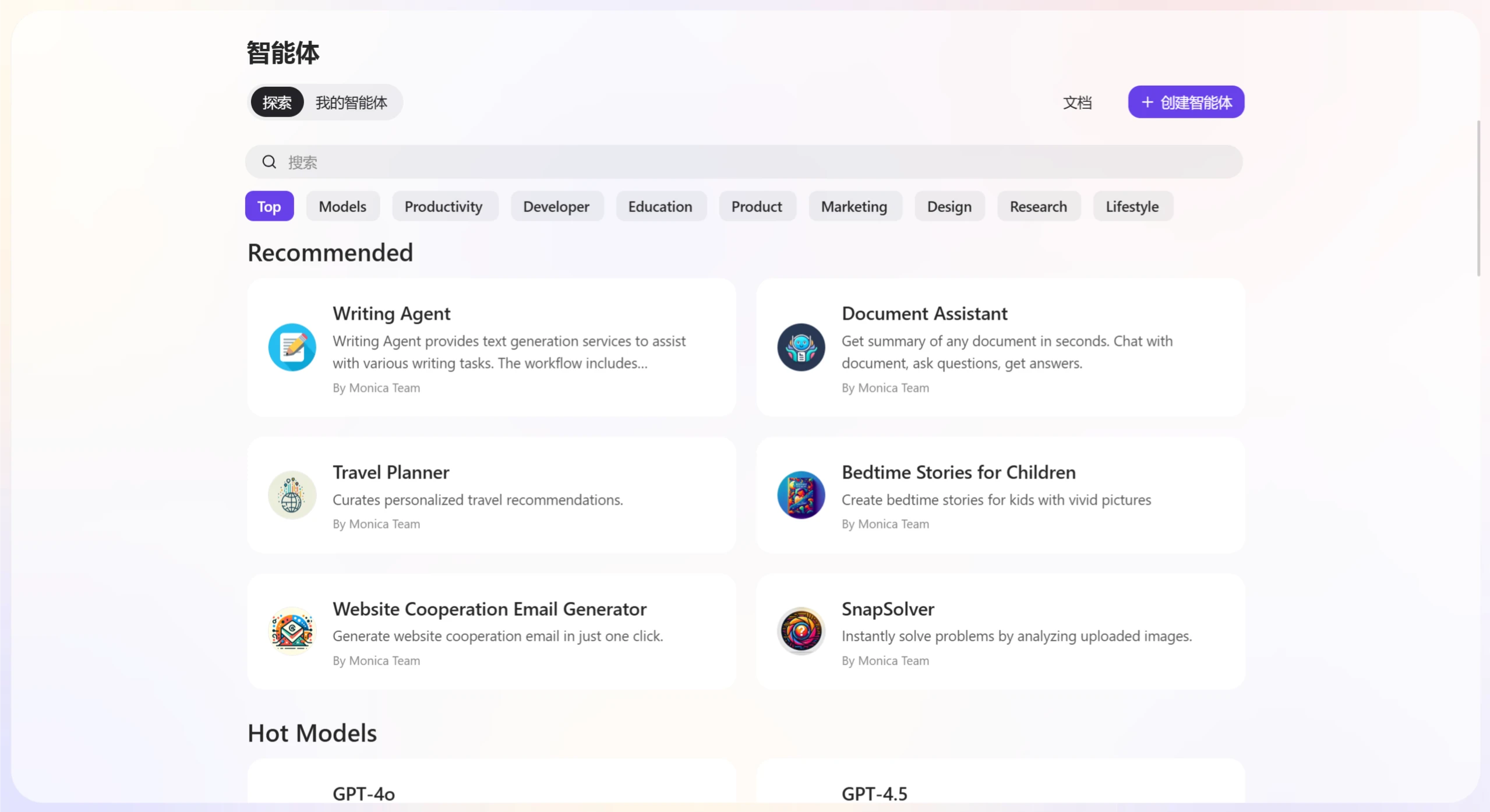
Features of Monica Bots
Zero-Code Development, Easy to Get Started
No coding required. You can create AI assistants through simple configuration and drag-and-drop operations. The platform also provides an intuitive visual interface, making it easy to design and manage assistants.
Wide Applications Across Multiple Fields
Customer service: Automatically answers frequently asked questions and improves customer satisfaction.
Education: Provides learning tutoring, homework grading, and other services.
Marketing: Generates marketing copy and auto-responds to customer inquiries.
Personal life: Manages schedules, reminders, handles emails, and more.
Rich Skill Library to Choose From
Built-in skills: More than 30 built-in skills covering news, image processing, search, data analysis, and other fields.
Custom skills supported: Users can create custom skills based on their needs and extend bot functionality through API configuration.
Multi-Format Support for Convenient Operation
File processing: Supports uploading and processing documents, images, PDFs, and other file formats.
Content creation: Offers text generation, image generation, video generation, and other content creation features.
Smart Memory for Personalized Service
The AI assistant can remember user preferences and conversation history for more accurate responses. It also adjusts services based on the user's background and preferences, and users can view, modify, or delete memories at any time.
Real-Time Task Monitoring to Ensure Operation
Users can view the task execution status of their AI assistants in real time and receive detailed reports and feedback after tasks are completed.
Multi-Platform Deployment for Flexible Use
Web: Supports a web version for convenient access anytime, anywhere.
Desktop: Provides desktop clients for Windows and macOS.
Mobile: Supports mobile apps for iOS and Android systems.
Advanced Features for Deep Customization
Agent customization: Create agents powered by advanced models (such as GPT-4, Claude 3.5), and upload professional documents to build dedicated assistants.
Multi-modal generation: Supports AI drawing, video generation, and other features, integrating Runway Gen - 3, PixVerse and other tools.
Data analysis and visualization: Upload Excel files to automatically generate statistical analysis reports, supporting multiple chart types.
Use Cases of Monica Bots
Customer service: Automatically responds to common customer questions and provides instant replies, with multi-language support to meet international customer needs.
Education: Provides learning guidance and homework grading services for students, and assists teachers in developing course content and teaching materials.
Marketing and sales: Generates marketing copy, slogans, etc., and auto-responds to customer inquiries to enhance customer experience.
Personal life: Helps manage schedules, reminds important tasks, and assists with writing, drawing, video production, and more.
Enterprise office: Automatically processes and analyzes documents, spreadsheets, and other files, and generates data analysis reports to support decision-making.
How to Use Monica Bots
Registration and Login:
Visit the Monica Bots official website.Click "Get Started" or "Sign Up", register with an email or social media account, andlog in to enter the platform's main page.
Create an AI Assistant
Click the "Create Bot" or "New Bot" button on the platform's main page.
Enter the AI assistant's name, description, and intended purpose.
Choose suitable functions from preset skill templates, such as "Customer Service Bot" or "Education Assistant"; you can also create custom skills based on your needs and configure APIs to extend functionality.
Test and Optimize
Click the "Test" button to chat with the AI assistant and test its functions.
Adjust skill configurations or optimize dialogue logic based on the test results.
Deploy and Share
Deploy the AI assistant to web pages, social media, or mobile apps, and share it with others via links or QR codes.
Using Advanced Features
Agent customization: Create agents powered by advanced models and upload professional documents as a knowledge base.
Multi-modal generation: Use AI drawing, video generation, and other features to create content.
Data analysis: Upload Excel files to generate reports and visualization charts.
Monica Bots is powerful and easy to use, suitable for individuals, enterprise developers, and professional teams. With a rich skill library, multi-platform support, and strong customization capabilities, it can meet the needs of various scenarios, helping users quickly achieve their goals and improve work and life efficiency.
Related Information:















