
 Script Planner Assistant▸
 AI Apps
 AI News

Awesome-Ollama-Server – Real-Time Monitoring and Health Checks for Ollama
Awesome-Ollama-Server – Real-Time Monitoring and Health Checks for OllamaIntroduction
What is Awesome-Ollama-Server?
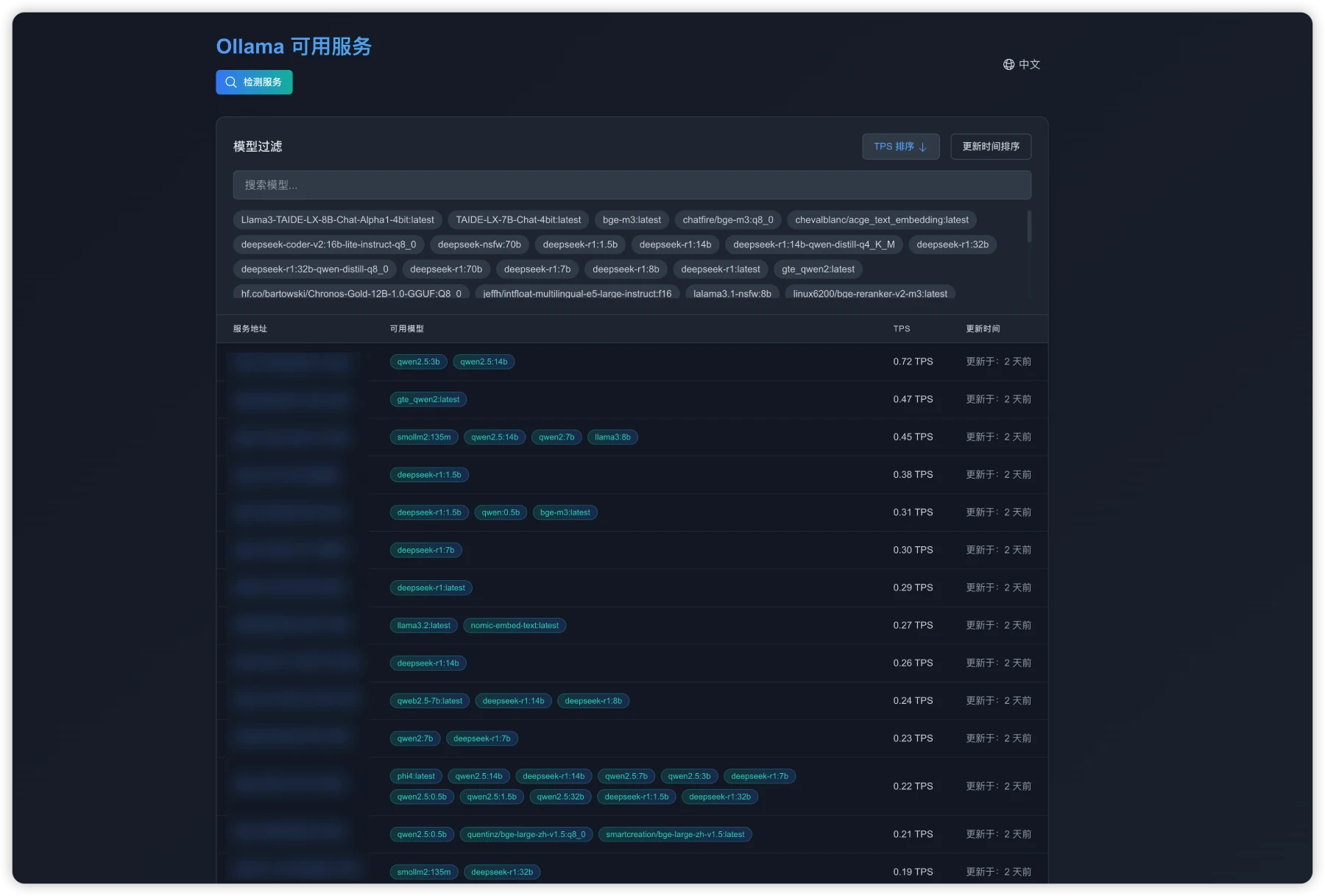
Awesome-Ollama-Server is a system that can monitor and detect the availability and performance of Ollama services. It features a modern web interface with support for both Chinese and English, enabling real-time detection and data display. This system helps users effectively manage multiple Ollama instances and detect performance issues in a timely manner. It is an ideal tool for users or teams who need to batch-check the status of online Ollama servers.
Features
Service Detection: Supports batch detection of Ollama services, with real-time display of detection status and results.
Performance Monitoring: Provides testing of service response time and TPS (transactions per second), displays the list of available models, and visualizes performance data.
Multilingual Interface: Provides both Chinese and English interfaces, allowing users to easily switch between languages.
Advanced Filtering: Allows users to filter by model and sort by TPS or update time, making it easy to quickly find and manage data.
Tech Stack
Next.js: A React framework for building user interfaces.
TypeScript: Used to ensure type safety in code.
Tailwind CSS: Used to quickly build styles.
next-intl: Used for handling internationalization.
Responsive Design: Ensures a great display across various devices.
Awesome-Ollama-Server Installation Steps
1. Clone the repository:
git clone [email protected]:forrany/Awesome-Ollama-Server.git
cd Awesome-Ollama-Server
2. Install dependencies:
npm install
3. Run the development server:
npm run dev
4. Then visit http://localhost:3000 to view the application.
How to Use Awesome-Ollama-Server
Service Detection:
After opening the application, click the "Service Detection" button and enter the Ollama service addresses in the pop-up dialog (one per line).
Click the "Start Detection" button, wait for the detection to complete, and then view the results. You can choose to download the detection results.
Filtering and Sorting:
Use the model filter to select a specific model, click TPS or update time to sort, or use the search box to quickly find models.
Language Switching:
Click the language switch button in the top-right corner and select the desired language to switch the interface.
Related Articles:














