Script Planner Assistant▸
 AI Apps
 AI News

Memento: Open-Source Video Player Designed for Learning Japanese
Memento: Open-Source Video Player Designed for Learning JapaneseIntroduction
What is Memento?
Memento is an open-source video player built on top of mpv, designed specifically for Japanese language learners. It cleverly combines video playback with language learning features, supporting grammar analysis, vocabulary capture, and flashcard creation through video content. It has been officially included in the Arch Linux AUR and Flathub repositories.

Core Features
Grammar-aware subtitle search: Automatically identifies grammatical structures in subtitles, supports grammar-aware subtitle search, allowing users to quickly find the vocabulary or sentences they need to study through subtitles.
Vocabulary card generation: Memento integrates with Anki card creation, allowing users to easily create and sync vocabulary cards for convenient review later.
Seamless Anki integration: Generate flashcards with one click via AnkiConnect, with support for audio/screenshot embedding.
Multi-language support: Built-in dictionaries in 9 languages, including JMdict, KANJIDIC, and Japanese name databases.
OCR image recognition: Screen text extraction powered by manga-ocr (requires a Python environment).
Cloud video streaming playback: Integrated with the yt-dlp engine, allowing direct playback of content from platforms such as YouTube and Bilibili.
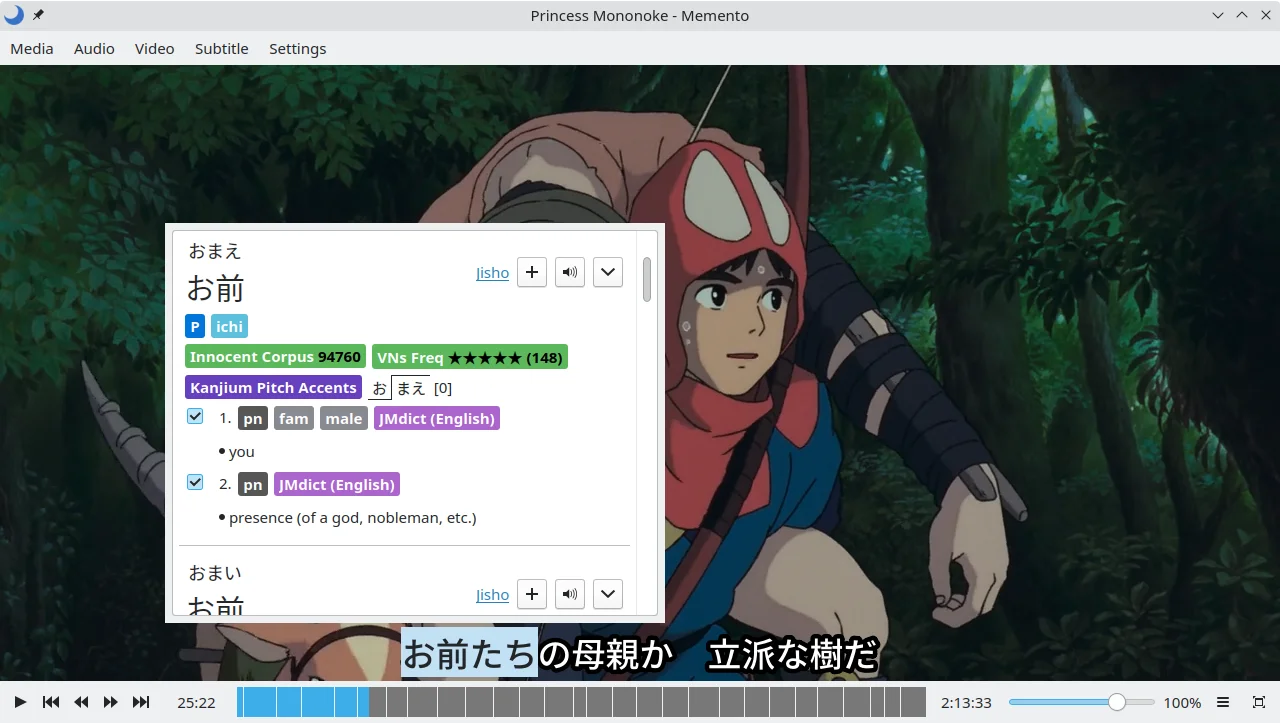
Popup dictionary: Memento has a built-in dictionary with support for multiple Yomichan-style formats, allowing users to look up the meaning of words directly while watching videos, for better content comprehension.
Memento also offers video playback enhancement features, such as zoom and selected-area playback, which lets you select specific segments to replay repeatedly, helping you master Japanese pronunciation and usage more thoroughly.
Quick Start Guide
Cross-platform installation options:
Linux: One-click installation via Flathub —
flatpak install flathub io.github.ripose_jp.Memento.Windows: Download the official portable version.
macOS: Compile using Homebrew —
brew install qt6 mpv mecab && make.
Required component configuration:
Dictionary installation: Download the English version of JMdict, then drag and drop the .zip file into the software's dictionary management interface.
Anki integration: Install the AnkiConnect plugin and enter the Anki port (default 8765) in Memento's settings.
GitHub: https://github.com/ripose-jp/Memento