
 Script Planner Assistant▸
 AI Apps
 AI News

Doocs: A Minimalist WeChat Markdown Editor
Doocs: A Minimalist WeChat Markdown EditorIntroduction
What is Doocs?
Doocs is a clean WeChat Markdown editor that makes typesetting and editing WeChat Official Account articles much easier. It supports Markdown syntax and offers features like a color palette, multi-image upload, one-click document download, custom CSS styles, and one-click reset. With Doocs, you can instantly render Markdown documents into WeChat图文 (article-with-image) format, eliminating the hassle of manual layout. As long as you know basic Markdown syntax, you can produce clean and beautiful WeChat articles. Combined with the article sync assistant, it enables one-click publishing to multiple platforms.
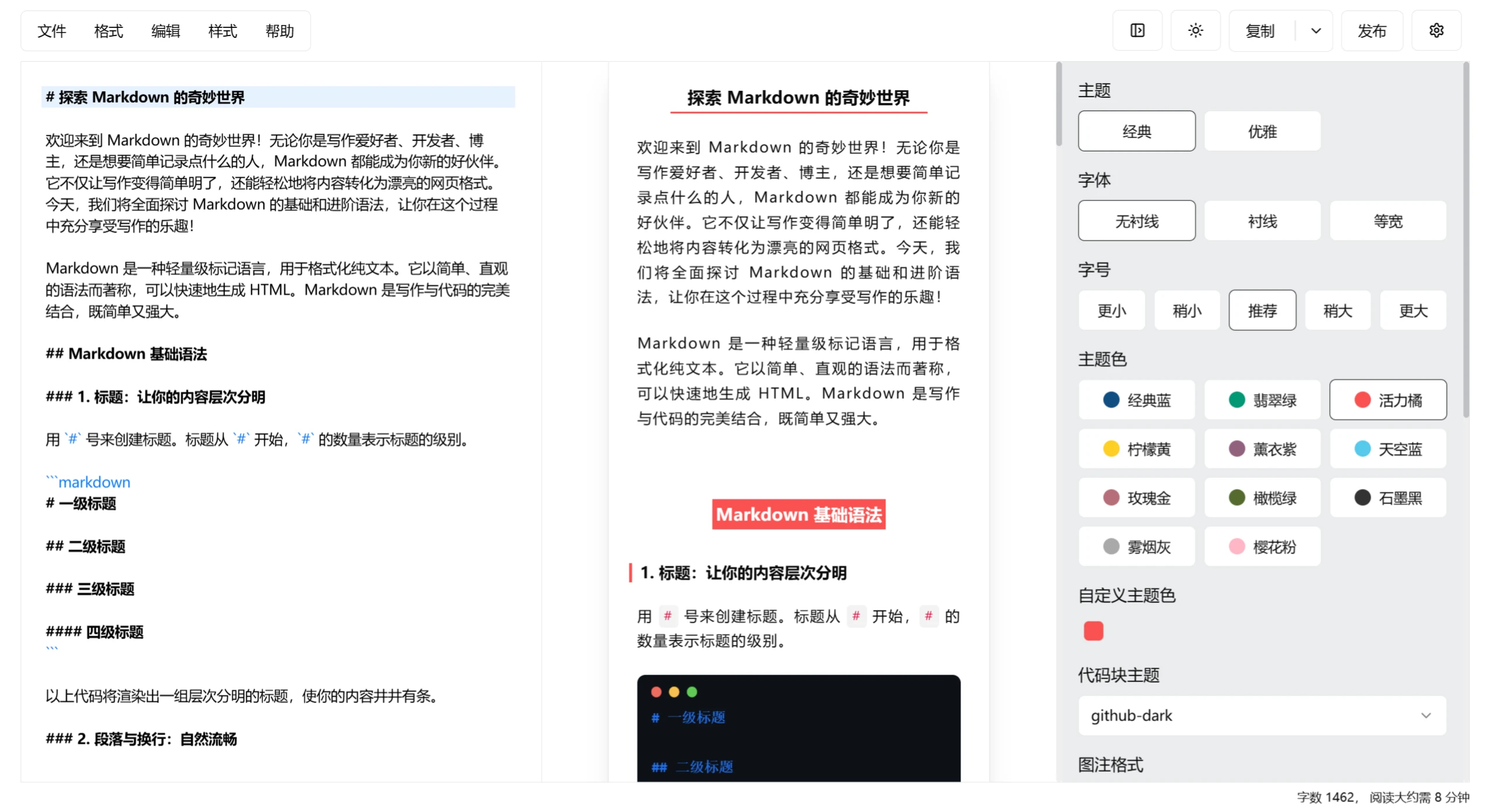
Main Features of Doocs:
Custom CSS Styles: Users can adjust article styles according to their own preferences, allowing custom theme colors and CSS styles for flexible display effects.
Supports Basic Markdown Syntax: Supports headings, paragraphs, code blocks, quotes, links, and more, along with basic syntax and math formulas.
Light and Dark Theme Modes: Adapts to different environments and personal preferences for a better reading experience.
Quick Document Formatting: Press the keyboard shortcut Alt + Shift + F to format documents with one click, boosting writing efficiency.
Color Palette and Batch Image Hosting: Quickly adjust article colors and batch convert local images to online image links, simplifying image management.
Multi-Image Upload and Custom Image Hosting: Supports multi-image uploads and can be configured with GitHub, Alibaba Cloud, Tencent Cloud, Qiniu Cloud, MinIO, and other image hosting services for convenient image resource management.
File Import and Export: Convenient file import and export functions to improve work efficiency.
Code Highlighting: A rich selection of code block highlighting themes to improve code readability.
Applications of Doocs:
WeChat Official Account Article Typesetting: Specifically designed for WeChat Official Accounts, it can render Markdown content in real time into WeChat图文 format, simplifying the typesetting process and improving efficiency.
Technical Documentation Writing: Supports all basic Markdown syntax, including code blocks, math formulas, etc., suitable for writing technical documents, tutorials, and blog posts.
Knowledge Base Management: Helps users record and manage knowledge in a structured way, generating clear and readable content, suitable for building and maintaining knowledge bases.
Project Documentation Maintenance: In team collaboration and project management, it provides a simple and efficient tool that supports multi-user simultaneous editing and real-time preview, ensuring document consistency and aesthetics.
Daily Note-Taking: With a clean interface and easy-to-use features, it is a great choice for recording daily notes, helping users quickly organize and share ideas.
How to Use Doocs:
Online Use
1. Access the online editor: Open your browser and visit the Doocs online editor or domestic mirror.
2. Start editing: Enter your Markdown content in the editor. It supports all basic Markdown syntax, such as headings, paragraphs, lists, code blocks, and math formulas.
3. Preview the effect: The editor provides a real-time preview of the rendered effect to ensure the layout meets your expectations.
4. Save and download: After editing is complete, you can download the file as a Markdown file or an HTML file with one click.
Local Deployment
1. Install Docker (if not already installed): Visit the Docker official website to download and install Docker.
2. Pull the Doocs image: Open the terminal and run the following command to pull the Doocs image:
docker pull doocs/md:latest
3. Run the container: Run the following command to start the Doocs container:
docker run -d -p 8080:80 doocs/md:latest
This will start the Doocs editor on local port 8080.
4. Access the local editor: Open your browser and visit http://localhost:8080 to start using the locally deployed Doocs editor.
Advanced Features
Custom CSS Styles: Click "Style" -> "Custom CSS" in the editor, enter your custom CSS styles to achieve personalized layout.
Configure Image Hosting: Supports GitHub, Alibaba Cloud, Tencent Cloud, Qiniu Cloud, MinIO, and many other image hosting services for flexible image resource management.
GitHub Repository:https://github.com/doocs/md
Related Information:














