
 Script Planner Assistant▸
 AI Apps
 AI News

KuangYou Excel: Analyze Your Spreadsheet Through Simple Conversations
KuangYou Excel: Analyze Your Spreadsheet Through Simple ConversationsIntroduction
匡优Excel is a tool that perfectly combines artificial intelligence with data analysis for Excel analysis. Through natural language conversations, you can easily extract insights from Excel files without mastering complex Excel functions or data analysis skills.

匡优Excel Features
Data Processing & Analysis: Provides a variety of data processing functions, including sorting, filtering, find and replace, etc., to facilitate quick analysis for users.
Formulas & Functions: Supports the use of various mathematical, statistical, and logical formulas and functions, allowing users to perform complex calculations and data analysis.
Chart Creation: Users can generate various types of charts such as bar charts, pie charts, and line charts based on data, facilitating visual data analysis.
Pivot Tables: Allows users to quickly summarize and analyze large amounts of data, ideal for reports and business decision-making.
Macros & VBA: Users can write macro programs to automate common tasks and improve work efficiency, with VBA support for further functionality expansion.
Data Sharing & Collaboration: Supports cloud collaboration features, allowing multiple users to edit the same document simultaneously, facilitating teamwork.
匡优Excel Use Cases
Financial Management: Used for budgeting, financial report creation, and data analysis.
Project Management: Helps plan project schedules, allocate resources, and track budgets.
Market Analysis: Organizes and analyzes market data to provide decision support.
Education & Training: Used for courseware creation, student grade statistics, and assessment.
Personal Finance: Individuals can use it to manage household budgets and investment portfolios.
How to Use 匡优Excel?
1. Register and Log In: Visit the 匡优Excel website and log in to your account.
2. Upload Excel File: Upload your Excel file to 匡优Excel. The system supports all common Excel formats (.xlsx, .xls, .csv).
3. Ask Questions in Natural Language: Once the file is uploaded, you can start asking questions in natural language, such as: "Help me calculate the total sales for each month."
4. Get Analysis Reports: 匡优Excel will immediately process your request and retrieve detailed data analysis reports, highlighting key metrics and trends, providing data explanations and suggestions, and supporting the automatic generation of data visualization charts.
Advantages of 匡优Excel:
Save Time: No need to manually build complex formulas, quickly obtain data insights, and automatically generate professional charts and reports.
Easy to Use: No professional Excel skills required, with an intuitive conversational interface that supports natural Chinese interaction.
Professional Analysis: Strong data and statistical analysis capabilities with intelligent interpretation features.
Pricing of 匡优Excel:
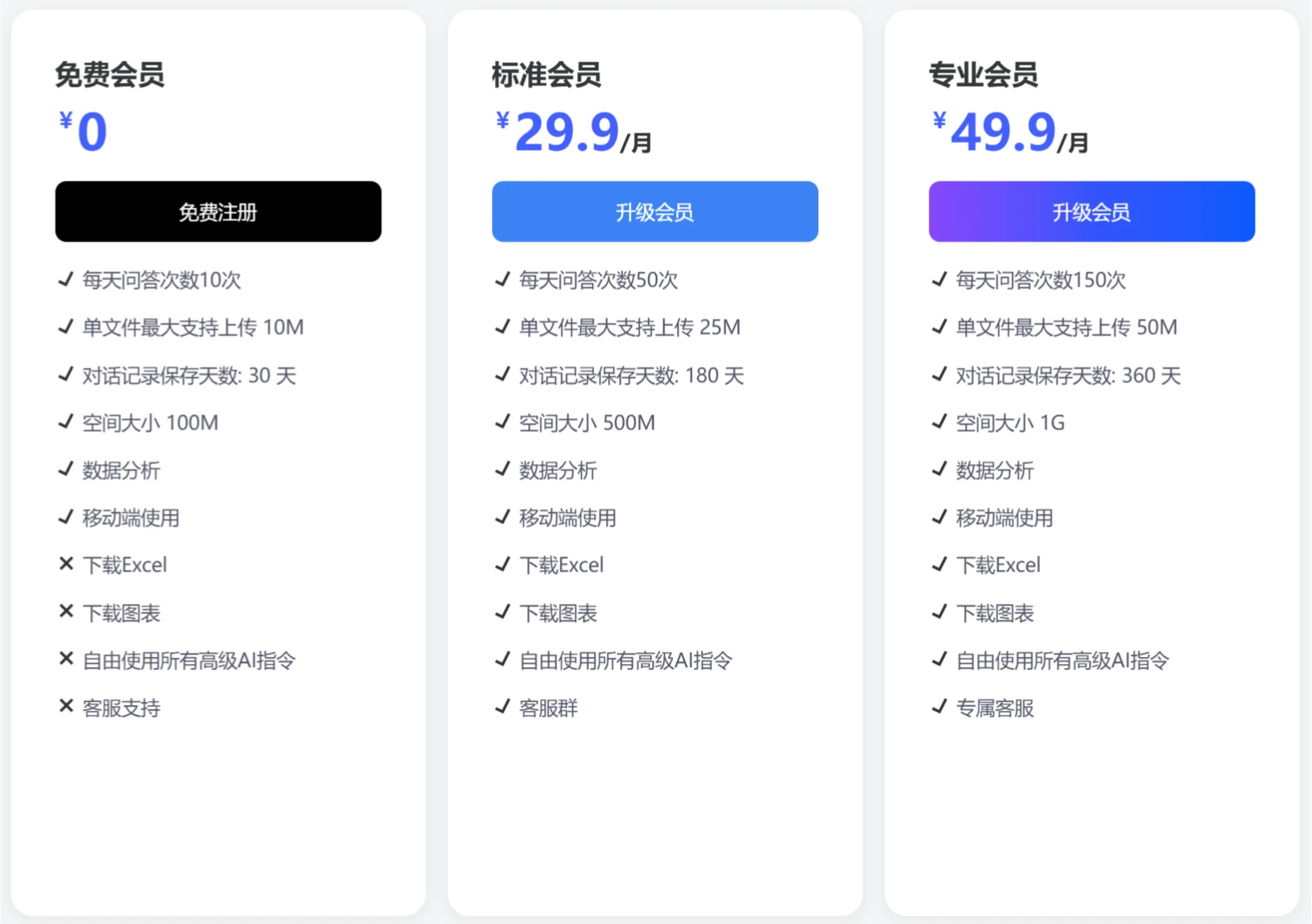
匡优Excel makes Excel analysis no longer a challenge. Whether you are a beginner just entering the field of data analysis or an experienced professional, 匡优Excel can help you complete your work more quickly and easily. Start your trial of intelligent Excel analysis mode now!















