Script Planner Assistant▸
 AI Apps
 AI News

FontShow: Easy Local Font Batch Preview & Comparison Tool
FontShow: Easy Local Font Batch Preview & Comparison ToolIntroduction
FontShow is a convenient local font batch preview and comparison tool that requires no installation and is ready to use right out of the box. Through the browser, you can preview local fonts in real time. It supports personalized text input, multi-font batch comparison, free style adjustment, and more. With a built-in theme color library and favorites system, it helps you easily find the best font.
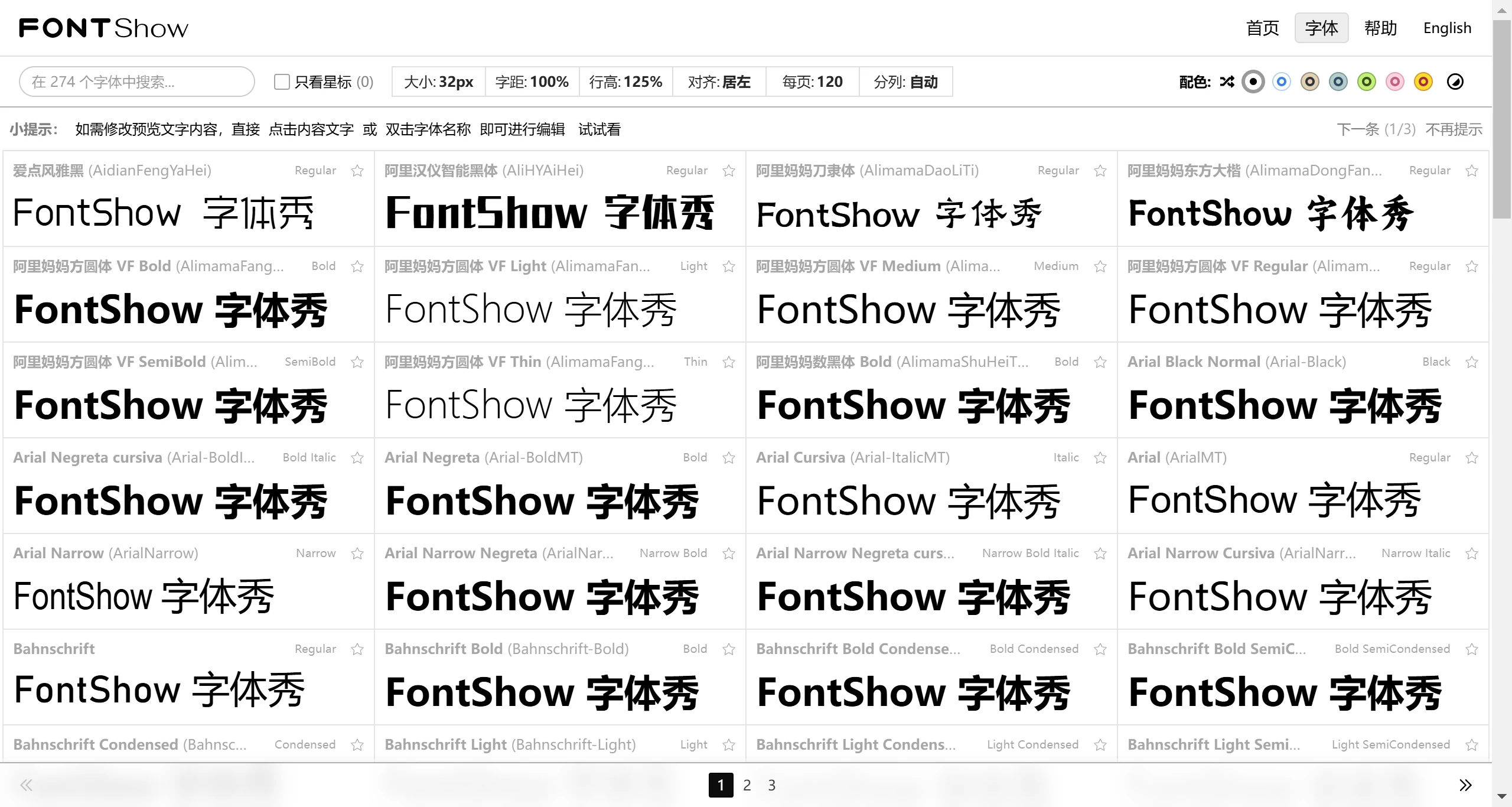
Core Features of FontShow:
Free Customization: Input any text content, support mixed Chinese and English typography, adjust styles with WYSIWYG (What You See Is What You Get), and preview different font rendering effects in real time.
Batch Preview: Users can preview all fonts installed on their computer at once, which is especially suitable for font collectors.
Style Control: Freely adjust 10+ typography parameters such as font size, line spacing, and alignment, offering a WYSIWYG editing experience.
Efficient Search: The built-in search function helps quickly locate specific fonts, while filtering tools help narrow down your choices.
Font Favorites: Bookmark frequently used fonts through the star feature, build a personal font resource library, and access them quickly in the future.
Completely Free: No fees required, ready to use immediately.
No Download or Registration Required: Access directly in the browser, no need to download or install additional plugins.
Who is FontShow For
Graphic Designers: A powerful font comparison tool for logo design and poster typography;
Typography Professionals: Quickly determine the best font solution for print materials;
Font Enthusiasts: A convenient tool for managing personal font libraries;
FontShow User Guide
Chrome/Edge 103+ browsers are recommended. Domestic browsers based on the Chromium kernel have good compatibility (such as QQ Browser, 360 Speed Browser), while Firefox/Safari are not currently supported. The program automatically detects local font files with no additional configuration required.
FontShow simplifies the traditional, complicated font testing process into a few clicks through an intuitive visual interface. Whether you are selecting a font for a product slogan or creating a PPT title, it can be considered a "magic tool" for designers, front-end developers, UI designers, and any user who needs to quickly find the right font. It would be even better if this product also included a font copyright lookup feature, similar to 360 Font Lookup.