
 Script Planner Assistant▸
 AI Apps
 AI News

PixEraser: Free Online Tool to Remove Watermarks from Photos and Videos
PixEraser: Free Online Tool to Remove Watermarks from Photos and VideosIntroduction
PixEraser is a tool specifically designed for removing watermarks from photos and videos. It supports free online use and runs on multiple systems including Windows and macOS. PixEraser uses AI to intelligently identify and automatically remove selected watermark areas while preserving the original quality of images and videos. There is no need to install cumbersome software — watermarks can be quickly removed from photos and videos, making it very convenient to use.

PixEraser Feature Overview
Efficient Watermark Removal: Leveraging advanced AI technology, it accurately identifies and removes watermarks from images and videos while naturally restoring the affected parts, ensuring the modified visuals look natural and seamless.
Intelligent Watermark Detection: PixEraser intelligently analyzes image content and effectively handles complex backgrounds and fine details, ensuring the cleaned areas look natural with no visible traces.
Object Removal: In addition to removing watermarks, users can also use PixEraser to remove other objects from photos, such as unwanted people or items.
Multiple Format Support: Compatible with various image formats including PNG, JPEG, JPG, WebP, and TIFF, as well as video formats such as MP4, MOV, AVI, and MKV, with a maximum resolution of up to 5000×5000 pixels.
Add Watermarks: It is not limited to watermark removal — it also offers the ability to add custom watermarks, allowing users to freely set the font, size, color, and transparency.
Precise Watermark Eraser Control: The eraser size can be precisely adjusted to perfectly fit watermarks of different sizes, handling everything from tiny watermarks of just a few pixels to large watermark areas with ease.
PixEraser Use Cases
Image and Video Watermark Removal: Used to handle situations where watermarks need to be removed from images or videos, such as downloaded videos with platform watermarks, or self-recorded videos where certain logos need to be removed.
Copyright Protection: Allows users to add watermarks to their original content to prevent unauthorized use, providing copyright protection.
Social Media and Content Creation: When sharing on social media or creating content, unwanted watermarks can be removed to make images and videos look more polished and professional.
Personal Photo Editing: Remove signs, passersby, and other distractions from travel photos so the images focus more on the main subject.
Commercial Use: Clean copyright watermarks from stock images for use in product promotion or website design.
Video Editing: Remove watermarks or logos from videos to produce clean video content.
How to Use PixEraser
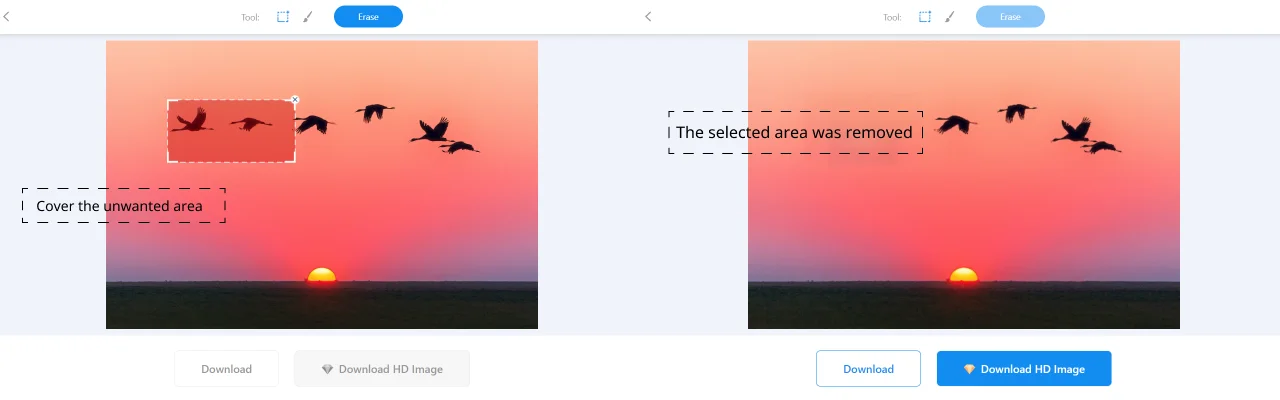
Visit the Official Website: Go to the PixEraser official website https://pixeraser.com/zh-cn/, or install the PixEraser browser extension.
Choose a Function: Select either the watermark removal or watermark adding function based on your needs.
Choose a Function: Select the watermark removal or watermark adding function as required.
Upload an Image or Video: After opening PicEraser, click the "Upload Image" or "Upload Video" button to import the image or video you want to process.
Select the Watermark Area: Use the selection tool to cover the watermark, then click the erase button to remove the circled watermark area.
Perform Watermark Removal: Click the "Remove Watermark" button and the software will automatically process the selected area. Once finished, users can preview the result.
Download the Result: After processing is complete, click the "Download" button to save the final watermark-free photo or video.
Compared with Vidmore and AnyMP4, PixEraser not only removes watermarks but also allows you to add custom watermarks. More importantly, the online version of PixEraser is completely free and requires no download or installation, making it ideal for users who only occasionally need to remove watermarks.
Related Articles:















