
 Script Planner Assistant▸
 AI Apps
 AI News

MiaoYan: A Markdown Note Editor Built for Engineers
MiaoYan: A Markdown Note Editor Built for EngineersIntroduction
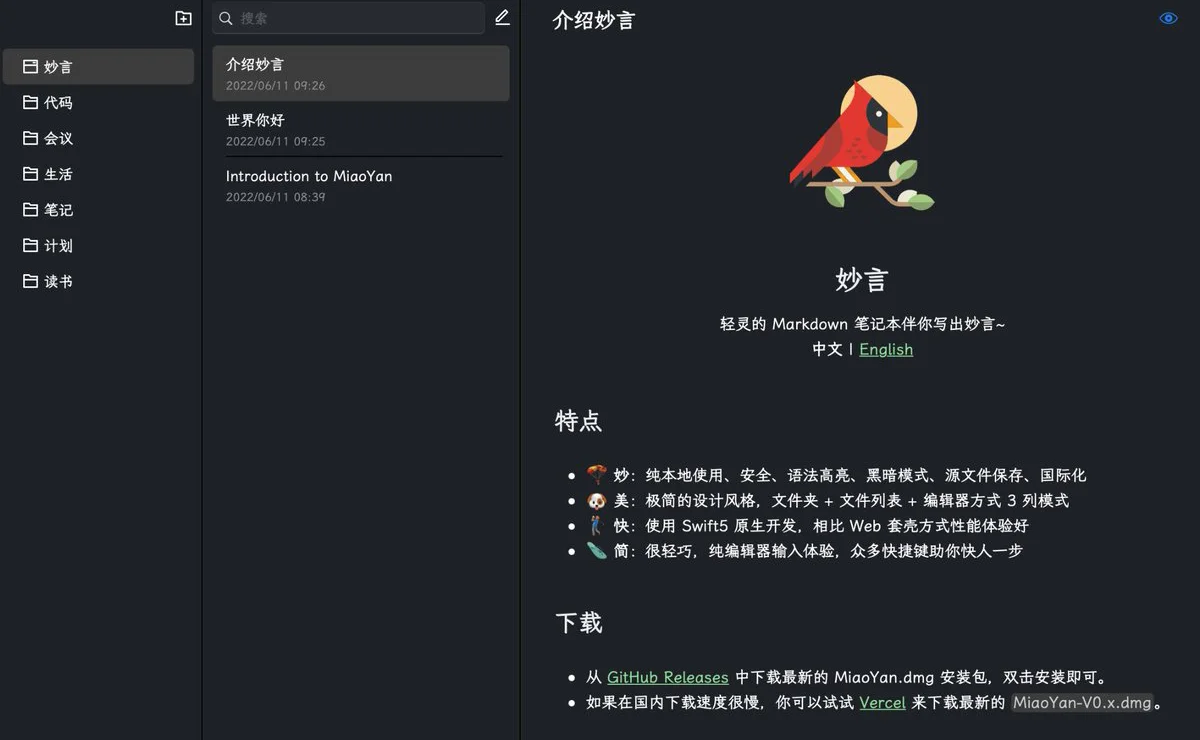
妙言 is a feature-rich Markdown note editor that works fully offline and locally, offering syntax highlighting, light and dark themes, multi-language support, presentation mode, ppt mode, focus mode, single-file mode, image hosting, LaTeX, and more. Currently, it only supports macOS.
妙言 Features
Editor Experience: Provides document formatting similar to VSCode, supports Prettier automatic formatting, and custom Markdown syntax highlighting.
Lightweight and Efficient: Natively developed in Swift 5, with a compact installer (23M), fast running speed, and excellent performance.
Markdown Extensions: Supports multiple syntaxes beyond GFM, such as Markmap, LaTeX, Mermaid, PlantUML, as well as embedded online code editor and video.
Image Hosting Support: Configurable with image hosting tools like uPic and PicGo to enable automated image uploading.
Multi-Mode Operation: Includes focus mode, presentation mode, and single-file mode to adapt to different working scenarios.
Document Inline Jump: Use [[link]] to realize cross-document linking, making content organization easier.
Export Options: Supports exporting as PDF and images for easy sharing.
Minimalist Design: Classic three-column layout with customizable settings, allowing you to hide infrequently used features to keep the interface clean.
Security and Privacy: All data is stored on the user's local device with no dependence on cloud services, making data import and export convenient.
妙言 Advantages:
Developer-Friendly: Follows the markdown source-first principle, aligning with engineers' coding habits.
Keyboard Shortcuts: Almost all functions can be accessed via keyboard shortcuts, improving efficiency.
Fast: Natively developed with Swift 5, offering better performance and a smoother experience compared to web-based wrappers. It's not just faster in performance, but also more convenient to operate, saving time on moving the mouse.
Aesthetic Interface: Clean design that meets engineers' requirements for tool aesthetics.
Customization and Extensibility: Open-source nature allows users to customize or extend features as needed.
Installation and Setup of 妙言
Download and Installation: Download the latest dmg installer from GitHub Releases, or install via brew install miaoyan --cask.
Set Default Storage Location: Create a MiaoYan folder in iCloud or the root directory, open 妙言's settings, and change the default storage address to this folder.
Basic Operations
Create Folder: Click the new folder icon in the upper-left corner of 妙言 to create your own document category folder.
New Document: Use the keyboard shortcut command + n to create a new document, or click the New Document option in the menu bar.
Rename Document: Use the keyboard shortcut command + r to rename a document, or right-click the document and select Rename.
Duplicate Document: Use the keyboard shortcut command + d to duplicate a document, or right-click the document and select Duplicate.
Delete Document: Use the keyboard shortcut command + delete to delete a document, or right-click the document and select Delete.
Advanced Features
Presentation Mode: Use the keyboard shortcut command + 4 to switch to presentation mode, or select a document, right-click, and choose 妙言PPT to open.
Auto Formatting: Use the keyboard shortcut command + shift + l for automatic document formatting.
Internal Jump: Use [[article title]] to realize inline jumps between 妙言 documents.
Image Hosting: Configure image hosting in settings, supporting drag-and-drop, copy, and auto-upload to replace the address.
Export PDF and Images: Select a document and right-click to easily export neatly formatted PDFs and images.
For users who need frequent note-taking and document editing, especially professionals in the technical field. 妙言's lightweight, secure, and rich text formatting features make it an ideal note-taking tool for engineers.















