
 Script Planner Assistant▸
 AI Apps
 AI News

LangBot: An Open-Source LLM-Native Instant Messaging Bot Platform
LangBot: An Open-Source LLM-Native Instant Messaging Bot PlatformIntroduction
LangBot is an open-source instant messaging bot platform that supports multiple platforms (such as QQ, WeChat, Feishu, Discord, etc.) and various large language models (such as ChatGPT, DeepSeek, Gemini, etc.). It features multimodal interaction capabilities, supporting multiple input and output forms such as text, voice, and images, and is capable of multi-turn conversations and tool calling.
Main Features of LangBot:
Multi-platform support: Seamlessly integrates with multiple mainstream instant messaging platforms, such as QQ, WeChat (including Enterprise WeChat and Personal WeChat), Feishu, Discord, etc.
Multimodal interaction: Supports multiple input and output forms such as text, voice, and images, handles complex interaction tasks such as image recognition and speech recognition, providing users with a richer interactive experience.
Multi-model adaptation: Supports access to various mainstream large language models (LLMs), such as Openai's ChatGPT, DeepSeek, Claude, Gemini, Ollama, etc. Users can choose the appropriate model for dialogue tasks based on their needs.
High stability: Built-in mechanisms such as access control, rate limiting, and sensitive word filtering ensure stable operation of the bot and prevent abuse and the spread of inappropriate content.
Plugin extension: Rich plugins allow users to select and add suitable plugins during development and management according to their own needs.
Web management panel: Provides an intuitive web management panel, making it convenient for users to configure and manage bot instances without frequently editing configuration files, allowing for quick debugging and optimization of the bot.
How to Deploy LangBot?
1. Install dependencies: Ensure that Python 3.10.1 or higher is installed on your system. Then, install the dependencies required by LangBot. You can install these dependencies by running the following command:
pip install -r requirements.txt
2. Download and extract the project: Go to LangBot's Release page to download the latest version of the compressed package and extract it to your local directory.
3. Generate configuration file: In the extracted directory, run the main program to generate the required configuration file. Run the following command:
python main.py
The program will automatically generate the configuration file, which you can modify as needed.
4. Modify the configuration file: Modify the generated configuration file according to your needs, such as setting the API key for the messaging platform, adjusting plugin configurations, etc.
5. Run LangBot: After completing the configuration, run the main program again to start LangBot:
python main.py
6. Access the Web management panel: After LangBot is started, you can access the Web management panel through your browser for real-time monitoring and management. By default, the WebUI can be accessed at http://127.0.0.1:5300.
7. Deploy plugins (optional): If you need to extend LangBot's functionality, you can install and configure plugins. LangBot supports event-driven and component extension mechanisms, allowing you to add corresponding plugins based on your business needs.
List of Plugins Supported by LangBot
ElvisChenML/Waifu: A plugin for creating realistic chatbots, utilizing program logic combined with a large language model (LLM) to provide a realistic chat experience. The basic functions of this plugin, such as bot operations and interaction with the LLM model, are implemented by LangBot.
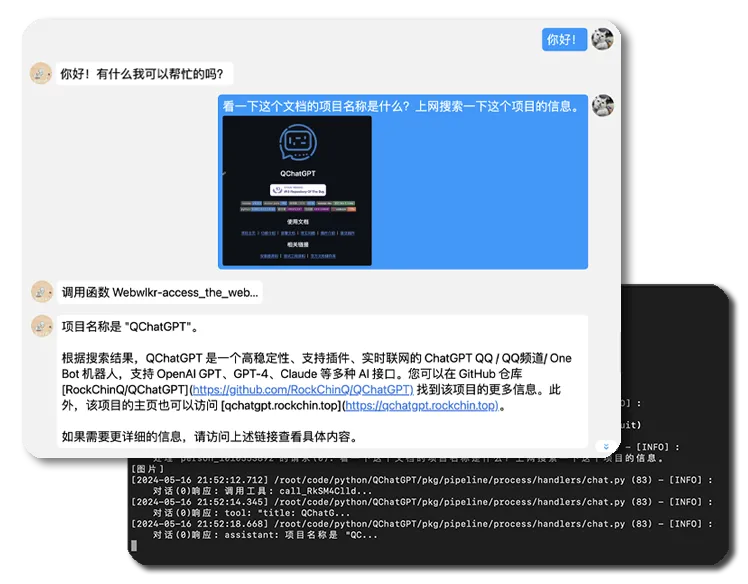
WebwlkrPlugin: Enables LangBot with internet access capabilities, allowing it to access online resources and services.
LangBot voice plugin: Supports multiple text-to-speech (TTS) platforms for voice chat.
URLMaskerPlugin: Used to mask (replace) URLs to address restrictions on URLs in messages imposed by the QQ official bot API.
LangBot_Plugin_Emoticon_v3: An online API-based emoticon plugin, suitable for LangBot v3.
Russian Roulette game plugin: Implements the Russian Roulette game function based on LangBot.
File sending plugin: Supports sending specified local files to applicants.
GalgameMaker: A plugin specifically designed for quickly generating Galgames in QQ conversations. These plugins enrich LangBot's functionality, enabling it to cover more scenarios and user needs.
GitHub:https://github.com/RockChinQ/LangBot














