
 Script Planner Assistant▸
 AI Apps
 AI News

ResearchFlow: Literature Management & Analysis Tool
ResearchFlow: Literature Management & Analysis ToolIntroduction
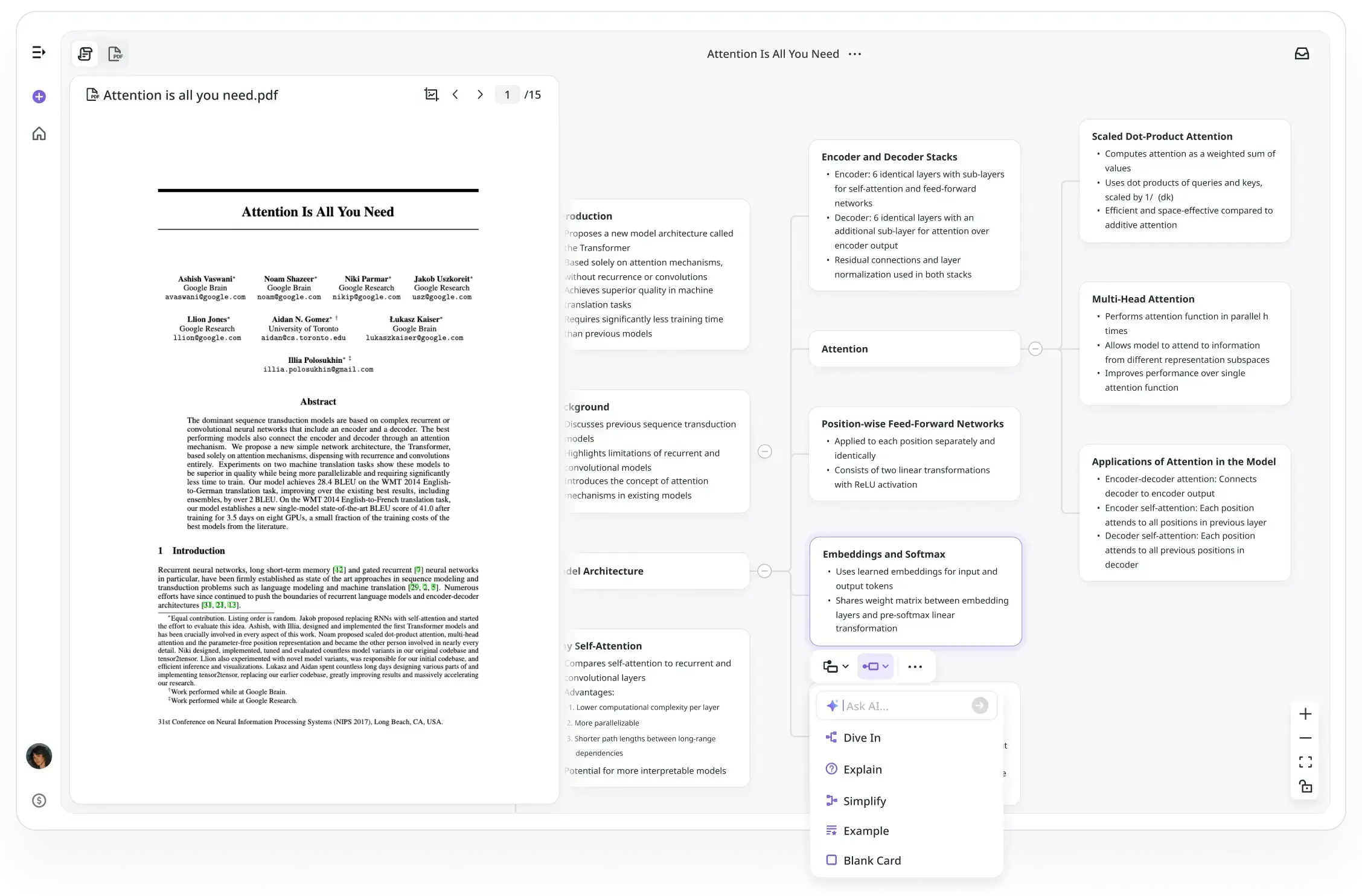
ResearchFlow is an AI-driven academic research tool designed to help users explore and organize complex research content more easily and intuitively. It combines the functions of a whiteboard and mind mapping, providing powerful features such as academic search, in-depth exploration, document annotation, and interaction. It is suitable for a variety of scenarios, including academic research, thesis writing, project reports, course learning, and market research.
ResearchFlow Features and Highlights:
Literature Management
Importing Literature: ResearchFlow supports batch import of literature information from multiple databases (such as PubMed, Web of Science, Google Scholar, CNKI, etc.).
Creating and Managing Literature Libraries: Users can create multiple literature libraries, each of which can contain literature on different topics, making it easier to categorize and manage.
Literature Deduplication: The tool can automatically identify and remove duplicate literature, ensuring that the literature library remains clean and efficient.
Document Annotation and Interaction: Users can highlight and annotate content of interest within documents. The AI provides explanations and analysis, and allows users to drag the analysis results into a mind map for integration.
Literature Analysis
Keyword Extraction: ResearchFlow can automatically extract keywords from literature, allowing users to quickly understand the core content of a paper.
Citation Analysis: The tool can generate citation network graphs for literature, displaying the citation relationships between papers and helping users identify important research nodes.
Author and Institution Analysis: ResearchFlow provides author and institution analysis features, allowing users to view the publication history and influence of a particular author or institution.
Trend Analysis: The tool can analyze publication trends within a research field, helping users understand the research hotspots and development directions of that field.
AI-Assisted Analysis
The tool is capable of AI-driven analysis of complex charts and data, helping users quickly understand the trends and insights behind the data.
Multi-Format Export
Supports exporting research results in multiple reference formats (APA, MLA, Harvard, Chicago), and automatically generates clear mind maps.
Literature Search
Academic Search: Provides precise search based on academic databases, helping users find relevant academic literature and research materials, and generates detailed search results.
In-Depth Exploration: Presents complex academic content in a visual way, using mind maps to display the structure of research topics. Users can further ask questions through interactive nodes to deeply investigate each research point.
How to Use ResearchFlow:
Registration and Login
Users first need to register and log in to the ResearchFlow platform.
During registration, basic information such as name, email, and research field must be provided.
Creating a Literature Library
After logging in, click "New Research" or "New Whiteboard," then enter the name and a brief description of the literature library.
A literature library can contain multiple groups, and users can categorize literature by topic or type.
Importing Literature
Importing from Databases:
Search for literature in databases such as PubMed, Web of Science, and Google Scholar. After selecting the desired literature, export it in formats such as RIS, BIB, or XML.
In ResearchFlow, click the "Import" button, select the exported file, set the import options, and click "Import."
Importing from Files:
Import downloaded literature information files (such as RIS, BIB, XML, etc.) into ResearchFlow.
In ResearchFlow, click the "Import" button, select the file, set the import options, and click "Import."
Managing Literature
Editing Literature Information: Select the literature to be edited in the literature library, click the "Edit" button, and modify the various pieces of information for the literature.
Creating Groups: In the literature library, users can create multiple groups to classify and store literature.
Literature Deduplication: ResearchFlow automatically identifies and removes duplicate literature, and users can also perform deduplication manually.
Analyzing Literature
Keyword Extraction: Select the literature to be analyzed, click the "Keyword Extraction" button, and the tool will automatically extract keywords from the literature.
Citation Analysis: Select the literature to be analyzed, click the "Citation Analysis" button, and the tool will generate a citation network graph for the literature.
Author and Institution Analysis: Select the literature to be analyzed, click the "Author Analysis" or "Institution Analysis" button, and the tool will display the publication history and influence of the author and institution.
Trend Analysis: Select the research field to be analyzed, click the "Trend Analysis" button, and the tool will generate a publication trend chart for that field.
Collaboration and Sharing
Inviting Team Members: In the literature library, click the "Invite Members" button, enter the team member's email address, and send the invitation link.
Literature Sharing: Select the literature to be shared, click the "Share" button, generate a sharing link, and share it with others via email or social media.
Personalized Recommendations
Setting Keyword Subscriptions: In user settings, enter keywords of interest and set the subscription frequency.
Viewing Recommended Literature: On the "Recommendations" page, view the latest literature pushed by the tool based on keyword subscriptions.
Target Users of ResearchFlow:
Researchers: University professors, PhD students, master's students, and other researchers can use ResearchFlow to manage and analyze literature, improving research efficiency.
Academic Institutions: Universities, research institutes, and other academic institutions can use ResearchFlow to facilitate team collaboration and share literature resources.
Thesis Writing: Undergraduates and graduate students use ResearchFlow to assist with thesis writing, from topic selection and literature review to data analysis and writing, improving writing efficiency and quality.
Market Research: Market researchers use ResearchFlow to analyze consumer behavior, study market trends, and develop marketing strategies.
Related Information:
60 Must-Have Thesis Writing and Academic Research Tools for Researchers















