
 Script Planner Assistant▸
 AI Apps
 AI News

Refviz: Professional Literature Analysis Software
Refviz: Professional Literature Analysis SoftwareIntroduction
RefViz is a powerful text analysis and visualization software designed to help researchers analyze, organize, and understand large volumes of data. It can cluster references by keywords to form "galaxy" maps, allowing users to intuitively view and manage literature. RefViz is compatible with bibliographic management software such as EndNote, ProCite, and Reference Manager, greatly enhancing the efficiency of literature research.
RefViz Main Features:
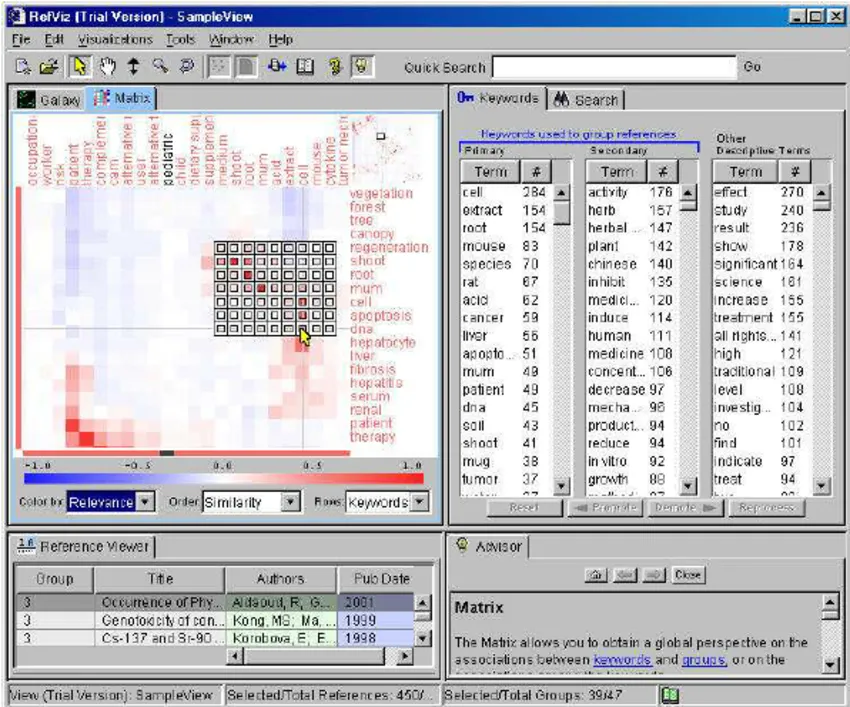
Literature Association Visualization: RefViz can analyze keywords and citation relationships in the literature, generating "Galaxy" and "Matrix" maps that visually display the connections between publications, helping users identify core literature and hotspots in the research field.
Integration with Literature Management Software: RefViz seamlessly integrates with literature management tools such as EndNote and Reference Manager, making it easy for users to import existing literature databases for in-depth analysis.
Keyword Analysis: By defining keywords or synonyms, RefViz highlights literature groups related to these keywords, helping users focus on specific research directions.
Literature Management Assistance: Beyond analyzing literature, RefViz also helps users perform initial screening and organization of references, improving the efficiency of literature reading and review.
Research Trend Identification: By analyzing the time series of literature publications, RefViz helps users identify development trends and potential research gaps in the research field.
Data Import and Export: Supports importing data from multiple literature databases (such as PubMed, Web of Science, etc.), and seamlessly connects with literature management software such as EndNote and Reference Manager.
Data Analysis: Automatically indexes the main subject terms, secondary subject terms, and descriptors of the literature through statistical models, and uses clustering algorithms to group references based on relevance.
Visualization Display: Provides Galaxy view and Matrix view to intuitively display the connections between literature and research hotspots.
Keyword Tools: Allows users to change the level of keywords, and modify the classification status of literature through the Reprocess function.
RefViz Application Scenarios:
Introduction for New Researchers: For scholars just entering a research field, RefViz provides a quick overview, helping them quickly grasp the key literature and research directions in the field.
Literature Review: When preparing papers or project proposals, RefViz can help quickly build a literature review framework and clarify research positioning.
Identifying Research Gaps: By analyzing the distribution of existing literature, RefViz helps identify unexplored areas within a research field, providing directions for new research.
Academic Research: Researchers can use RefViz for literature reviews, analyzing research trends in related fields, and identifying important literature and authors.
Research Project Management: In research projects, RefViz helps team members share literature resources, promoting collaboration and information exchange.
Education and Training: Universities and research institutions can use RefViz for literature analysis training, enhancing the literature management capabilities of graduate students and young researchers.
How to Use RefViz for Literature Analysis?
Installing and Setting Up the RefViz Environment:
Download and install the RefViz software, ensuring that the Java Runtime Environment (JRE) is installed on your system.
Launch RefViz and perform initial configuration, such as setting language and display options.
Importing Literature Data:
Supports importing multiple literature formats, such as .ris, .bib, .enw, etc.
Import literature data into RefViz through the "Import" option in the "File" menu.
Creating and Editing Literature Libraries:
Create multiple literature libraries in RefViz, each of which can independently store and manage different research projects.
Use drag-and-drop or the right-click menu to add, delete, or modify literature entries.
Literature Filtering and Classification:
Use filter conditions to limit the range of displayed literature.
Tag literature with classification labels for easier management and retrieval.
Keyword and Topic Analysis:
Select "Keyword Cloud" from the "Analysis" menu, and adjust parameters to generate a keyword cloud.
Group related literature into the same topic through clustering algorithms, revealing research hotspots.
Citation Relationships and Hotspot Maps:
Select "Citation Relationship Map" from the "Analysis" menu, and set the layout, style, and filter conditions for the map.
Combine the analysis results of keywords and citation relationships to generate a hotspot map.
Advanced Analysis Techniques:
Conduct collaboration network analysis to identify key authors in the research field and their collaborative relationships.
Perform co-citation analysis to reveal mutual citation patterns between literature.
Generating Customized Reports:
Generate analysis reports based on needs, making them easy to share and archive
RefViz is suitable for all researchers who need to conduct literature analysis, including scholars from natural sciences, social sciences, medicine, and other fields, such as doctoral students, professors, and researchers.
Related Information:
60 Essential and Useful Paper Writing and Academic Research Tools for Researchers















