
 Script Planner Assistant▸
 AI Apps
 AI News

Trae: AI Coding Tool by ByteDance
Trae: AI Coding Tool by ByteDanceIntroduction
ByteDance released an AI programming IDE called Trae on January 20, 2025. It's an AI programming tool launched by ByteDance targeting Chinese developers, designed to compete with internationally renowned programming tools such as Cursor and Windsurf. It integrates the GPT-4o and Claude-3.5-Sonnet models, supports native Chinese, and provides AI Q&A, automatic code completion, and Agent-based AI programming capabilities.
Main Features of Trae
Native Chinese Support: Trae offers a fully Chinese interface with no need for language switching, tailor-made for Chinese developers.
Integration of Mainstream AI Models: Built-in advanced AI models such as Claude 3.5 and GPT-4o, supporting code generation, real-time completion, and optimization.
Two Interaction Modes:
Chat Mode: Allows users to directly ask questions about the codebase or programming issues and get instant help.
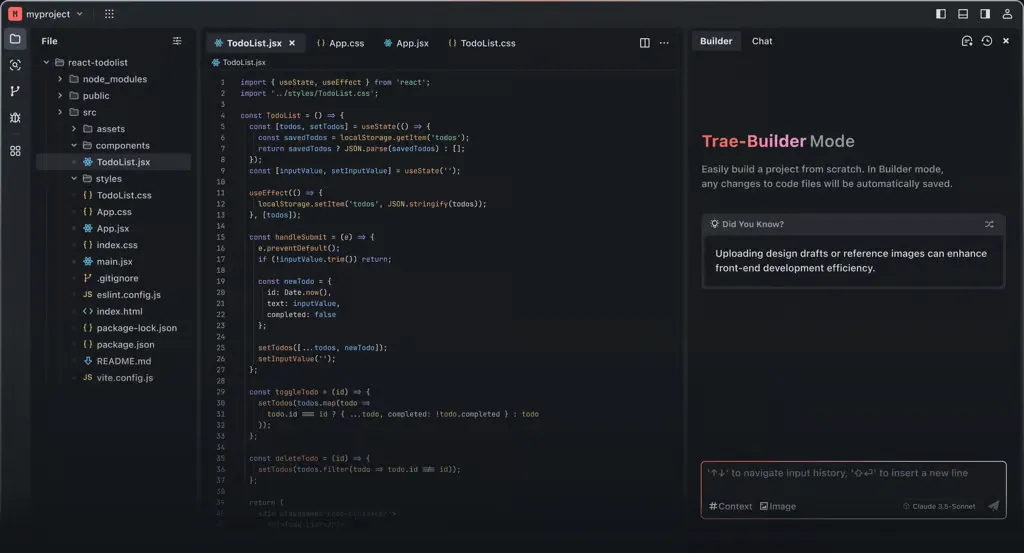
Builder Mode: Assists in building projects from scratch, quickly completing project setup through AI prompts.
Multimodal Support: Supports uploading images, and the AI will generate relevant code based on the image content.
Context Awareness: Able to analyze the context of the entire codebase, intelligently predict and complete code in real time.
Webview Feature: Supports previewing web pages directly within the IDE, convenient for front-end development and debugging.
Seamless Configuration Migration: Supports importing configurations from editors such as VS Code and Cursor, including plugins, settings, and keyboard shortcuts.
Real-time Code Suggestions: It can analyze the code I'm writing in real time and provide optimization suggestions in the editor, helping me improve code quality.
Code Snippet Generation: Just describe your needs in natural language, and Trae can generate the corresponding code snippets, and even automatically write project-level cross-file code, reducing a lot of repetitive work.
AI Q&A Assistant: While writing code, you can ask the AI assistant any questions at any time, such as explaining code, writing comments, or fixing errors, helping me quickly find solutions.
Project Development from 0 to 1: If I want to develop a new project but am unfamiliar with certain technologies, Trae can automatically generate code or create related files based on my needs, making development much easier.
How to Use Trae and Its Scenarios:
Installation and Startup
Visit the official website to download: Go to Trae's official website (trae.ai) to download the installer.
First-time Setup: Open Trae after installation. When launching for the first time, select the interface language as Chinese and pick your favorite theme.
Configuration Migration: If you previously used VSCode or Cursor, you can choose to migrate configurations to quickly adapt to the new environment.
Registration and Login
Use your email or social media account to complete registration and log in to Trae, so you can enjoy the free service of the built-in AI models.
Interaction and Feature Usage
Chat Mode:
Shortcut Operation: Use Cmd + u to quickly invoke the AI dialogue function.
Code Suggestions: Ask the AI questions or describe requirements, such as optimizing code or generating code snippets for specific features.
Builder Mode:
Rapid Project Generation: Just describe the project requirements, such as "generate an image compression tool", and Trae will automatically generate the code framework.
Interactive Development: During the generation process, Trae may ask about your preferences to ensure the project meets expectations.
Code Preview and Debugging:
Using the Webview feature, front-end developers can directly preview and debug web pages within the IDE, without frequently switching tools.
Context References:
When communicating with the AI, you can reference code, files, or the entire project to get more precise suggestions.
Notes:
Currently, Trae does not support directly reading external links for AI interaction. It is recommended to manually create a virtual environment in advance (such as Python's venv or Conda) to avoid environment variable issues.
For environment configuration, it is recommended to manually create a virtual environment to avoid potential environment issues.
Although it currently mainly supports the MacOS system, it may expand to other operating systems in the future.
Application Scenarios of Trae:
Rapid Prototyping: Use Trae to quickly create online store prototypes, automatically generating front-end and back-end code.
Team Collaboration and Cross-functional Development: Design teams upload design images through Trae, and the AI automatically generates HTML/CSS.
Programming Learning and Practice: Utilize Trae to automatically generate code, helping beginners learn programming easily.
Cross-language Development: Simultaneously manage and optimize JavaScript and Python code, improving full-stack development efficiency.
Code Debugging and Optimization: Automatically detect and optimize performance bottlenecks in code, quickly improving application performance.
Trae is an innovative product launched by ByteDance for the programming community. It uses AI technology to simplify the programming process. Its friendliness to Chinese users in particular makes it unique among similar products.
The emergence of Trae makes programming more accessible to the masses. Even without development experience, knowledge of code, or even English, you can personally build projects from scratch. As long as you have an idea, you can quickly and at zero cost bring your creativity to life.
Related Information:
ByteDance Trae Tutorial: IDE Setup Methods
14 Recommended AI Programming Assistants for Smart Code Writing and Generation!
ByteDance Trae Installation, Setup, and Usage Guide
Cursor Directory: Configuration Files and Cursor Prompt Library for Various Programming Languages












