
 Script Planner Assistant▸
 AI Apps
 AI News

SimplifyAI: An Online Document Translation Platform
SimplifyAI: An Online Document Translation PlatformIntroduction
Simplifyai is an online platform focused on simplifying complex technology and document translation. It leverages large language models to provide high-quality document translation services, supporting a wide range of mainstream file formats including PDF, DOCX, pptX, and EPUB. The goal of SimplifyAI is to ensure the accuracy and readability of translation results by preserving the original layout and formatting.
Key Features of SimplifyAI
Large Model Translation: Utilizes advanced large language models similar to GPT to deliver fluent translations that approach human-level quality, particularly excelling at handling complex contexts.
Real-Time Translation: The platform supports real-time translation, allowing users to view translation results instantly while editing documents, thereby improving work efficiency.
Layout Preservation: Translated documents maintain the same layout as the original, which is especially important for documents containing charts, formulas, or special formatting.
Multi-Language Support: SimplifyAI not only supports Chinese translation but also handles documents in multiple languages, meeting the needs of users worldwide.
Multi-Format Support: SimplifyAI supports a variety of file formats including PDF, DOCX, PPTX, XLSX, EPUB, and SRT.
Glossary Function: Users can create glossaries to ensure consistent use of specialized terminology in translations, enhancing translation professionalism.
SimplifyAI Application Scenarios
Academic Research: Researchers can use SimplifyAI to translate foreign-language literature, helping them better understand and cite relevant studies.
Business Documents: Enterprises can use the platform to translate contracts, reports, and other important documents, ensuring accurate communication of information.
Education Sector: Teachers and students can use SimplifyAI to translate textbooks and learning materials, facilitating cross-language learning.
SimplifyAI User Guide:
Register or Log In: Visit the official SimplifyAI website to register. Domestic users can register and log in using a mobile phone number or WeChat.
Select the Translation Function: Click the "Upload Document" button on the homepage. If you are not registered, please return to step one.
Upload Document: Click the "Select File" button to upload the document you wish to translate. Supported formats include PDF, DOCX, PPTX, XLSX, EPUB, and SRT.
Select the Target Language and the Source Language: After uploading the document, choose the target language you would like the document translated into.
Create Translation Task: After confirming the file and language settings, click the "Start Translation" button, and the system will begin processing your translation task.
View Translation Results: Once the translation is complete, you can view the results. The system typically provides a side-by-side comparison of the original and translated texts.
Download Translation: If you are satisfied with the translation results, you can choose to download the translated document.
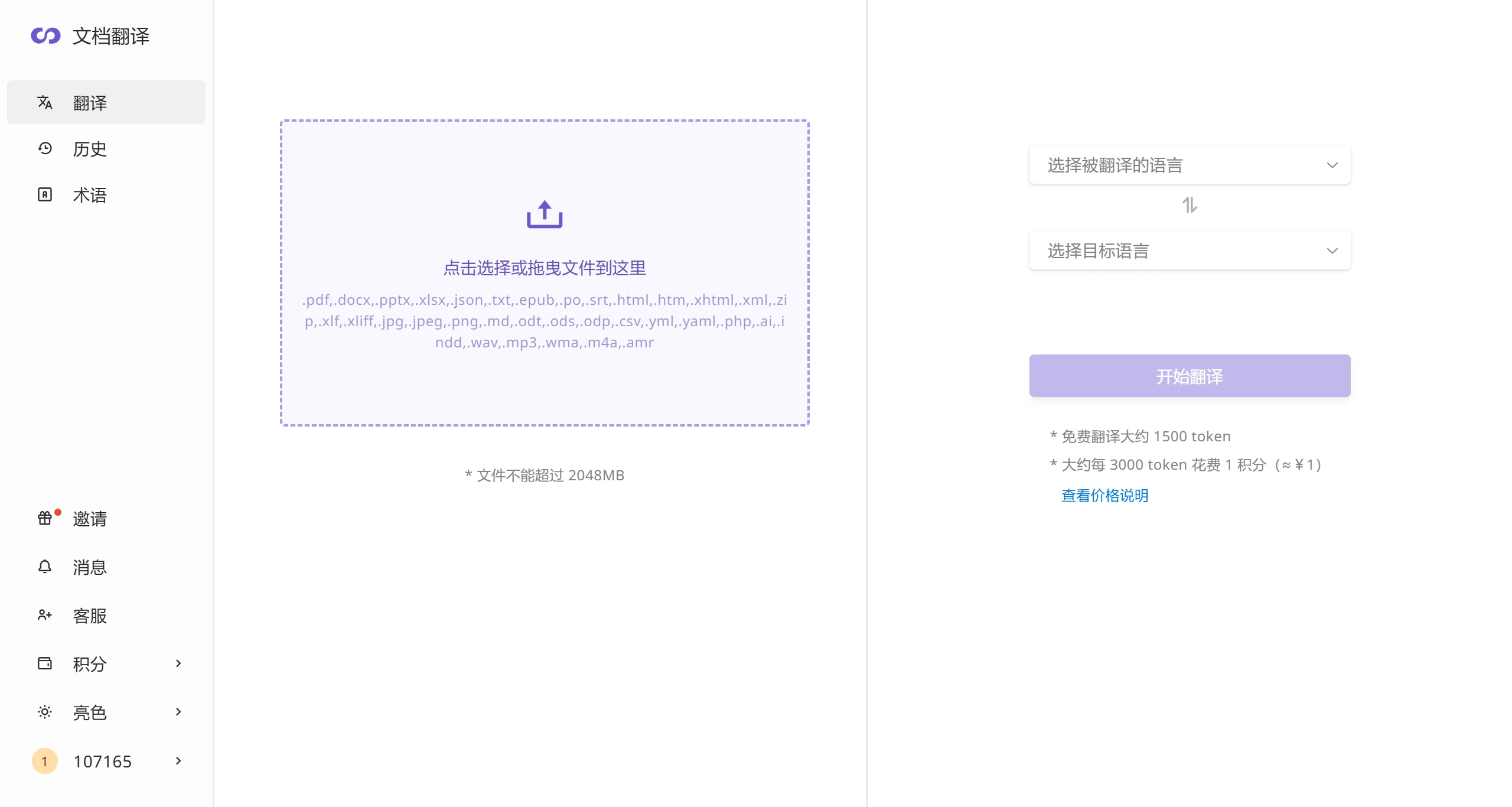
Each document has a free quota of 1,500 tokens.
Comparison with DeepL:
Format Preservation: SimplifyAI outperforms DeepL in maintaining the original layout of PDFs and other formats.
Context Understanding: SimplifyAI improves translation consistency and accuracy by integrating document context when sending requests to the large model.
Formulas and Illustrations: When handling documents containing formulas and complex illustrations, SimplifyAI delivers superior translation quality.
Related Information:















