
 Script Planner Assistant▸
 AI Apps
 AI News

MagicQuill: AI Image Editing Tool by Alipay & HKU
MagicQuill: AI Image Editing Tool by Alipay & HKUIntroduction
MagicQuill is an intelligent interactive image editing system jointly developed by Alipay and the University of Hong Kong. Through its intuitive interface and ai-driven features, MagicQuill enables fast and precise image modifications like adding or removing objects, changing colors, swapping backgrounds, and altering your outfit, among others.
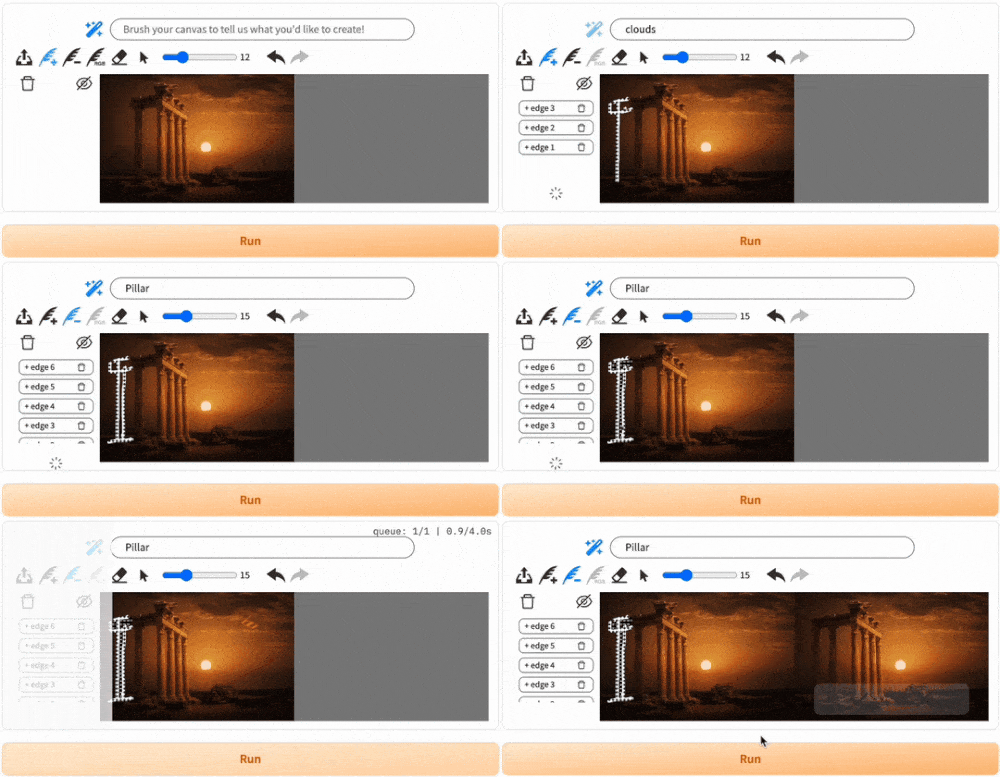
MagicQuill's Core Features:
AI Smart Suggestions: By analyzing the user's editing behavior and input prompts in real time, MagicQuill can predict editing intentions and provide intelligent editing suggestions, simplifying the editing workflow.
Precise Local Editing: Users can perform precise edits on specific parts of an image, with pixel-level editing accuracy. Whether adding new elements, erasing objects, or adjusting colors, the results look natural and realistic.
Three Magic Brushes:
Add Brush: Adds image details based on text instructions.
Subtract Brush: Removes or modifies parts of the image.
Color Brush: Applies color precisely and achieves color matching.
Multi-function Canvas Tools: Includes undo/redo, rotation, resize, and more, enhancing editing flexibility.
Parameter Adjustment: Users can customize editing parameters, such as selecting different base models, adjusting negative prompts, and edge control, to suit different editing needs.
Draw-and-Guess Feature: While the user is drawing, the system automatically guesses what the user wants to create and fills in the corresponding prompts, speeding up the creative process.
MagicQuill Use Cases:
Rapid character modification: Users can change a character's clothing or add accessories with simple strokes. For example, when a user wants to add a necklace to a character or change their hair color, they only need to draw an outline at the desired location, and the system will automatically complete those details.
Background processing: With the Subtract Brush, users can easily remove unwanted background elements. For example, when processing a photo, the user only needs to paint over the part to be removed, and the AI will intelligently recognize and process the background.
Creative illustration: Users can use the Add Brush to add details to illustrations, such as adding a scarf to a character or adding birds to the background.
Color filling: When users use the Color Brush to color an image, the AI automatically generates relevant prompts and completes the color fill. For example, when coloring a photo of Elon Musk, the system automatically recognizes and fills in colors such as "rock blue" and "brick red."
Education and teaching demonstration: MagicQuill is not only suitable for professional artistic creation but also for teaching demonstrations. Teachers can use the tool to demonstrate the basic principles and techniques of image editing, helping students better understand image processing technology.

How to Use MagicQuill:
1. Upload an Image:
Select and upload the image you need to edit, or use the built-in canvas to create one.
2. Select a Brush:
Choose the Add Brush, Subtract Brush, or Color Brush based on your needs.
Use the brush to draw on the canvas.
3. AI Generation:
MagicQuill generates corresponding image editing results based on the brush strokes and prompts.
Users can also modify the prompts to refine the results.
4. Parameter Adjustment:
Use advanced parameters to adjust the details of the generated result, such as edge strength and color range.
5. Save, Download, or Continue Editing:
Save and download once you are satisfied, or continue editing if not.
MagicQuill Project URL: https:// magicquill.art/demo/
MagicQuill GitHub:https:// github.com/magic-quill/magicquill
MagicQuill Online Experience:https:// huggingface.co/spaces/AI4Editing/MagicQuill https:// pic.x.com/029xwD5ZRb














