Script Planner Assistant▸
 AI Apps
 AI News

京点点:京东基于自研AIGC能力的内容创作平台_云技派,专注ai人工智能!
京点点:京东基于自研AIGC能力的内容创作平台_云技派,专注ai人工智能!Introduction
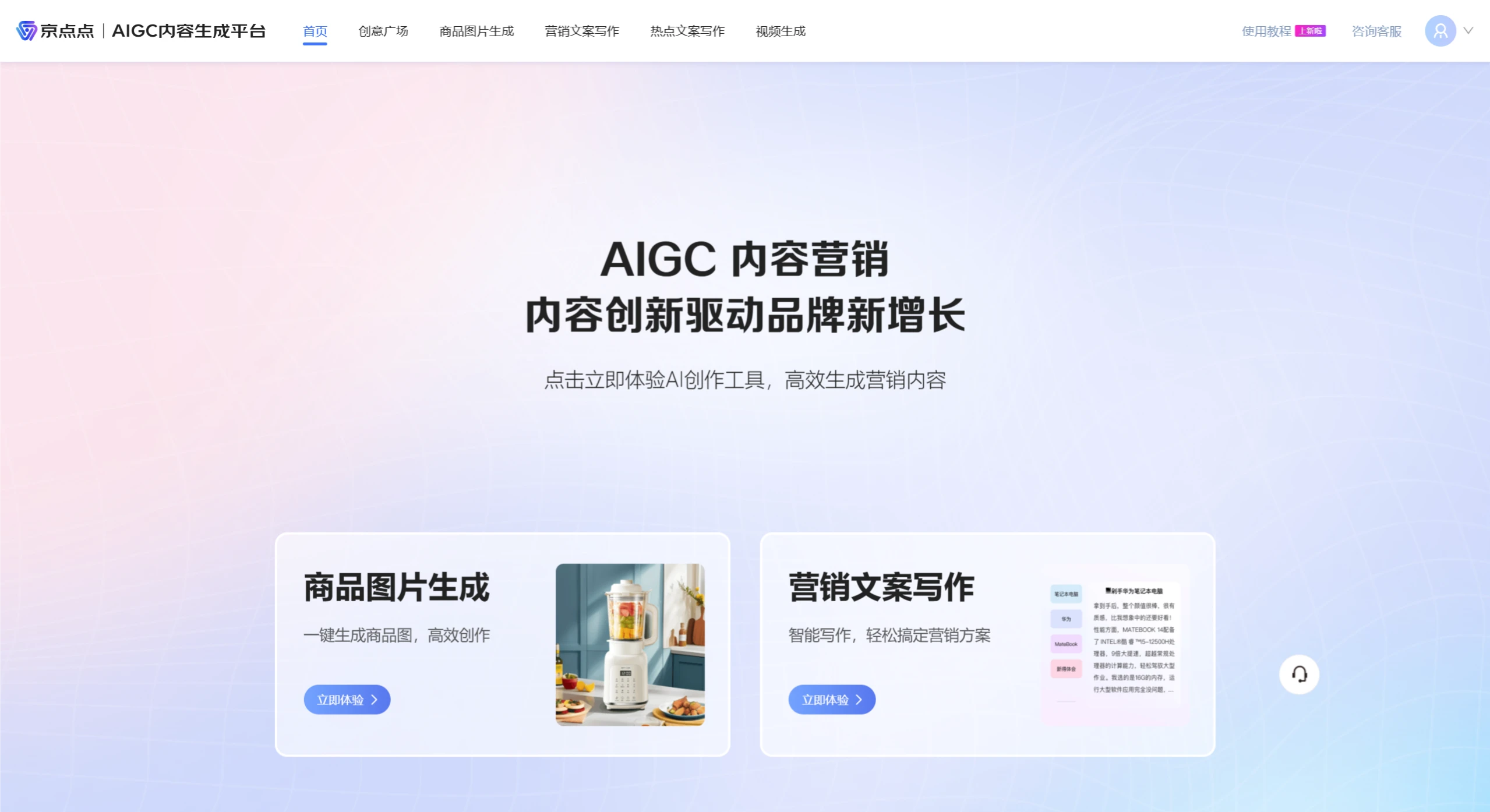
JingDianDian is JD's content creation platform built on its proprietary AIGC capabilities. JingDianDian offers features such as AI intelligent image cutout, AI product images, marketing posters, AI selling-point images, AI marketing copy/livestream scripts, and video generation, enabling the rapid AIGC creation of professional e-commerce images and marketing copy assets.
JingDianDian Official Website: ai.jd.com
Key Features of JingDianDian:
Product Image Generation: Generate product images with one click for efficient creation.
Marketing Copy Writing: Powered by JD's AIGC technology, effortlessly create marketing plans with one click based on the JD product SKU, brand, or keywords you input.
JingDianDian Applications:
E-commerce Imagery
Rich Scenarios: JingDianDian can generate scene images for product photos with one click, suitable for main product images, product detail images, slot images, and many other scenarios.
Efficient and High-Quality: In actual testing, merchants' product scene image production takes no more than 20 seconds, reducing costs by over 90%. It enhances the creative quality of merchants' product scenes, enabling every merchant to produce "eye-catching" scene images for consumers.
Advertising & Marketing
Rich Templates: JingDianDian comes with a vast library of built-in advertising and marketing templates, kept up-to-date with major promotions and seasonal trends.
Flexible and Easy to Use: You can edit the elements and text within the advertising and marketing templates online, and even upload custom elements. It's simple, user-friendly, and offers strong controllability.
Seeding & Promotion
Convenient and Easy to Use: JingDianDian can intelligently create seeding copy and livestream scripts with one click based on the product name or SKU number.
Rich and Effective Content: Based on product insights, the intelligently written copy hits exactly what consumers care about.
JingDianDian Platform Usage Tutorial
I. Activating Access. JingDianDian AIGC Content Generation Platform link: https://ai.jd.com/. It is recommended to use Google Chrome browser or JingMai browser.
JD employees log in: Bind your JD personal shopping account to your ERP and log in to start using it.
JD platform merchants can log in directly: Use your JD merchant store account to log in—no payment required, and it is available for both Self-operated and POP merchants. (VC accounts require an appointment and manual review by the customer service on the page's homepage.)
Product Scene Image Generation:
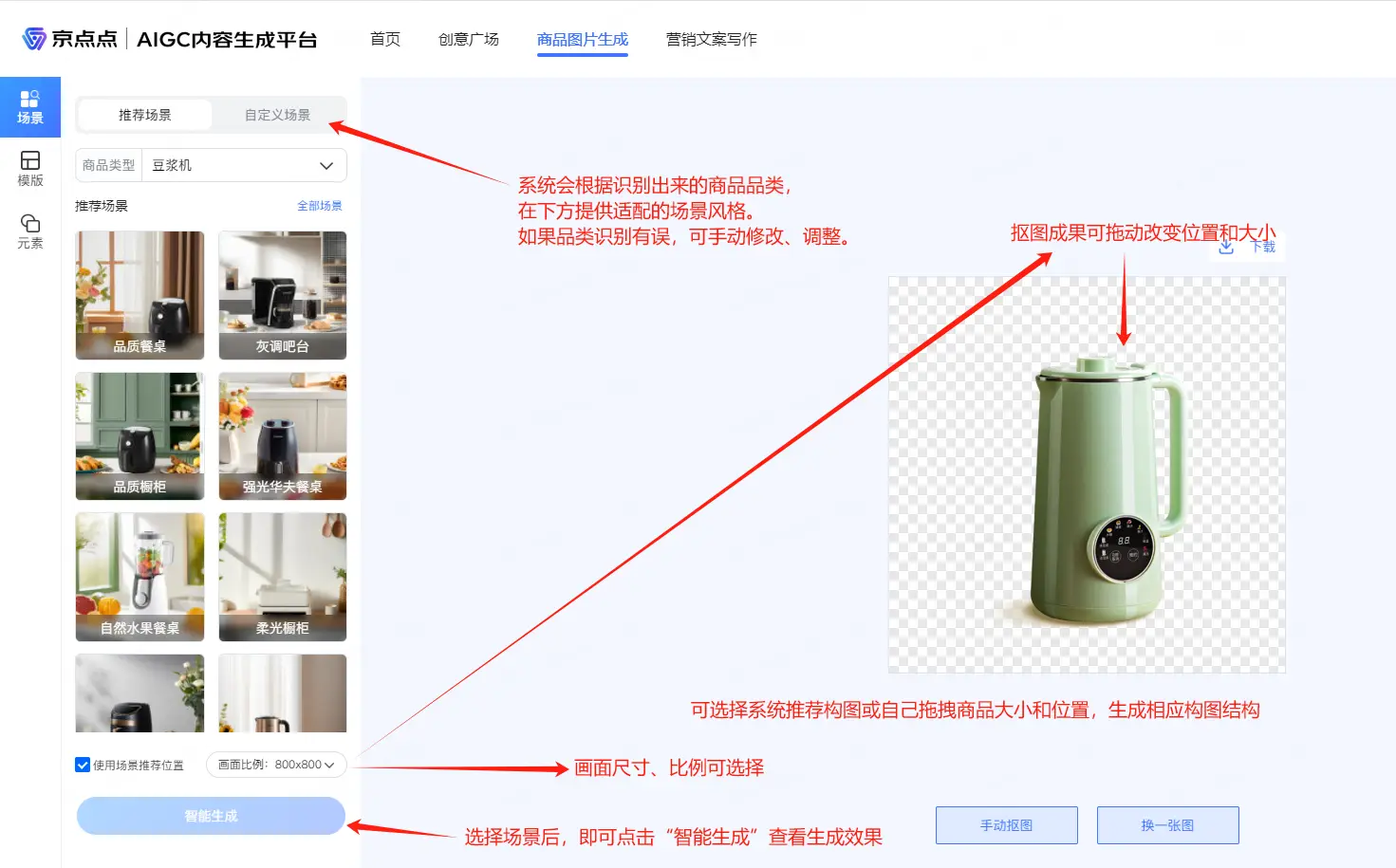
Upload a product image as shown in the figure. Click the "Upload Image" button to upload the product image for which you want to generate a scene effect (PNG format is not required—the system has a built-in cutout function).
After confirming the product cutout image is uploaded, JingDianDian automatically provides a default cutout effect. If you are not satisfied with the cutout, you can select "Manual Cutout" at the bottom of the page and follow the system prompts to choose the areas to keep and remove. (Once the cutout is complete, you can also click the "Download" button in the upper right corner to save it locally for other uses.)
After cutting out, click the [Download] button and choose to download the product white-background image. The dimensions of the generated white-background image match the product position and the canvas on the page.
Once the cutout and scene style selection are confirmed, you can choose the desired scene-matching effect from the function panel on the left side of JingDianDian.
After selecting the required scene effects, click "Generate Image" at the bottom of JingDianDian and wait a moment to view the composite result.
Copy Writing
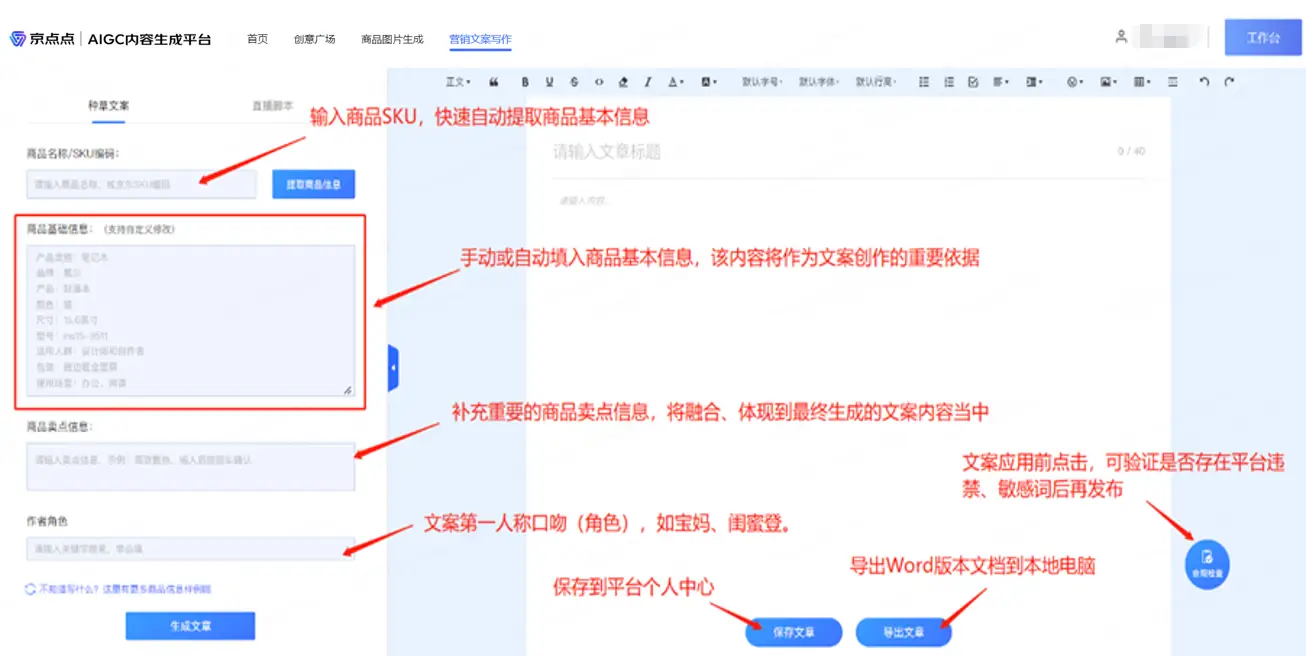
Enter product keywords in the information panel on the left side of JingDianDian. You can input the corresponding basic content as prompted, and click "Generate Copy" at the bottom to generate it.
Tips:
(1) The more complete and detailed the product name/SKU code, basic product information, and selling point information you fill in, the more accurate the copy generated by JingDianDian will be.
(2) Clicking "Generate Article" multiple times will produce entirely new content and automatically overwrite the previously generated content. If you are not satisfied with the result from one generation, try clicking a few more times to see different effects~
(3) The JingDianDian platform currently supports two types of writing styles (seeding copy and livestream script). You can switch between them at the top left of the page.
Editing or Modifying Content: After the content is generated, the page provides a built-in image-and-text editing function. You can directly edit, modify, or add necessary information based on the existing content according to your needs. Once confirmed, you can copy or move the entire text, or click Save Document/Export Document to obtain a Word version for subsequent content management.
Tips:
Saved documents can be viewed and accessed under "My Documents" on the homepage of the JingDianDian platform.
It saves you time on copywriting—simply make minor secondary edits and it's ready for commercial use~
Compliance Check: After copy generation is complete, you can click the floating "Compliance Check" window on the right side of the page to confirm. This ensures that the generated copy meets JD platform compliance requirements, avoiding situations where certain language habits or content get banned after publication.