
 Script Planner Assistant▸
 AI Apps
 AI News

Huichuang: An Online AI Photography Creation Platform
Huichuang: An Online AI Photography Creation PlatformIntroduction
绘创 (HuiChuang) is an online AI photography creation platform launched by Meitu. Through advanced AI technology, it simplifies the creation and editing workflow of images and videos. Its core features include AI portraits, AI themed photos, and AI style photo creation, enabling users to quickly generate uniquely styled photographic images through a one-stop service.
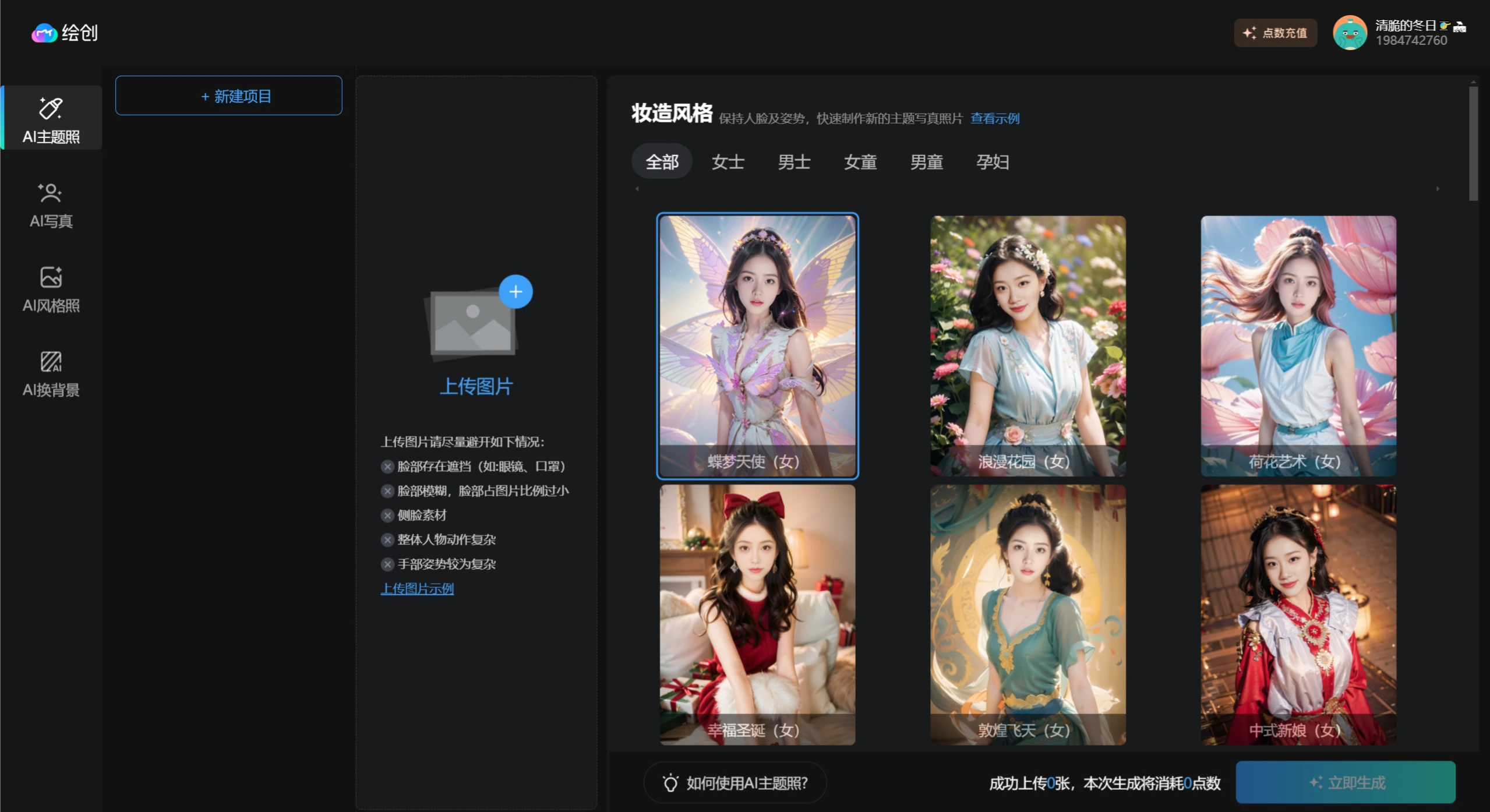
绘创 Features:
AI Background Replacement: Generates studio-style photo backgrounds, saving post-editing costs
AI Style Photos: Generates highly similar cartoon illustrations that can be used for avatars, character standees, invitation cards, hanging paintings, and more
AI Portraits: Generates highly similar realistic portrait photos, helping you save costs on makeup, styling, and scene setup
AI Themed Photos: Highly restores facial features and pose composition, delivering brand-new style AI themed portraits
Note: When uploading images, please try to avoid the following situations:
Face is obstructed (e.g., glasses, mask)
Face is blurry, or the face occupies too small a proportion of the image
Side-profile shots
Complex overall body poses
Complicated hand gestures
How to Use the 绘创 Photography Creation Platform:
Create a New Project: After creating a new project, users first upload their own photos, which can be selfies, portraits, or other images they want to edit.
Select a Style: The platform may offer a variety of preset style options, such as makeup styles, portrait sets, etc. Users can choose based on personal preferences, such as professional photos, trending styles, daily looks, ancient styles, festive themes, fantasy, and more.
AI Processing: After uploading, 绘创's AI algorithm automatically analyzes the photo, applies the selected style or beautification effects, and performs intelligent optimization and adjustments. With just a few seconds of waiting, you can quickly obtain portrait photos that look like you in a wide variety of styles.
Preview and Confirm: Before the final generation, users can preview the effect and confirm once satisfied.
Download or Share: After completing the edit, users can directly download the finished product and then share it to social platforms such as WeChat Moments or Xiaohongshu.
AI Themed Photo Creation Guide:
1. First, open the 绘创 website, log in, and click to enter [AI Themed Photo]
2. In the [Upload Photo Area], drag or select a local file to upload. Click the desired themed style on the right side. We'll use [Lotus Art (Female)] as an example. After selecting, click [Create Now].
Typically, generating one themed photo takes about 1 minute. Batch creation time will increase accordingly. You can minimize the page and wait briefly.
After the image generation is complete, please download and save it for the final processing step—
3. Open Photoshop, import the generated photo and the user's original photo, placing the original photo below the generated image. Create a mask on the generated image layer, use a brush to make simple strokes, then adjust the layer colors. A perfect AI photography photo is complete.
绘创 Recharge Pricing:
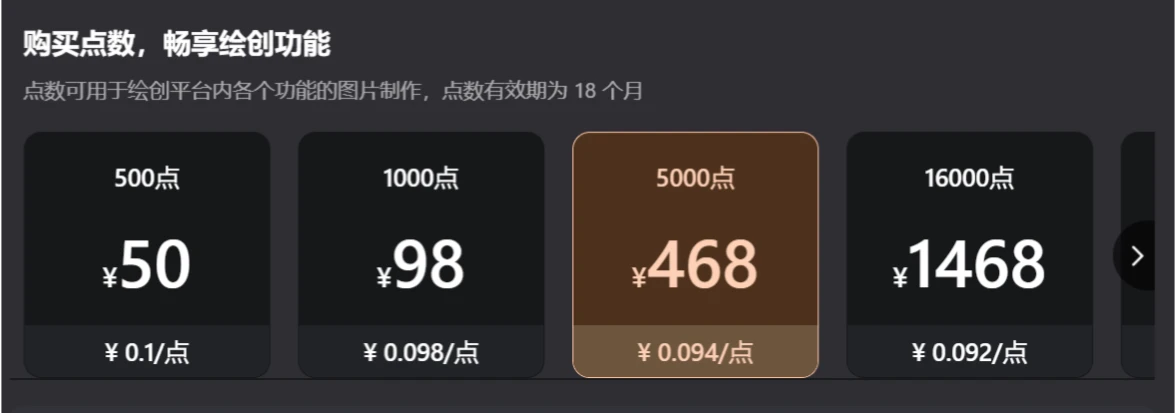
¥50: 500 points
¥98: 1000 points
¥468: 5000 points
¥1468: 16000 points















