
 Script Planner Assistant▸
 AI Apps
 AI News

Aperture Live: SaaS-Based Live Streaming Assistant
Aperture Live: SaaS-Based Live Streaming AssistantIntroduction
Guangquan Zhibo is an intelligent central control tool designed specifically for live streaming platforms such as Douyin, helping merchants and individual streamers improve their live streaming operations efficiency. It provides features such as automatic product pop-ups, automatic comment posting, automatic comment pinning, and automatic inventory replenishment, and supports one-click price and inventory adjustment from the central console.
In addition, Guangquan Zhibo also offers live room order data analysis features, helping merchants manage their live streaming business more professionally. Through the SaaS model, Guangquan Zhibo makes it easier for merchants to achieve scalable operations.
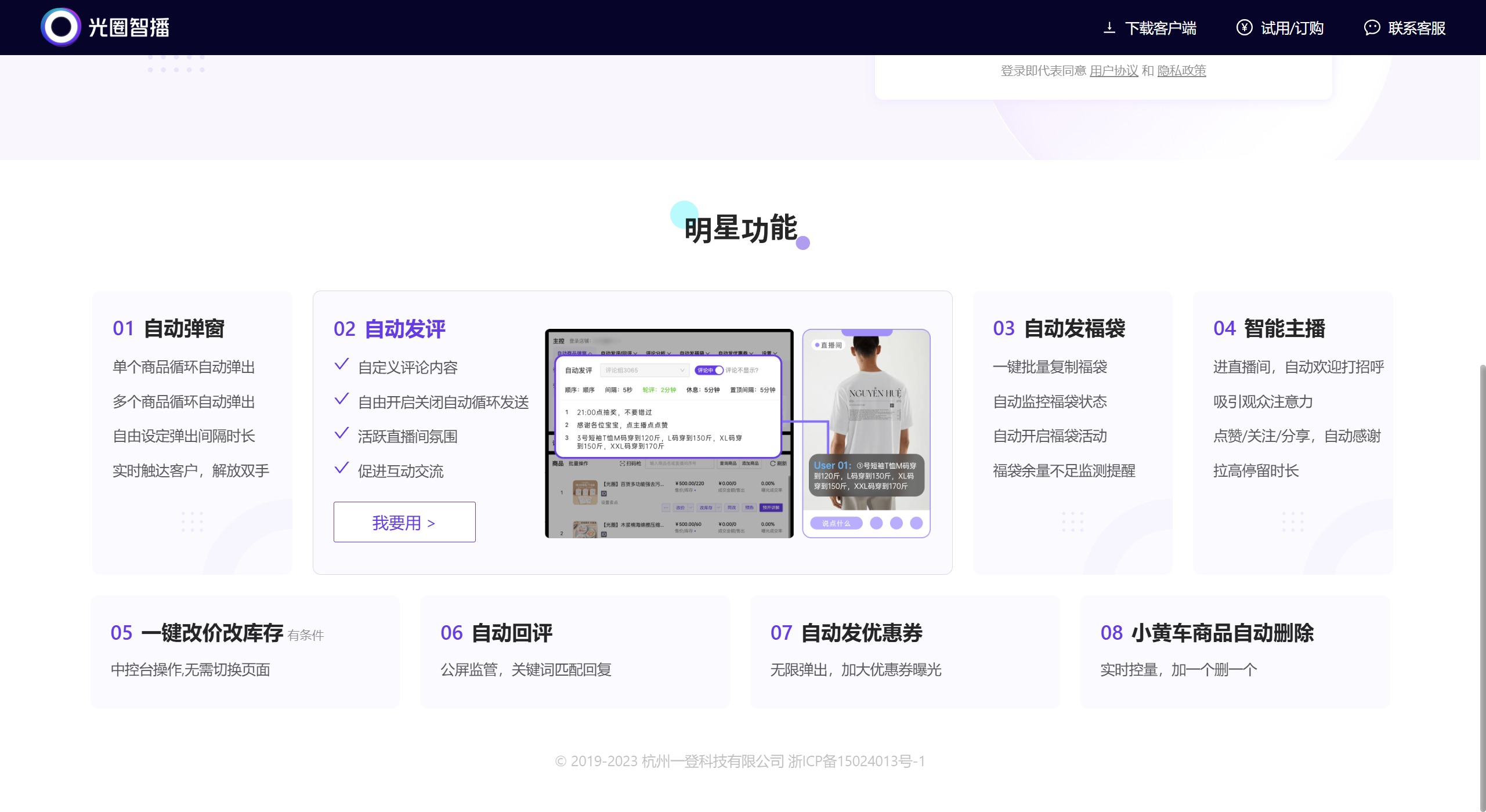
Main features of Guangquan Zhibo:
Automatic product pop-ups: In Douyin live rooms, Guangquan Zhibo enables automatic looping product pop-up displays, increasing product exposure and boosting viewers' purchase interest and conversion rates.
Automatic comment posting and comment management:
Automatic comment posting: Automatically sends guiding or notification comments in the comment section, such as answering frequently asked questions from fans, product pricing notifications, etc., creating an active live streaming atmosphere.
Automatic comment pinning: Pins important information to the top to ensure key messages do not get buried.
Automatic comment replies: Pre-set reply templates automatically answer audience questions, improving interaction efficiency.
Lucky bag management: Batch copy lucky bags and automatically distribute them, achieving continuous and automated lucky bag distribution, enhancing audience engagement and retention.
Central console price and inventory adjustment: Directly modify product prices and inventory in the live streaming central console, simplifying the operation process and avoiding inconvenience and errors caused by page switching.
Inventory alert and management: Provides inventory alert functions, helping merchants stay informed of inventory status and avoid stockouts or excess inventory.
Coupon distribution: Supports automatic distribution of store coupons and streamer coupons. By setting the number of coupon pop-ups and intervals, it enhances the attractiveness of live streaming promotional activities.
Real-time order status monitoring: Provides real-time monitoring of order status, helping merchants handle orders promptly and improving customer satisfaction.
Use cases for Guangquan Zhibo:
Guangquan Zhibo is widely used in the e-commerce live streaming field, covering scenarios such as product showcasing, promotional activities, and brand promotion. It is particularly suitable for live selling scenarios on e-commerce platforms such as Taobao, JD.com, and Douyin.
Install the Guangquan Zhibo client
Download the installation package: Visit the Guangquan Zhibo official website or contact the official team to obtain the installation package suitable for Windows or macOS.
Using Guangquan Zhibo:
Install the client:
Windows installation process: Double-click the installation package, click "More info" — select "Run anyway," follow the instructions to click "Next" until the installation is complete, then click "Finish." Find the [Guangquan Zhibo] icon on the desktop and double-click it to start using it.
macOS installation process: Double-click the installation package, and as indicated by the arrow, drag [Guangquan Zhibo] from the left side to the folder on the right. Wait about 30 seconds and you can find [Guangquan Zhibo] in the Applications folder. If it shows that [Guangquan Zhibo] cannot be opened, please open [System Preferences] - [Security & Privacy] - and select to allow downloads from [App Store and identified developers].
Log in to the Guangquan Zhibo backend
Open the Guangquan Zhibo client, click the first tab, and select an appropriate method to log in to Guangquan Zhibo.
You can log in using phone number verification code, account password, or Douyin Store login
Overall, as a comprehensive and easy-to-use e-commerce live streaming tool, Guangquan Zhibo is especially suitable for merchants who wish to stream across multiple platforms.















