
 Script Planner Assistant▸
 AI Apps
 AI News

VideoDoodles: Insert Hand-Drawn Animations Into Videos
VideoDoodles: Insert Hand-Drawn Animations Into VideosIntroduction
VideoDoodles is an AI tool that easily inserts hand-drawn animations into videos and seamlessly blends them with the video content, combining video content and hand-drawn animations to create unique video clips. With VideoDoodles, you can add hand-drawn doodle animations to your videos—for example, you can draw a funny little character or other hand-drawn elements and insert them into the video to make it more engaging. These animations can not only follow the movement of objects in the video, but also automatically adjust their size and angle.
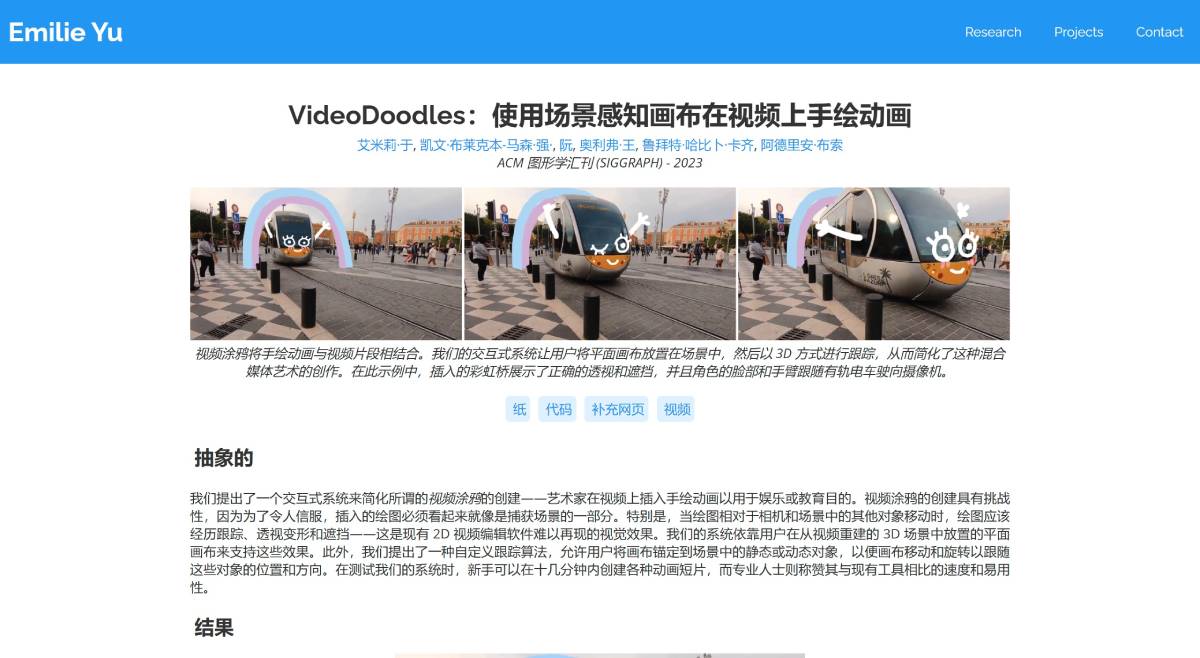
The main challenge of VideoDoodles lies in ensuring that hand-drawn animations can be perfectly integrated into the captured scene, with appropriate tracking, perspective deformation, and occlusion as they move relative to the camera and other objects in the scene.
VideoDoodles introduces a novel UI and tracking algorithm to unlock new version capabilities for videos enhanced with depth and motion data (obtained through existing computer vision methods). Based on user intent expressed through any number of position and orientation keyframes, VideoDoodles' algorithm can render scene-aware canvases at any frame of the video with correct occlusion and perspective transformations, and make the canvas follow moving objects. This allows inserted drawings to blend naturally into the video scene, achieving complex visual effects such as tracking, perspective deformation, and occlusion.
Main Features of VideoDoodles:
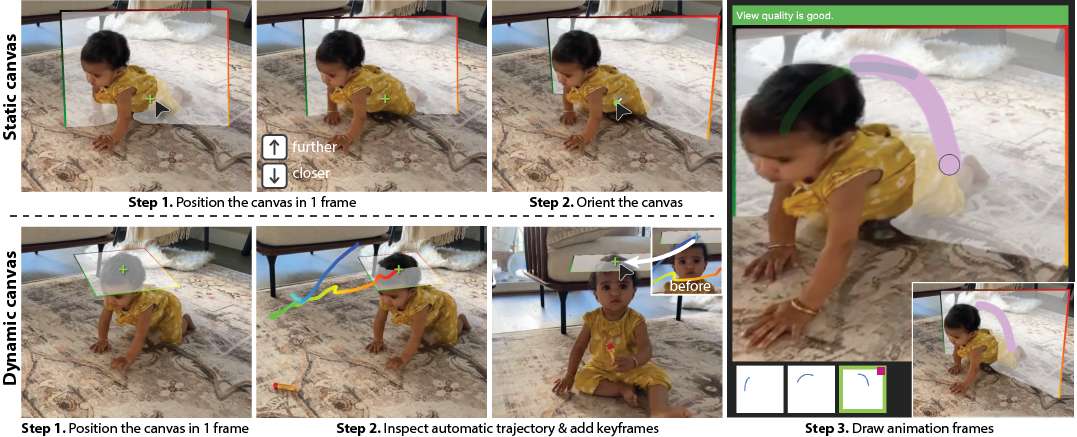
Scene-aware Canvas: VideoDoodles allows users to place a flat canvas within a 3D scene reconstructed from the video. These canvases are tracked in 3D, and hand-drawn animations maintain correct perspective and occlusion as they move relative to the camera and other objects in the scene.
Custom Tracking Algorithm: VideoDoodles can anchor the canvas to static or dynamic objects in the video. This ensures that the canvas moves and rotates to follow the position and orientation of these objects, making the animations appear as part of the captured scene.
Easy-to-use User Interface: VideoDoodles provides a 2D image space UI where users can control the position and orientation of the canvas through keyframes. The system inserts these keyframes by tracking the motion of moving objects in video 1.
Depth and Motion Data Integration: VideoDoodles leverages depth and motion data obtained through existing computer vision methods to enhance the realism of animations. This integration allows accurate rendering of scene-aware canvases with correct occlusion and perspective transformations.
Applications of VideoDoodles:
Entertainment: Create visually appealing video content by adding animated elements that interact with real-world footage.
Education: Enhance educational videos with illustrative animations, helping to explain complex concepts more effectively.
Enhanced Storytelling: VideoDoodles can be used to add whimsical or illustrative elements to live-action footage, thereby enhancing the narrative and visual appeal.
Creative Advertising: Brands can use VideoDoodles to create unique ads that are more engaging by combining real-world footage with animated elements.
VideoDoodles enables the seamless integration of hand-drawn animations with video content clips, making it easy to generate unique, fun, and interactive video visual content, thereby enhancing the user experience in storytelling, education, marketing, and social media content creation.














