
 Script Planner Assistant▸
 AI Apps
 AI News
Deep Live Cam
Deep Live CamIntroduction
Deep Live Cam is an open-source real-time face swap and one-click videoface replacement tool. It can perform face replacement on videos or other images using a single image, making it suitable for various scenarios such as video production and animation creation. Deep Live Cam is ideal for video production and creative projects, enabling users to seamlessly swap faces in videos or images.
Deep Live Cam download address:https://github.com/hacksider/Deep-Live-Cam
Main features and functions of Deep Live Cam:
Real-time face swap: This tool allows users to perform real-time face swaps using a single image, providing instant preview functionality. This feature is particularly useful for video production and animation projects.
One-click video Deepfakes: Users can quickly and easily generate high-quality Deepfake videos with simple operations. This makes it accessible even for those who may not have extensive technical knowledge.
Multi-platform support: Deep Live Cam supports various execution platforms, including CPU, NVIDIA CUDA, Apple Silicon (CoreML), DirectML (Windows), and OpenVINO (Intel). This flexibility allows it to adapt to different hardware setups, optimizing performance based on the user's configuration.
Community and support: Deep Live Cam benefits from an active community that provides ongoing support and improvements, keeping the tool at the forefront of technology.
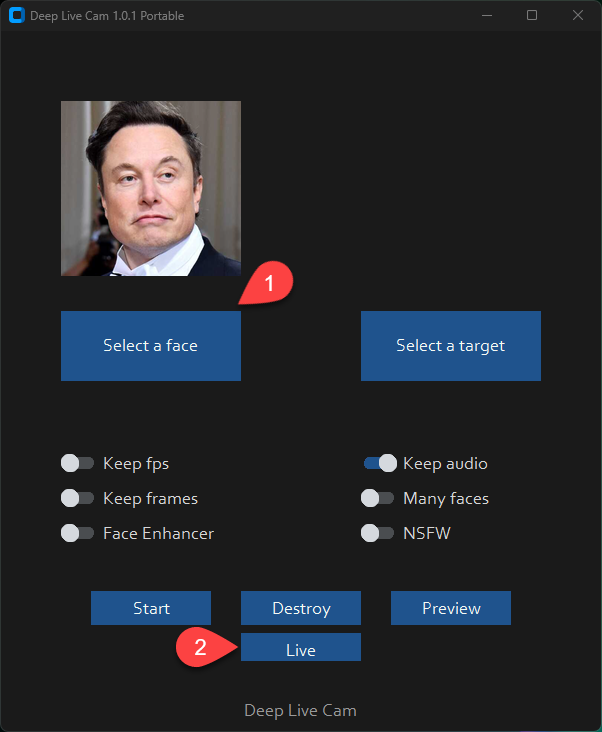
Webcam mode: Deep Live Cam supports real-time video stream processing using a webcam. Simply follow the click operations in the screenshot:
1. Select a face
2. Click Live
3. Wait a few seconds (it takes a relatively long time, usually 10 to 30 seconds to display the preview)
This feature is very useful for live streaming or virtual meetings.
How does Deep Live Cam work?
1. Select a source image: Upload an image containing the desired face as the source image.
2. Select a target: Choose the target image or video for face replacement.
3. Start processing: Click the 'Start' button, and Deep Live Cam will automatically perform face replacement.
Deep Live Cam FAQ
What is Deep Live Cam?
Deep Live Cam is an open-source real-time face swap and one-click video deepfake tool. It can perform face replacement on videos or other images using a single image, making it suitable for various scenarios such as video production and animation creation.
What are the main features of Deep Live Cam?
The main features of Deep Live Cam include: 1) Real-time face swap; 2) One-click video deepfakes; 3) Multi-platform support; 4) Anti-misuse measures.
How to use Deep Live Cam?
The basic steps to use Deep Live Cam are: 1) Install the required environment; 2) Clone the GitHub repository; 3) Download the required models; 4) Install dependencies; 5) Run the program; 6) Select a source image and target; 7) Start face replacement processing.
What platforms does Deep Live Cam support?
Deep Live Cam supports multiple execution platforms, including CPU, NVIDIA CUDA, Apple Silicon (CoreML), DirectML (Windows), OpenVINO (Intel), and more. Users can choose the optimal execution platform based on their hardware configuration.
How does Deep Live Cam ensure it is not misused?
Deep Live Cam has built-in checks to prevent processing inappropriate content (such as nudity, violence, sensitive material, etc.). The developers are committed to the continued development of the project within legal and ethical frameworks, and will take measures when necessary (such as adding watermarks to outputs) to prevent misuse.
Is Deep Live Cam free?
Yes, Deep Live Cam is an open-source project and completely free to use. You can obtain the source code on GitHub and use it freely.
Can I use Deep Live Cam for commercial purposes?
Deep Live Cam is an open-source project, but for commercial use, you need to carefully read the project's license terms. Additionally, using deepfake technology may involve legal and ethical issues, so it is recommended to consult legal professionals before commercial application.
What are the hardware requirements for Deep Live Cam?
The performance of Deep Live Cam varies with hardware configuration. Basic functions can run on a regular CPU, but for better performance and results, it is recommended to use devices with CUDA-supporting NVIDIA graphics cards or Apple Silicon chips.
Does Deep Live Cam support real-time video stream processing?
Yes, Deep Live Cam supports real-time video stream processing. You can use a webcam for real-time face swapping, and the program provides a real-time preview function.
How to improve the face swap results of Deep Live Cam?
To improve face swap results, you can try the following methods: 1) Use high-quality, clear source images; 2) Choose source images and targets with similar angles and lighting; 3) Adjust the program's parameter settings; 4) Use more powerful hardware to run the program.














