
 Script Planner Assistant▸
 AI Apps
 AI News

Teable: No-Code Database Application Builder
Teable: No-Code Database Application BuilderIntroduction
Teable is an ultra-fast, real-time, professional, developer-friendly no-code database built on Postgres. It is an Airtable alternative that allows you to create complex enterprise-grade database applications by operating like a spreadsheet, without writing any code.
Teable uses a simple, spreadsheet-like interface to create complex enterprise-grade database applications. Achieve efficient application development through no-code, breaking free from the barriers of data security and scalability.
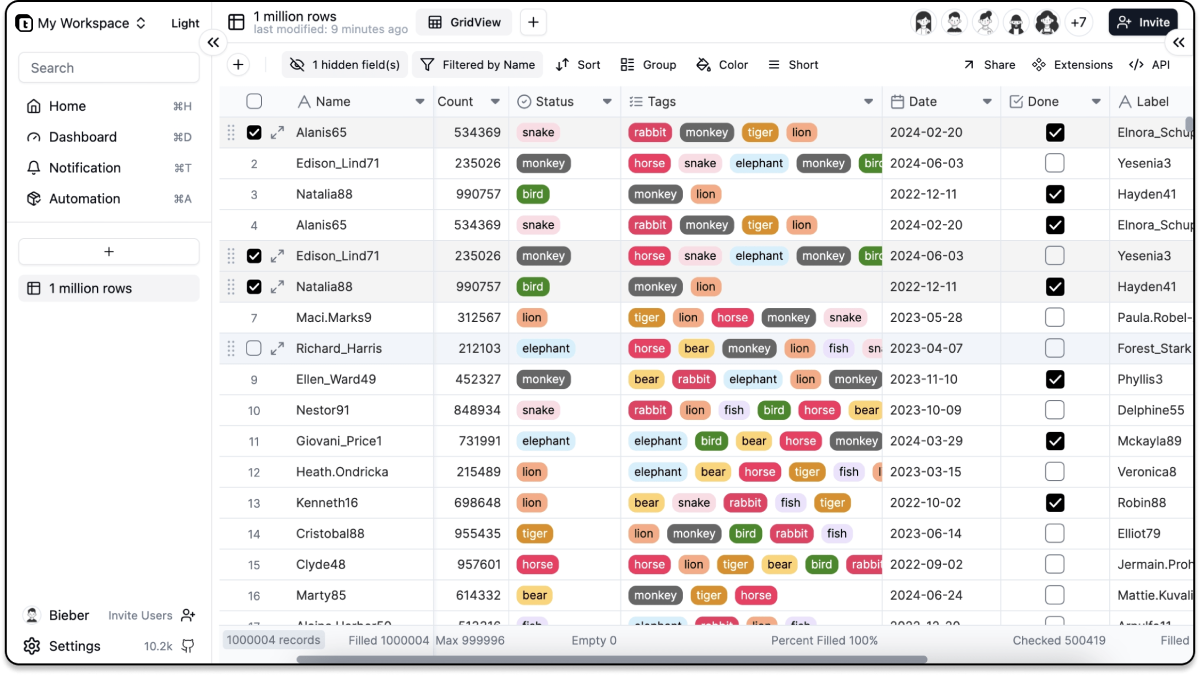
Teable Features:
Intuitive interface: Provides a spreadsheet-like interface for convenient data entry, editing, sorting, filtering, summarization, and more
Diverse views: Supports Grid view, Form view, Kanban view, Calendar view, and more
Performance: Based on the PostgreSQL database, it can handle massive amounts of data and provides automatic indexing to ensure speed
Supports SQL statements and can seamlessly integrate with other tools
Supports self-hosted databases, giving you full control over your data
Supports real-time collaboration, making it easy for team members to edit and manage data together
Supports extensions and automation
Integrated AI capabilities to quickly create applications, analyze data, create views, perform operations, and more
Supports multiple databases including SQLite, PostgreSQL, MySQL, MariaDB, TiDB, and more
Spreadsheet-like Interface
Cell editing: Click directly to edit the content within a cell.
Formula support: Enter mathematical and logical formulas to automatically calculate values.
Data sorting and filtering: Sort data based on one or more columns; use filters to view specific data rows.
Aggregation functions: Automatically summarize statistical data for each column, providing instant computations such as sum, average, count, maximum, and minimum to simplify data analysis.
Data formatting: Format numbers, dates, and more.
Grouping: Organize rows into collapsible groups based on column values for easier data analysis and navigation.
Freeze columns: Freeze the left columns of the table so they remain visible when scrolling.
Import/export functionality: Import and export data in other formats, such as .csv and .xlsx.
Row styling and conditional formatting: Automatically change row styles based on specific conditions. (Coming soon)
Charts and visualization tools: Create charts from table data, such as bar charts, pie charts, line charts, and more. (Coming soon)
Data validation: Restrict or validate the data entered into cells. (Coming soon)
Undo/Redo: Undo or redo recent changes. (Coming soon)
Comments and annotations: Attach comments to rows to provide explanations or feedback for other users. (Coming soon)
Multiple Views
Visualize and interact with data in various ways that best suit their specific tasks.
Grid view: The default view of a table, displaying data in a spreadsheet-like format.
Form view: Enter data in a form format, which is useful for collecting data.
Kanban view: Display data in a Kanban board, which is a visual representation of data in columns and cards.
Calendar view: Display data in a calendar format, which is useful for tracking dates and events. (Coming soon)
Gallery view: Display data in a gallery format, which is useful for displaying images and other media. (Coming soon)
Gantt view: Display data in a Gantt chart, which is useful for tracking project progress. (Coming soon)
Timeline view: Display data in a timeline format, which is useful for tracking events over a period of time. (Coming soon)
Ultra-fast
Amazing response speed and data capacity
Easily handle millions of data entries, with no stress on filtering or sorting
Automatic database indexing for maximum speed
Supports one-time batch data operations
Full-featured SQL Support
Seamlessly integrates with the software you're familiar with
BI tools like Metabase, Power BI, and more...
No-code tools like Appsmith...
Use native SQL to directly retrieve data
Privacy First
Despite the cloud, you own your own data
Bring your own database (Coming soon)
Real-time Collaboration
Designed for teams
No need to refresh the page; data updates in real time
Seamlessly integrated member invitation and management for collaboration
Comprehensive permission management mechanism, from table to column level
...
In essence, Teable is not just another no-code solution; it is a comprehensive answer to the evolving needs of modern software development, ensuring that everyone, regardless of their technical proficiency, has a platform that fits their requirements.














