
 Script Planner Assistant▸
 AI Apps
 AI News

Magic Studio
Magic StudioIntroduction
Canva has officially launched Magic Studio, which brings together Canva's best AI features to help you complete the entire process from your first brainstorming session to the final product with unprecedented ease, speed, and creativity. All the AI productivity tools you need to enhance quality and efficiency are now in one place.
Advantages of Magic Studio:
AI tools at your fingertips: No need to constantly switch between multiple software applications. Use AI tools directly within Canva to make your design process smoother, more efficient, and more creative. Magic Studio includes a wide range of artificial intelligence tools to give your every creative process a divine boost.
Kickstart your creative process: No matter what you need, Magic Studio can help you quickly create a first draft. Use Magic Write to generate copy, and use Magic Eraser to remove unwanted elements. Use Text to Image to generate eye-catching images.
Boost productivity: Use Canva's templates as the basis for your layout, pair them with the AI tools in Magic Studio, explore new ideas, generate unique images, save time on design conception, and significantly increase your content productivity.

Features of Magic Studio:
Magic Write
With Magic Write, you can instantly generate everything from advertising copy and product descriptions to article drafts. In addition, it can help you quickly rewrite sentences or paragraphs, as well as summarize or expand text content.
Magic Media Generator
The Magic Media Generator can turn your ideas into images in different styles, such as ink wash, watercolor, illustration, and photography, based on text descriptions. Simply describe your vision, and the Magic Media Generator will quickly generate image assets suitable for your design projects, accelerating the creative process.
Magic Switch
Quickly convert content formats, sizes, and languages. Transform your designs into different types of copy and content, adjust design dimensions for publishing across multiple platforms, or automatically translate copy without switching pages.
Easy Image Editing
Smart Grab: Separate the subject of an image from its background, resize it, reposition it, or add a new background.
Magic Effects: Overlay any texture and pattern effects you want onto text and shapes to unify the theme and atmosphere of your design.
Magic Animate: Intelligently generate animation and transition options that perfectly fit your design, making your designs more vivid.
Background Removal: With a single click, Magic Studio can remove the background from images and videos.
Magic Eraser: Erase unwanted elements from your images to make the main subject stand out more and keep the background cleaner.
Magic Studio Pricing
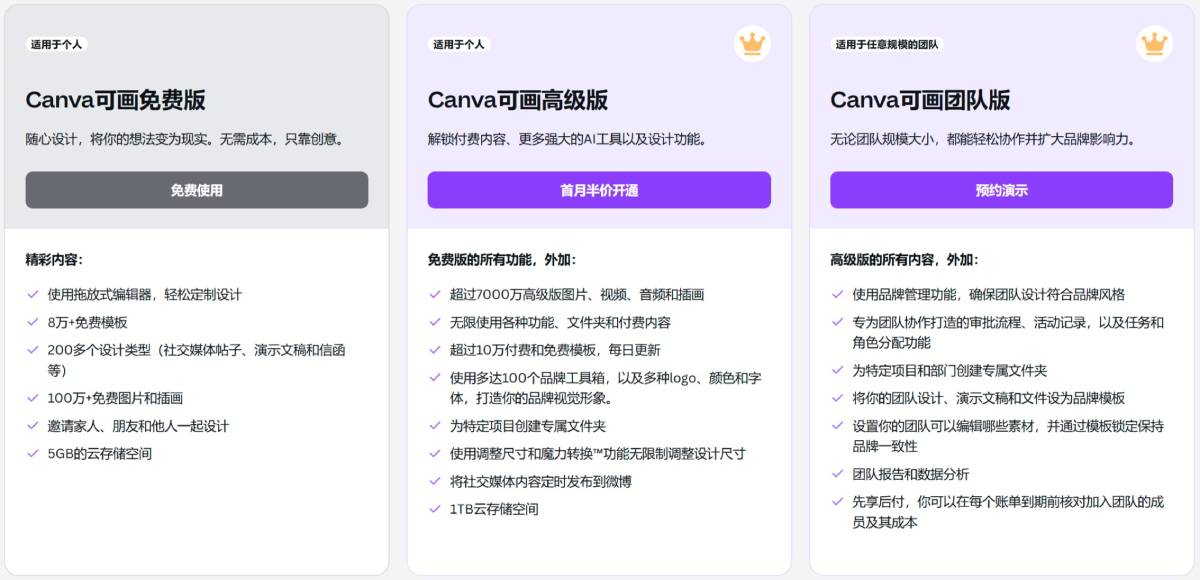
Some features of Magic Studio are free. Taking Magic Write as an example, free users can use it up to 50 times for life. Upgrade to Canva Pro or Canva Teams to get up to 500 uses of Magic Write per person per month. You can check our pricing plans and Magic Studio feature usage instructions here.
Magic Studio brings together Canva's best AI features to help you complete the entire process from your first brainstorming session to the final product with unprecedented ease, speed, and creativity. Magic Studio allows you to use AI tools directly within Canva without constantly switching between multiple software applications, making your design process smoother, more efficient, and more creative. Magic Studio includes a wide range of artificial intelligence tools to give your every creative process a divine boost.














