
 Script Planner Assistant▸
 AI Apps
 AI News
Cody Former: Face Restoration & Mosaic Removal
Cody Former: Face Restoration & Mosaic RemovalIntroduction
CodeFormer is an advanced AI image processing tool, Cody Former focuses on face restoration, image clarity enhancement, and video mosaic removal and restoration.
CodeFormer leverages advanced AI technologies, including Transformer-based architecture and attention mechanisms, to effectively analyze and process images, restoring them to a pristine state, enhancing colors, recovering facial details, and reducing noise in photos.
CodeFormer is particularly suitable for restoring old photos, allowing precious memories to be vividly再现. As an open-source project, CodeFormer's source code and related documentation can be found on GitHub. It supports accelerated processing via GPU or CPU, but using GPU requires ensuring that the system configuration meets the requirements of CUDA and cuDNN. For non-technical users, it also provides a graphical interface one-click installation version, simplifying the installation and usage process. In addition, CodeFormer is widely regarded as very powerful in terms of processing effects, capable of mosaic removal, image quality enhancement, and even outstanding performance in the field of video restoration.
CodeFormer project address:https://shangchenzhou.com/projects/CodeFormer/
CodeFormer download address:https://github.com/sczhou/CodeFormer
CodeFormer main features:
1. Image Restoration and Enhancement
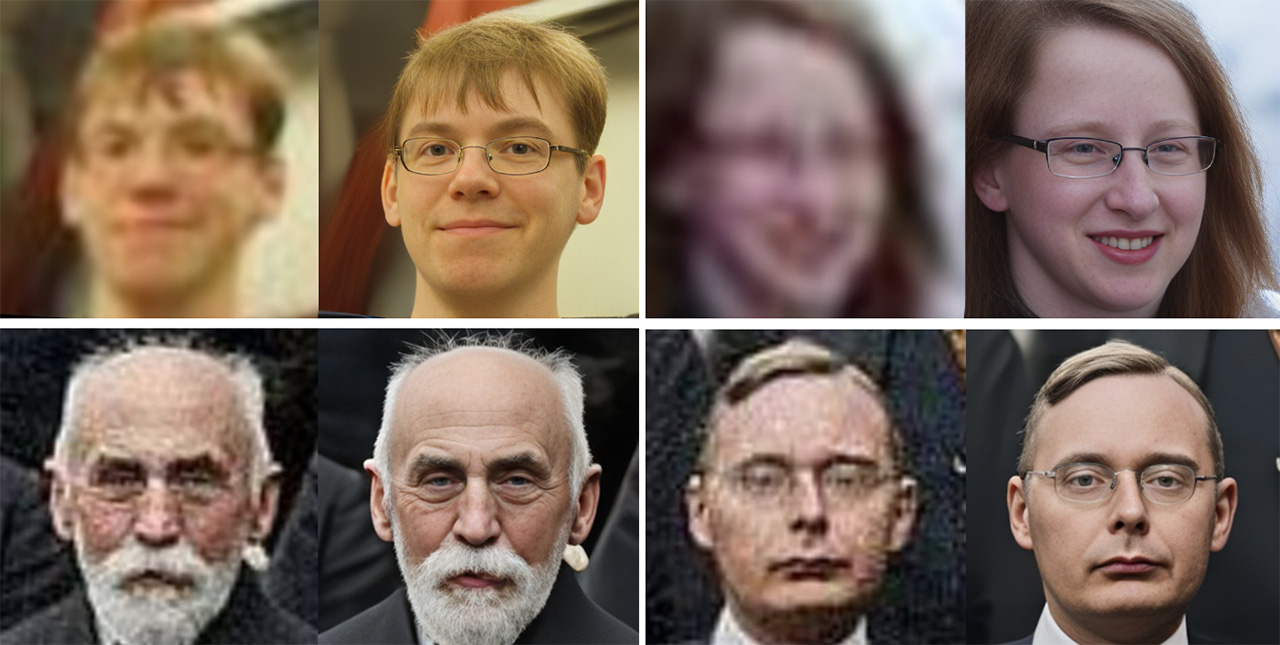
Face Restoration: Particularly adept at handling low-quality, blurry, or damaged facial images, removing noise and mosaics from images, repairing scratches or blurry areas, restoring details, and making facial images approach original clarity and color.
Colorization: Capable of converting black-and-white or monochrome images into color, giving historical photos new vitality.
Damaged Image Repair: For images with missing parts or graffiti damage, CodeFormer can perform intelligent restoration, recovering the original appearance as much as possible.
Multi-person Image Enhancement: Not only suitable for single-person images, but also capable of processing pictures containing multiple characters, improving overall image quality.
Autoencoder Technology: Utilizing autoencoders to achieve image transformation, including clarity enhancement and color adjustment, optimizing visual effects of images.
2. Video Processing
Video Enhancement and Decoding: Addressing issues such as blur, jitter, and color distortion in videos, CodeFormer provides restoration, improving video clarity and stability.
Super-resolution Reconstruction: Capable of upgrading low-resolution videos to high resolution, improving viewing experience.
Frame-level Processing: Analyzing and repairing videos frame by frame, ensuring consistency and high quality throughout the entire video.
What are the installation steps for CodeFormer?
1. Ensure Python environment:
First, you need to install Python 3.8. You can download Python 3.8 directly from the official Python website, avoiding the use of the latest version to prevent potential dependency issues.
Alternatively, choose to install Anaconda, a distribution that includes Python and numerous scientific computing libraries, facilitating environment management. After installing Anaconda, create a virtual environment named codeformer, specifying the Python version as 3.8.
2. Install Git:
Download and install Git, a version control system for cloning CodeFormer's source code from GitHub.
3. Install PyTorch:
For PyTorch installation, it is recommended to use a command-line tool (such as Anaconda Prompt rather than ordinary CMD), and enter specific commands to install PyTorch, ensuring to select a version compatible with your Python environment. If you encounter the issue of "conda" command being unavailable, ensure that you run the installation command in Anaconda Powershell Prompt.
4. Clone CodeFormer source code:
Open a terminal (such as Windows CMD or Anaconda Prompt), and use the command git clone https://github.com/sczhou/CodeFormer to copy the CodeFormer project from GitHub to your local machine.
5. Install dependency libraries:
Enter the cloned CodeFormer folder, and install all required Python libraries by executing pip install -r requirements.txt -q. If you encounter slow installation speeds, you can use domestic mirror sites, such as Tsinghua University's TUNA mirror, and accelerate downloads by adding -i https://pypi.tuna.tsinghua.edu.cn/simple. However, please note that some libraries may not be available in specific mirror sites, such as tb-nightly, in which case you may need to download them separately from other mirror sites such as Alibaba Cloud.
6. Configure environment:
Ensure that all operations are carried out in the CodeFormer project directory, avoiding path mistakes.
7. Additional handling:
If you encounter a problem where a specific library cannot be installed when using a mirror site, such as tb-nightly, you need to handle it separately, for example, installing the library using Alibaba Cloud's mirror.
After completing the above steps, theoretically the CodeFormer environment is set up. Next, you can follow the project documentation's instructions for model compilation and usage, in order to start face restoration or other image processing tasks. For users unfamiliar with programming, it is recommended to directly use the official online service to experience CodeFormer's features in a simpler way.
Related information:
How to use CodeFormer to restore old photos and remove mosaics?














