
 Script Planner Assistant▸
 AI Apps
 AI News

TemPolor: AI Music Creation Assistant
TemPolor: AI Music Creation AssistantIntroduction
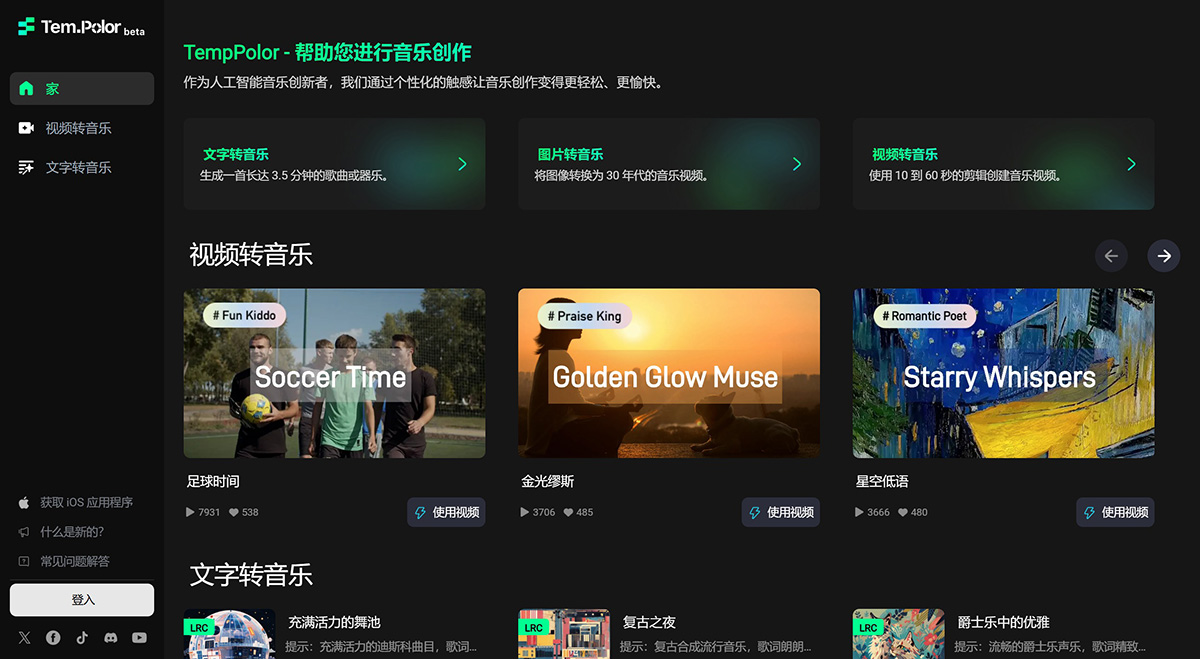
TemPolor is an AI music generator that can transform your text into personalized music, creating a musical symphony of your own. Users provide melodic inspiration through text, tapping, or humming, which then helps generate a full song.
What makes TempPolor unique is its ability to analyze video content and generate music with lyrics and vocals, making it easy for both amateur and professional content creators to produce soundConfirm Submissiontracks that match their visual work.
TemPolor Key Features:
Video and Photo Music Generation: TempPolor's ai can generate unique, style-specific music based on the content of videos and photos. Users can choose from various song personalities such as "Praise the King," "Sarcasm," and "Positive Vibes" to create engaging interactive experiences.
Humming to Music: Users can hum a melody, and TempPolor's AI will transform it into a complete musical work, making music creation easy and intuitive.
Key of Music: By tapping inspiration on a sleek keyboard interface, users can have TempPolor's AI generate a one-of-a-kind composition.
Video-to-Music Artificial IntelligenceTool: TemPolor is the world's first AI tool that generates music and songs with lyrics and vocals by analyzing video content input. This feature is especially useful for content creators who want to add high-quality, royalty-free music to their videos without any musical knowledge.
Text-to-Music Generation: Users can describe the desired music through text input, and the AI will generate a complete soundtrack that matches the description. This feature supports various video formats such as MP4, MOV, and AVI, and exports audio in MP4 and WAV formats.
TemPolor Frequently Asked Questions
1. What is TempPolor?
TemPolor is a completely free AI music creation tool designed to provide high-quality background music for your videos, enhancing the visual appeal and attractiveness of the videos.
2. What features does TempPolor offer?
TempPolor currently offers two main features: video music generation and text-based music generation. Video music generation allows users to create music with lyrics based on uploaded images or videos. Text-based music generation supports uploading reference audio and generating music with lyrics or instrumental tracks.
3. How does TempPolor's video music generation feature work?
TempPolor's model analyzes video frames, identifies elements and emotions, and generates music that complements these elements to enhance the effect of the final video.
4. How can I create higher-quality music?
V2M Creations: Create videos longer than 20 seconds, capturing everyday moments through frame cuts, photos, etc.
T2M Creations: Design 60-second pop songs that bring joy through an intro, verses, and a catchy chorus sequence.
5. What video formats does TempPolor support? What audio formats can it export?
TempPolor supports various common video formats, such as MP4, MOV, AVI, etc. It can export audio formats such as MP4 and WAV to meet users' needs.
6. How long of music can TempPolor generate?
Currently, TempPolor can generate up to 60 seconds of video music and up to 5 minutes of text-based music. We are continuously enhancing these capabilities.
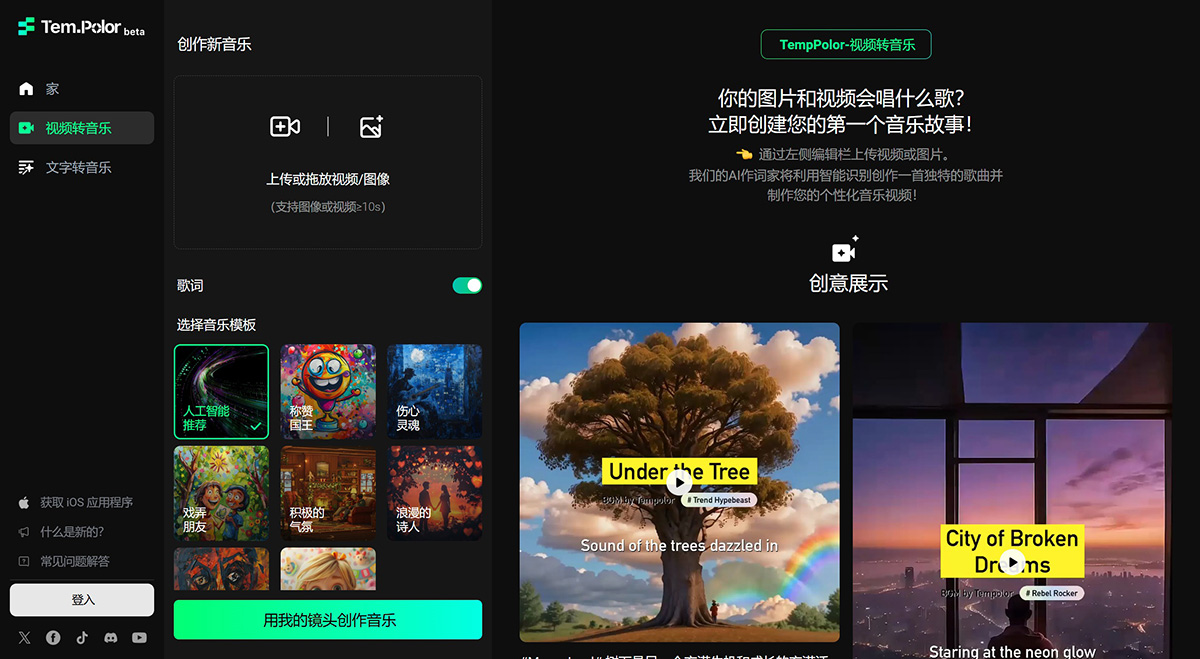
7. How can I use TemPolor to create music with vocals and lyrics?
(1) Go to the "Video to Music" page and activate the "Lyrics" option.
(2) Click "Upload" to add an image or video that is at least 10 seconds long.
(3) Select your favorite AI lyrics music template.
(4) After uploading, it takes a few minutes to generate your custom music video.
8. Can I use existing lyrics or other copyrighted materials in the music generated with TempPolor?
No, unless you are the owner of the copyrighted material, or have obtained explicit permission from the owner of the copyrighted material to use that material in content generated with TempPolor. We explicitly prohibit the use of copyrighted materials and any other third-party intellectual property to generate content with TempPolor, and our policy is to disable or terminate the accounts of users who repeatedly infringe on others' copyrights or other intellectual property rights when appropriate.
9. Are TempPolor's features completely free?
Yes, TempPolor is currently free for all users.
10. How do users earn and spend credits?
Users can get 50 free credits every day. Credit consumption depends on factors such as the length of the uploaded video and the music generation time.
11. Can I share content generated with TempPolor on social media?
Yes, as long as the content does not contain copyrighted material that you do not own or do not have explicit permission to use, and as long as you properly indicate that the content was generated using TempPolor.














