
 Script Planner Assistant▸
 AI Apps
 AI News

3D Camera Control: AI Tool to Generate New Images from Multiple Angles of a Single Photo
3D Camera Control: AI Tool to Generate New Images from Multiple Angles of a Single PhotoIntroduction
3D Camera Control: What is it
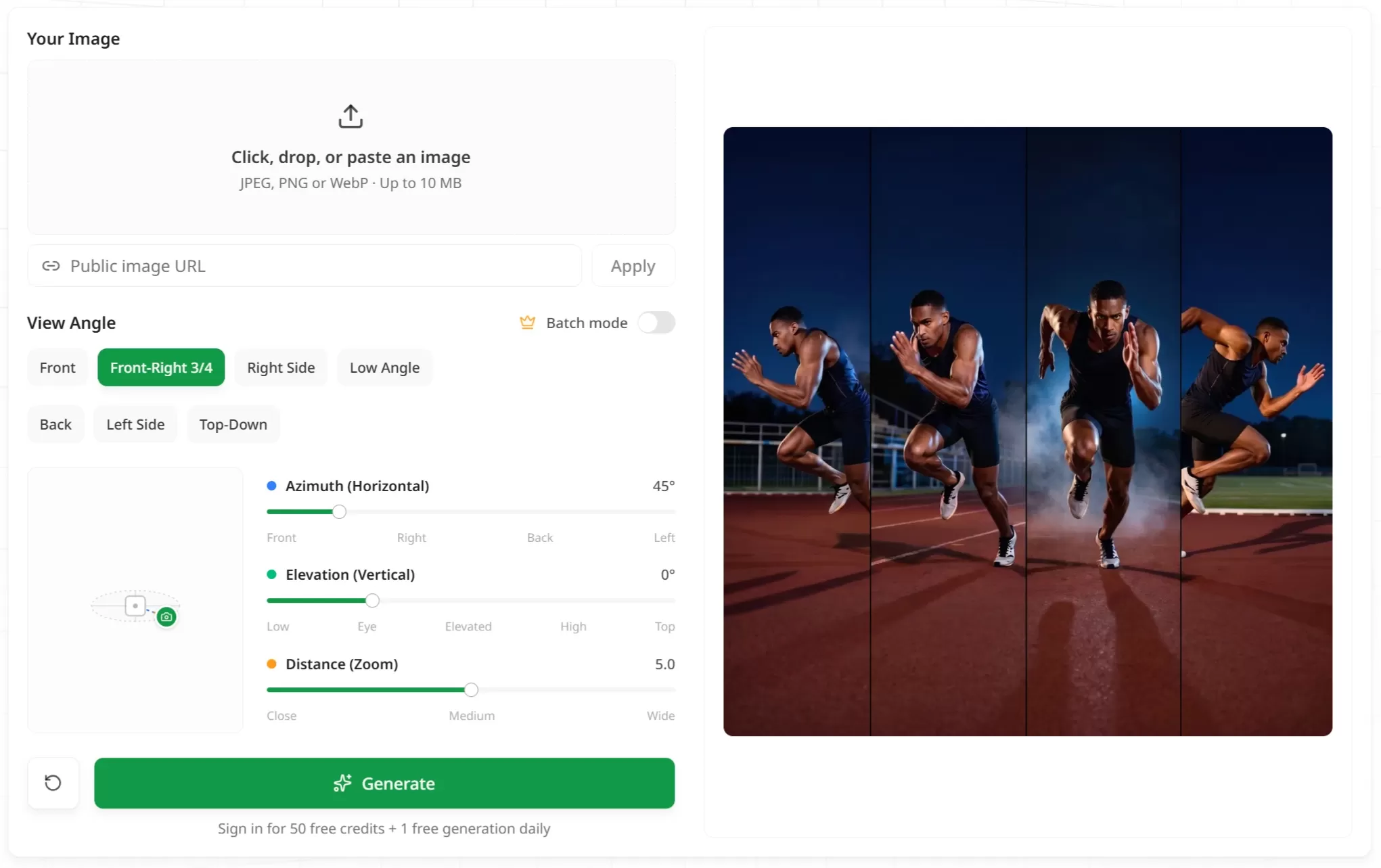
3D Camera Control is an AI tool that can generate new images from multiple angles based on a single image. After uploading a reference image, you can adjust the camera position (horizontal rotation, vertical tilt, camera distance) by dragging or using sliders, and the AI will directly generate new images from the corresponding viewpoints, solving the inflexible "angle control" problem in AI image generation. No need to repeatedly modify prompts. Each image takes about 30 seconds to generate, supporting a 270° horizontal viewing range.
Features
Three-axis independent control: Azimuth (horizontal angle), Elevation (vertical angle), Distance, combined to precisely position the camera
Subject consistency preservation: Multi-angle images generated from the same reference image maintain high consistency in character identity, style, and key details, avoiding appearance drift caused by re-drawing
Batch generation: Supports generating multiple preset angles at once (such as front, side, 3/4 view, back, top-down, etc.), suitable for creating character turnaround sheets or product image libraries
Free trial: New users get free credits, and there are also daily free usage opportunities. Batch generation is a paid feature, consuming credits
Use Cases
Character and concept art: Quickly generate character turnaround sheets for comics, animation previews, and game asset creation
E-commerce and product design: Generate multi-angle display images from a single product photo (front, angled, top-down, contextual scenes, etc.), greatly reducing shooting time
AI video production: Provide specific viewpoint reference frames for image-to-video models such as Kling, Runway, Veo, enhancing the continuity of camera movement
Generative exploration: Based on a satisfying image, extend and try different compositions and viewpoints without starting from scratch
3D Camera Control Pros and Cons
Pros: Intuitive operation, virtually no learning curve; high subject consistency; supports commercial use; no subscription required, pay as you go
Cons: Angle control leans toward "discrete camera semantics" (such as front, side), not millimeter-level continuous photography simulation; rotation of complex subjects may produce slight deviations; currently only single PNG download is supported, batch export functionality is not yet available
How to Use 3D Camera Control
Upload a reference image (JPEG/PNG/WebP, up to 10MB)
Adjust the three-axis parameters by dragging in the 3D viewport or using sliders to set the camera position
Click generate and download the PNG image of the corresponding viewpoint
Repeat adjusting angles until the multi-view image set is complete
Review
The value of the 3D Camera Control tool lies not in how strong its underlying model is, but in its innovation at the interaction level—turning "describing the camera with text" into "directly dragging the camera," which better fits designers' composition habits. For creative workflows that require strict viewpoint control (such as character design, product photography), the efficiency improvement is significant.
Related News:
Stable Virtual Camera: Generate 360-degree Rotating 3D Videos from a Single Image














