
 Script Planner Assistant▸
 AI Apps
 AI News

Mohu AI
Mohu AIIntroduction
MoFox AI is an AI tool focused on boosting productivity for online novel creation writers. It offers a range of online writing assistance features such as outline generation, story continuation, plot tree generation, and scriptwriting, helping novel authors tackle common creative challenges like difficulty starting a book or hitting writer's block. It shortens the distance from a mere fragment of an idea to a highly readable online novel story, making literary dreams within reach.
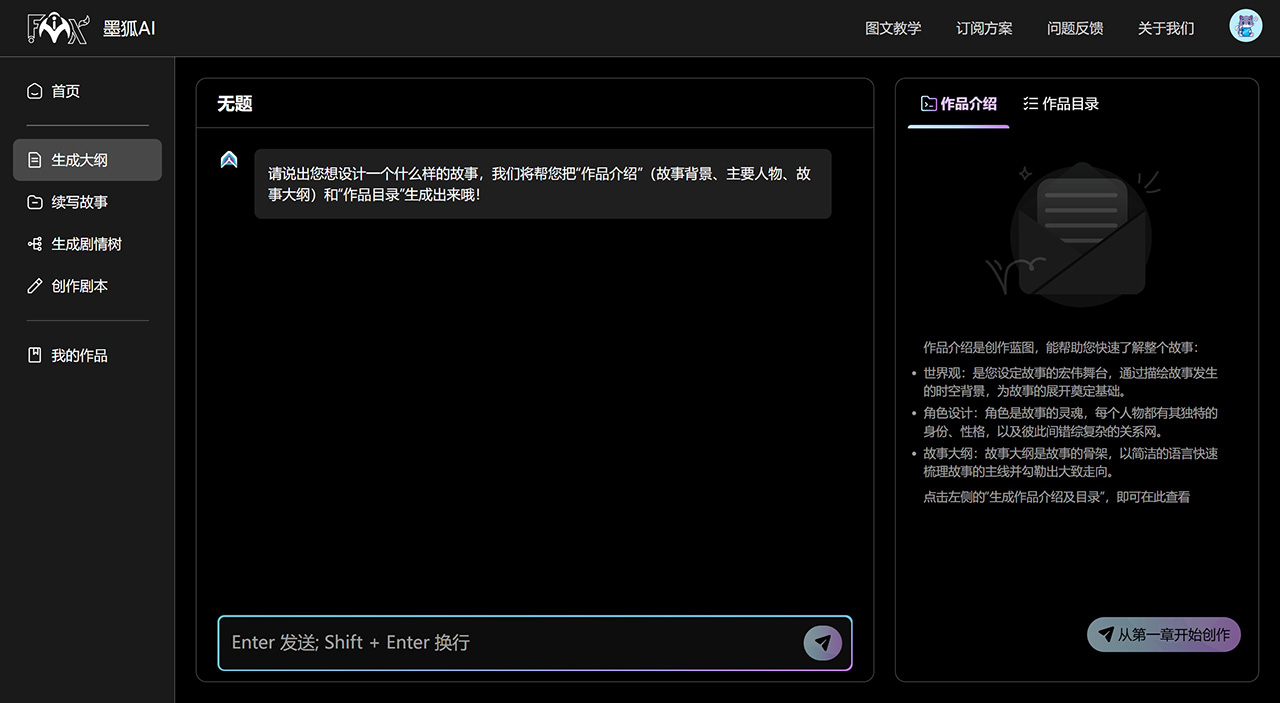
Core Features of MoFox AI:
Outline Generation: Enter a simple story inspiration and quickly build your story framework to obtain the world view, character design, and chapter outline.
Story Continuation: Simply input a sentence, choose the desired word count and style, expand the plot from multiple angles, enrich your narrative dimensions, and generate multiple relevant continuation directions.
Plot Tree Generation: Upload a segment of plot text to obtain a tree-like diagram of possible directions for the original text, expanding the plot from multiple angles and enriching your narrative dimensions. For authors who already have some plot but don't know how to extend it, this provides multiple possible directions and their developments.
Scriptwriting: MoFox AI carefully polishes dialogue and scenes based on the given characters, plot, and other descriptive text, achieving a perfect conversion from novel fragments to scripts, and generating the relevant specific character dialogue passages.
MoFox AI Subscription Pricing:

How to Use MoFox AI?
1. Visit the Platform: Open the official website of MoFox AI and make sure you have registered and logged into your account.
2. Input Creative Inspiration: On the homepage creation interface, you will see an input box where you need to enter your creative inspiration.
3. Select the Function: Clarify that you want to use the "Outline Generation" function. MoFox AI allows you to directly input creative inspiration of any word count, such as character settings, background environment, or the theme you want to explore.
4. Start Creating: Click the "Start Creating" button. The system will begin processing the information based on your input and generate an outline framework containing a short introduction, world view settings, and character design.
5. Customize the Outline: The outline generated by MoFox AI may include a table of contents. If the initial result does not meet your expectations, you can use its custom modification function to adjust elements such as characters, plot, or world view until you are satisfied.
6. Refine and Adjust: After the outline is generated, you may find that some parts need further refinement. MoFox AI may offer multiple options or suggestions, from which you can choose or combine with your own ideas for adjustment.
7. Review and Modify: Carefully review the generated outline to ensure logical coherence and alignment with your original thoughts. If necessary, you can return to the previous step to make modifications.
8. Save and Apply: Once the outline meets your needs, remember to save it. Then, you can begin writing your story based on this outline. Other features of MoFox AI, such as story continuation and plot tree generation, can further assist your creative process on this basis.
MoFox AI is an AI technology company focused on providing productivity tools for online literature creators, dedicated to making the online novel creation process smarter and more efficient. We integrate cutting-edge AI technology.
Related Information:















