
 Script Planner Assistant▸
 AI Apps
 AI News

PDF-Guru: An Open-Source PDF File Processing Tool
PDF-Guru: An Open-Source PDF File Processing ToolIntroduction
PDF Guru is a universal PDF file processing tool that includes more than 20 commonly used features such as PDF merging, splitting, rotation, watermarking, encryption, and conversion. It is fully open-source, free for personal use, with a clean and user-friendly interface.
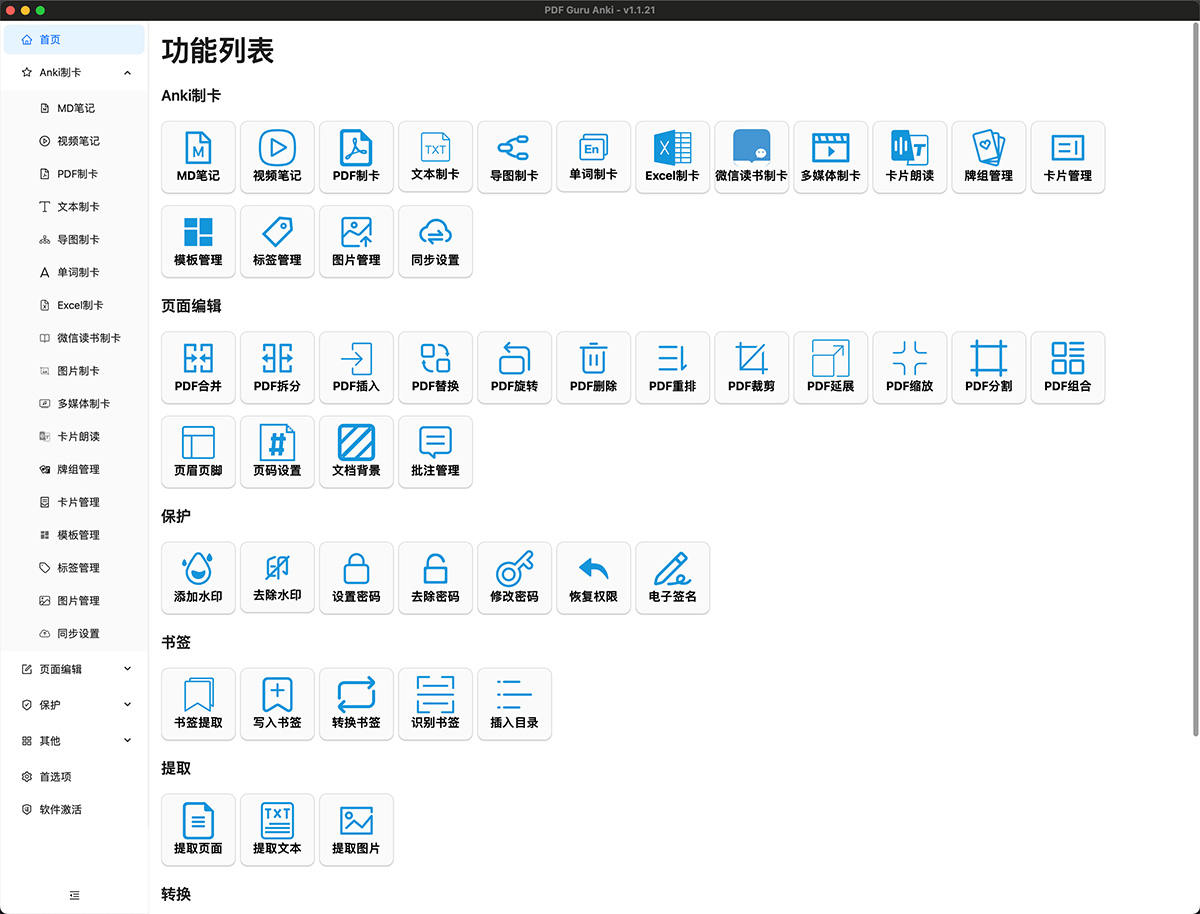
Although there are many PDF processing tools available online, they all have some drawbacks:
Professional PDF editing software requires payment or limits features for advanced functions (such as adding watermarks, page editing, etc.)
Online PDF tool websites require uploading PDFs to a server for processing and then downloading them, posing a risk of privacy leakage
PDF processing libraries for various programming languages can implement some advanced features for free, but they require certain programming experience and are not as convenient to use as graphical interface programs
Some niche tools can meet certain special needs but have relatively limited functionality
Since PDF processing is a very common need, this project was created to bypass the above limitations and improve work efficiency.
PDF Guru Advantages:
Fully Localized: No internet connection required, no worries about privacy leakage
Feature-Rich: Supports more than 20 functions including PDF batch merging, splitting, adding watermarks, encryption/decryption, extraction, and OCR recognition
Cross-Platform: Supports use on Windows, Mac, and Linux devices
Open-Source and Free
Beautiful and clean interface, easy to operate
Plugin-Based: Choose whether to install additional components as needed to reduce the installation package size
PDF Guru Specific Features:
PDF Insert/Replace
Insert: Supports two options for inserting blank pages and inserting other files.
Replace: Use the specified page range of the target PDF to replace the specified page range in the source PDF (the page range here only supports 1 or 1-3 formats)
PDF Merge
Merge multiple PDF files into a single PDF file, with support for custom sorting.
PDF Split
Split large PDF files into several smaller files, supporting multiple splitting methods such as even chunks, custom ranges, and splitting by directory level.
PDF Rotate
Rotate specified page ranges of a PDF.
PDF Delete
Delete specified pages in a PDF.
PDF Reorder
Reorder the page sequence of a PDF.
PDF Crop
Crop PDF pages.
PDF Scale
Scale PDF pages.
PDF Divide
Split PDF pages into several sub-pages, with support for even grid division and custom division methods.
PDF Combine
Combine multiple PDF pages into a single page.
Header & Footer
Set the header and footer of a PDF.
Page Number Settings
Add page numbers to PDF files, with multiple built-in page number styles and support for custom page number styles.
Document Background
Set the background for PDF documents, supporting the use of colors and images as backgrounds.
PDF Watermark
Add watermarks to PDF documents, and also provides multiple ways to remove PDF document watermarks (for improving reading experience only, do not abuse for infringement)
Add Watermark: Supports three forms of watermarks: text, image, and PDF document. Text watermarks support control over multiple attributes such as font, font size, color, and opacity, and support setting multi-line watermarks.
Remove Watermark: Supports multiple watermark removal methods, and you can choose the appropriate method according to the actual situation (not guaranteed to be absolutely effective).
Video Tutorial: https://www.bilibili.com/video/BV1Qz4y1E7vq/
PDF Encrypt/Decrypt
Set passwords for PDF documents, including open password and permission password. Also supports decrypting PDF documents and restoring permissions.
PDF Bookmarks
Supports extracting PDF bookmarks, writing PDF bookmarks, and even using OCR technology to automatically recognize PDF bookmarks (requires additional installation of paddleocr environment)
Video Tutorial: https://www.bilibili.com/video/BV1Wx4y1o7P6/
PDF Extract
Extract pages, text, images, etc. from PDF documents
PDF Compress
Compress PDF documents to reduce file size.
PDF Convert
Provides conversion between PDF and other formats. Some conversions require the support of pandoc (requires additional installation).
OCR Recognition
Perform OCR recognition on PDF pages, and also support OCR recognition on images.
Double-Layer PDF Creation
Related Information:
10 Excellent AI-Powered PDF Reading and Analysis Tools Recommended














