
 Script Planner Assistant▸
 AI Apps
 AI News

LightRabbit Push: Simple Email and SMS Notification Service
LightRabbit Push: Simple Email and SMS Notification ServiceIntroduction
Light Rabbit Push is a simple and easy-to-use email and SMS message push service, primarily providing email and SMS notification features. Users can quickly integrate these notification features into their applications through simple HTTP requests, making it ideal for developers and enterprises that need to quickly integrate email and SMS notification capabilities.
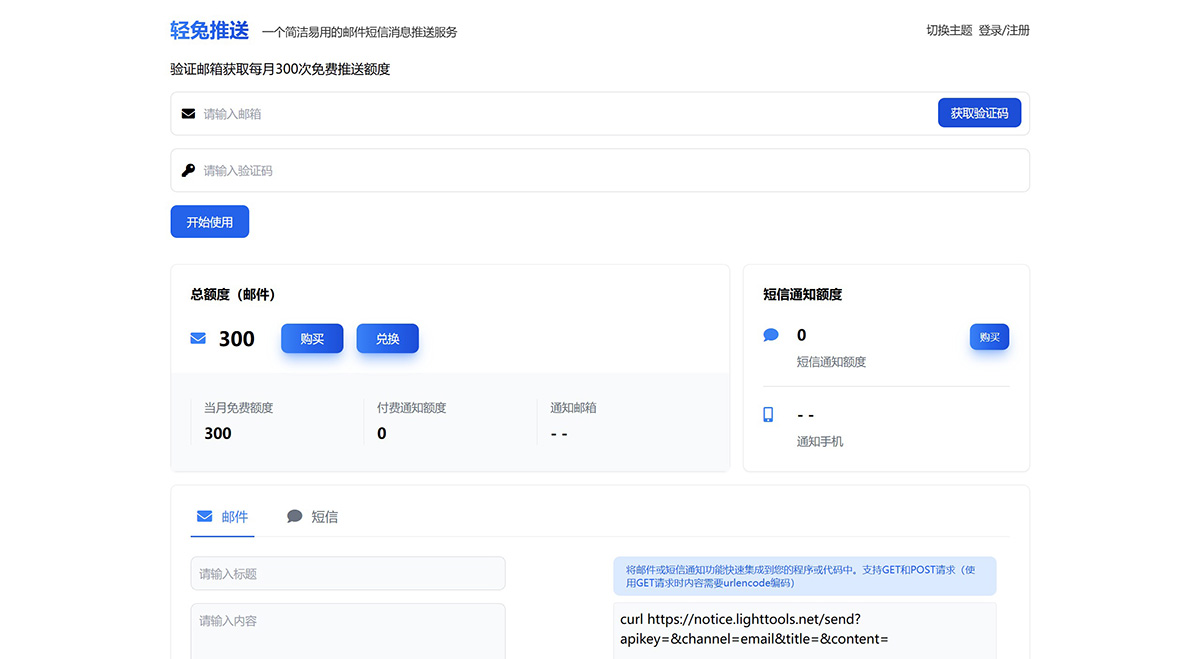
Main Features of Light Rabbit Push:
Email Push: Allows users to send email notifications through HTTP requests.
SMS Push: Users can also send SMS notifications through HTTP requests.
Quick Integration: Provides simple methods for users to integrate push functionality into their own programs or code.
User-Friendly Interface: Designed to be simple, easy to understand, and operate.
Real-Time Message Push: Suitable for scenarios that require real-time feedback or notifications.
How to Use Light Rabbit Push?
1. Registration and Initialization:
First, you need to register an account on the Light Rabbit Push platform and obtain an API key. This key will be used for identity verification in subsequent HTTP requests.
2. Write HTTP Request Code:
Using the API interface provided by Light Rabbit Push, you can send email or SMS notifications through simple HTTP requests. Detailed API documentation can be found on the official Light Rabbit Push website.
3. Construct Message Content:
When sending notifications, you need to construct the message content. This includes setting the recipient, subject, body, and other information. Light Rabbit Push supports custom message templates, which can improve efficiency and reduce repetitive work.
4. Send Notifications:
Using the constructed message content, send an HTTP POST request to the Light Rabbit Push API. The request needs to include the previously obtained API key as well as other necessary parameters, such as recipient, subject, and body.
5. Error Handling and Logging:
During the notification sending process, attention should be paid to error handling and logging to facilitate problem tracking and performance optimization. If any errors occur, exceptions should be caught and relevant information recorded for subsequent analysis and fixing.
6. Monitoring and Maintenance:
After integration is complete, you should regularly check the running status of the push service to ensure that all notifications are sent correctly. In addition, you need to pay attention to API usage frequency and costs to avoid exceeding the free quota and incurring additional charges.
Light Rabbit Push is very simple and easy to operate. As a concise email and SMS notification service, it is developed by independent developers in China and has been recommended in many communities and forums.















