
 Script Planner Assistant▸
 AI Apps
 AI News

iTextMaster: AI-Powered Text Analysis, Summarization & Chat
iTextMaster: AI-Powered Text Analysis, Summarization & ChatIntroduction
iTextMaster is an excellent text processing tool that combines artificial intelligence technology, enabling you to upload and process various types of documents, including PDF files and web pages. It can generate document summaries, provide intelligent answers, and support multiple languages. It is designed to simplify the text processing process, improve your comprehension efficiency, and save valuable time. Furthermore, iTextMaster can help you find the information you need, raise questions, and provide intelligent answers, making text processing easy and efficient.
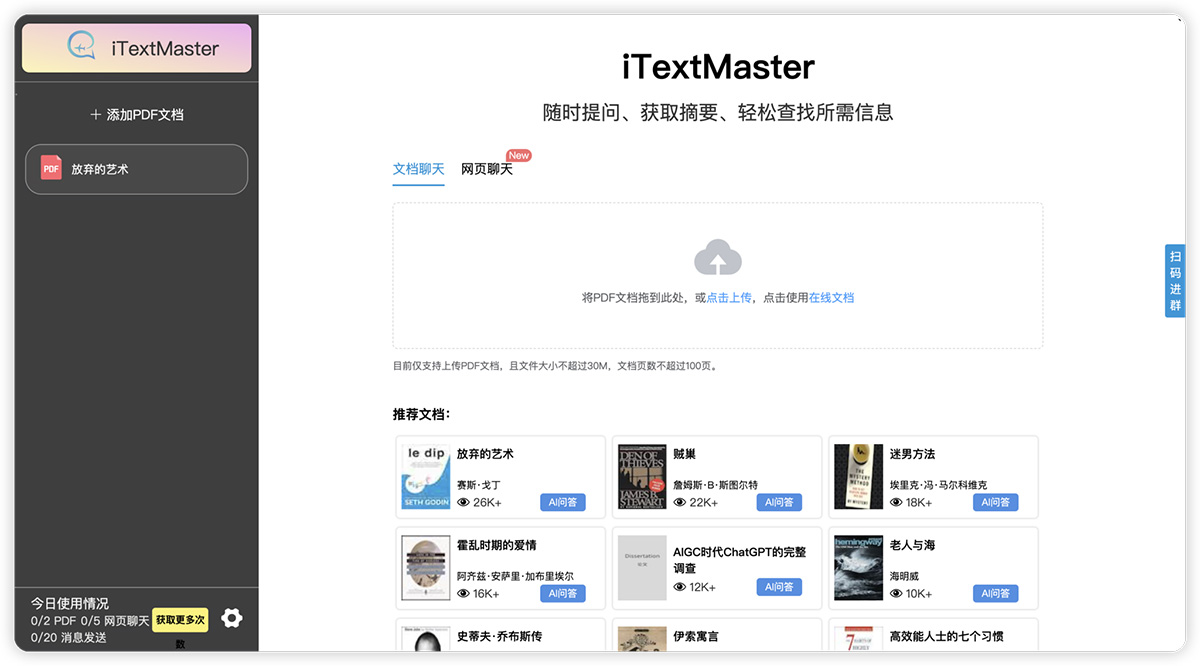
iTextMaster Features
iTextMaster saves you from time-consuming searches for answers, saves time, and improves work and study efficiency.
User-Friendly Interface, More Convenient Operation
iTextMaster's interface has been carefully designed so that users can get started immediately without any hassle. Whether you are a first-time user or an experienced user, our friendly operating interface will provide you with a pleasant experience. Quickly upload documents, easily ask questions, no complex learning curve required. You can start using iTextMaster anytime, anywhere, and enjoy convenient document processing and intelligent answers right away.
Powered by ChatGPT, Smarter Answers
We use the powerful ChatGPT technology to make iTextMaster a leader in intelligent querying. The ChatGPT API handles user questions and provides fast and accurate answers. Whether you need in-depth academic explanations, practical advice, or detailed explanations of information, iTextMaster can provide you with highly intelligent answers. This means you no longer need to browse through large amounts of text—simply ask iTextMaster a question, and you'll get the answers you need.
Multilingual Support, More Comprehensive Service
iTextMaster understands the importance of multilingual support and serves users worldwide. We support multiple languages, allowing you to interact with documents in the language you are most familiar with. Whether you are a scholar, entrepreneur, or ordinary user, iTextMaster will cross language barriers to provide you with multilingual support. This comprehensiveness offers users greater flexibility and convenience.
Intelligent Browsing Assistant - Easier to Ask Questions
Whether you are reading news, blog articles, or academic papers, iTextMaster's intelligent browsing assistant provides you with content summaries at the click of a button. Click on the chat window in the lower right corner to get the key points of the article, then ask questions right away. Intelligent text processing simplifies your reading experience and saves time.
How does iTextMaster work?
iTextMaster deeply analyzes the content of PDF documents and creates semantically rich indexes paragraph by paragraph. This index is a smart information architecture that carefully captures the key concepts and relationships of each paragraph. When you ask iTextMaster a question, our AI engine cleverly uses this semantic index to accurately locate and extract the relevant paragraphs containing the most accurate answers. This means you can quickly find the information you need in documents without reading large amounts of text, thereby improving efficiency and the depth of document understanding.
What are the benefits of using iTextMaster?
iTextMaster provides users with a series of important benefits, including the ability to quickly and accurately extract needed information from complex manuals, papers, legal contracts, books, research papers, and large PDF files like ChatDoc. This feature completely simplifies the tedious process of finding specific answers in large PDF documents, greatly saving your valuable time and energy, and making document processing and information retrieval efficient and convenient. No more aimlessly flipping through large amounts of text—iTextMaster will present the information you need accurately and quickly, allowing you to focus on more important tasks.
How to upload a PDF file or specify a web page?
Uploading a PDF file or specifying a web page is very simple. For PDF files, simply click the "Upload" button, then select your file. To specify a web page, simply enter the web address in the chat window. iTextMaster will immediately fetch and process the document, allowing you to interact and ask questions. This enables you to process text from different sources without cumbersome operations.















