
 Script Planner Assistant▸
 AI Apps
 AI News

BaixiaoYing: Baichuan Intelligence's First AI Assistant
BaixiaoYing: Baichuan Intelligence's First AI AssistantIntroduction
Baixuoying is the first AI assistant released by Baichuan Intelligence, built on the capabilities of the Baichuan 4 model and integrating search technology with large model technology. It offers a variety of features, such as answering user questions at any time, quickly reading files, organizing materials, and assisting with creative writing.
In addition, Baixuoying has multi-round search and targeted search capabilities, enabling it to understand user needs more precisely and provide professional, rich knowledge and resources.
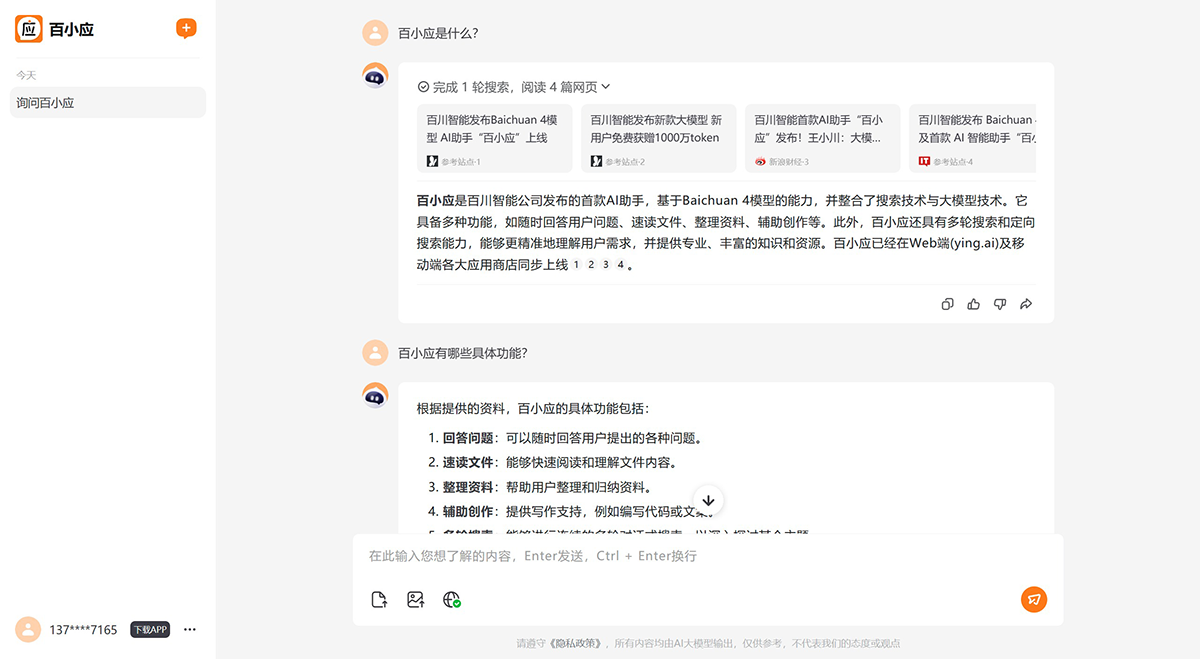
Features of Baixuoying:
Intelligent Search: Baixuoying is capable of multi-step intelligent search across the web, helping users easily solve various challenging problems. It can search for information in real time, provide content traceability, and ensure detailed and accurate answers.
Quick File Reading: Baixuoying can quickly understand and summarize lengthy PDFs, long web articles, and more. Whether it's academic papers or financial reports, it can rapidly deliver the information users need.
Document Reading and Analysis: Users can upload PDF or Word files, or directly enter a webpage link (URL), and Baixuoying can read and analyze long-form content such as books, reports, and academic papers.
Interactive Questioning: When faced with vague or broad queries from users, Baixuoying uses intelligent questioning to guide users in refining their needs, thereby providing more precise solutions.
Smart Image Recognition: Baixuoying has image recognition capabilities, can accurately understand the content of images, and supports voice input and output, making it simple and easy to use.
Creative Assistance: Baixuoying can also assist users in creative work, such as writing copy, inspiring users' creative ideas, and helping them draft paper outlines, PPT, novels, marketing copy, and more.
How to Use Baixuoying:
1. Visit the Platform: First, you need to visit the Baixuoying platform. According to available information, Baixuoying has been launched on the web (at ying.ai) and on major mobile app stores.
2. Download the App: If you are using a mobile device, you can search for "Baixuoying" in the app store and download and install the application, or you can use it on the web.
3. Register/Log In: After installation, you may need to create a new account or log in with an existing account.
4. Start Using: After logging in, you can directly enter your questions or commands in the app's interface, and Baixuoying will provide the corresponding service or answer based on your input.
5. Voice Interaction: If you prefer voice input, Baixuoying also supports voice interaction, allowing you to use it conveniently even when your hands are busy.
6. Personalization: Over time, Baixuoying will learn and adapt to user behavior and preferences to optimize the interaction experience.
Baixuoying has been simultaneously launched on the web (ying.ai) and on major mobile app stores.















