Script Planner Assistant▸
 AI Apps
 AI News

Langlang Dubbing: Free Text-to-Speech Tool
Langlang Dubbing: Free Text-to-Speech ToolIntroduction
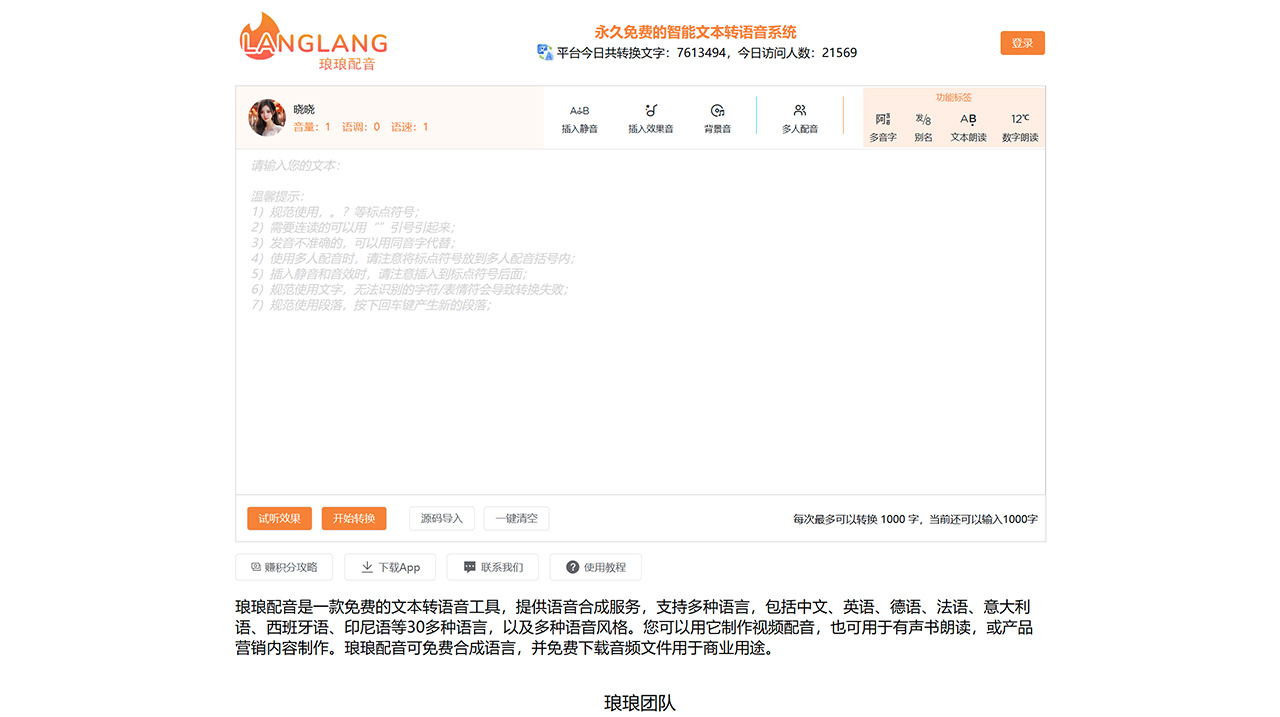
Langlang Dubbing is a free text-to-speech tool that provides voice synthesis services and supports multiple languages, including Chinese, English, German, French, Italian, Spanish, Indonesian, and more than 30 other languages, as well as a variety of voice styles. You can use it to create video voiceovers, read audiobooks, or produce product marketing content. Langlang Dubbing allows you to synthesize speech for free and download audio files for commercial use.
What is Langlang Dubbing?
Langlang Dubbing is an online text-to-speech platform and an AI dubbing tool that can easily convert text into audio through AI artificial intelligence algorithms. You can play the audio online or download the audio file.
Is the text-to-speech service free to use?
Yes, a free version is permanently provided to users, but we reserve the right to adjust the related rules in the future.
Can I use the synthesized voice for commercial purposes? How is the copyright of the audio attributed?
Yes, you can use the audio files for any legal purpose, including commercial use (both individuals and enterprises are supported). When using the Langlang service, users are strictly prohibited from converting or generating any illegal or non-compliant content. Users should consciously comply with laws and regulations and bear full responsibility for the consequences of any violations. Users own 100% of the copyright of the generated audio files, and the generated content does not represent the views or opinions of Langlang Dubbing.
How much content can 50,000 characters per month convert? What should I do if I need more characters?
The platform gives all registered users 50,000 characters on the 1st of each month, which can be converted into approximately 5 hours of audio. This estimate is affected by factors such as the narrator's speed and speech pauses. If you need to convert more characters, you can earn points to exchange for text conversion quotas. Points can be obtained by inviting friends, participating in platform activities, watching video ads, supporting outstanding users, and other methods.
What should I do if some features prompt me that I need to unlock privileges?
Some features of Langlang Dubbing require privileges to use, and these privileges are automatically obtained through the points you accumulate on the platform. The specific rules are: ① Accumulate 3,000 points to obtain: the privilege of using subtitle downloads, with the monthly platform gifted quota increased to 60,000, and the maximum characters per synthesis increased to 2,000; ② Accumulate 5,000 points to obtain: the privilege of using multi-voice dubbing, with the monthly platform gifted quota increased to 70,000, and the maximum characters per synthesis increased to 3,000; ③ Accumulate 10,000 points to obtain: the privilege of using premium narrators, with the monthly platform gifted quota increased to 80,000, and the maximum characters per synthesis increased to 5,000; ④ Accumulate 15,000 points to obtain: the privilege of using sentence-by-sentence audition, with the monthly platform gifted quota increased to 90,000, and the maximum characters per synthesis increased to 6,000; ⑤ Accumulate 20,000 points to obtain: the privilege of using batch subtitle synthesis, with the monthly platform gifted quota increased to 100,000, and the maximum characters per synthesis increased to 7,000. Note: The privileges you obtain are permanently valid.
What should I do if the conversion is successful but the audio cannot be downloaded?
1. Downloads are affected by network and browser environments: if you encounter slow downloads, you can try switching networks and downloading again. 2. Browser compatibility and interception policies: if there is no response when downloading, it may be due to compatibility and interception policies of certain browsers, especially security browsers such as 360. It is recommended to use standard browsers, such as Microsoft Edge or Google Chrome, to access Langlang Dubbing.
Where has the voice been downloaded to?
By default, once you complete the conversion and click download, the browser will display the download progress and download path. If no download prompt appears, you can check the browser's download history. Normally, the downloaded file will be saved in the default download path on your computer, generally in the "C:\Users\YourUsername\Downloads" folder. You can open this folder to check whether the file has been successfully downloaded.
What should I do if the conversion task keeps failing?
Normally, Langlang Dubbing will attempt your submitted conversion task multiple times (3 attempts within 5 minutes) to ensure your conversion task succeeds. If it still fails, you need to check the following aspects: ① If your task was imported using source code, the historical narrator model may no longer be supported. You need to re-enter the content to try the conversion, and stop using the source code import; ② Check the text content you entered to ensure there are no special symbols, emojis, or other information that the model cannot recognize; ③ The current narrator model service may be abnormal, you can try switching to another narrator; ④ The current narrator model may be under heavy load, you can wait a while and try again. Note: Please do not repeatedly submit the same information frequently, as this will only lead to more failures and slower conversions.
What should I do if the conversion task remains in the queue?
There are generally two reasons for this situation: ① The narrator model currently being used for the conversion task is under heavy load or experiencing an exception; you can try switching to another narrator model; ② There are currently many conversion tasks on the platform, and queuing is indeed required. You need to continue waiting. Note: Please do not use the same narrator to repeatedly submit tasks, as this will only make the conversion slower.
What should I do if there is a swallowing of characters when using silence insertion or sound effects?
Please check whether there are punctuation marks before or after the inserted silence or sound effect. If there are, please insert the silence or sound effect after the punctuation mark, which can resolve most character-swallowing issues.
What should I do if it prompts "Multi-voice dubbing needs to be used at the outermost level"?
There are generally two reasons for this situation:
Multi-voice dubbing cannot be used across paragraphs. Please check whether the selected text contains line breaks. Remove the line breaks or use one narrator for each paragraph.
Multi-voice dubbing cannot be nested. Within one multi-voice dubbing, the multi-voice dubbing feature cannot be used again.
What should I do if I encounter problems during use?
You can leave us a message on the Contact Us page for feedback, or join our WeChat group to provide feedback.