
 Script Planner Assistant▸
 AI Apps
 AI News

Jimeng AI Web: ByteDance CapCut's Online AI Creation Platform
Jimeng AI Web: ByteDance CapCut's Online AI Creation PlatformIntroduction
Jimeng AI is an online AI creation platform developed by ByteDance's Jianying (剪映) team. The web version is available at jimeng.jianying.com—simply open it in a browser to start using it. It is built on ByteDance's proprietary Seedream image model and Seedance video model. It integrates features including Octo, Infinite Canvas, Agent, text-to-image, image-to-image, text-to-video, image-to-video, and more. Whether you are a designer, video creator, or everyday user, you can go from sparking ideas to producing finished work all on this platform.
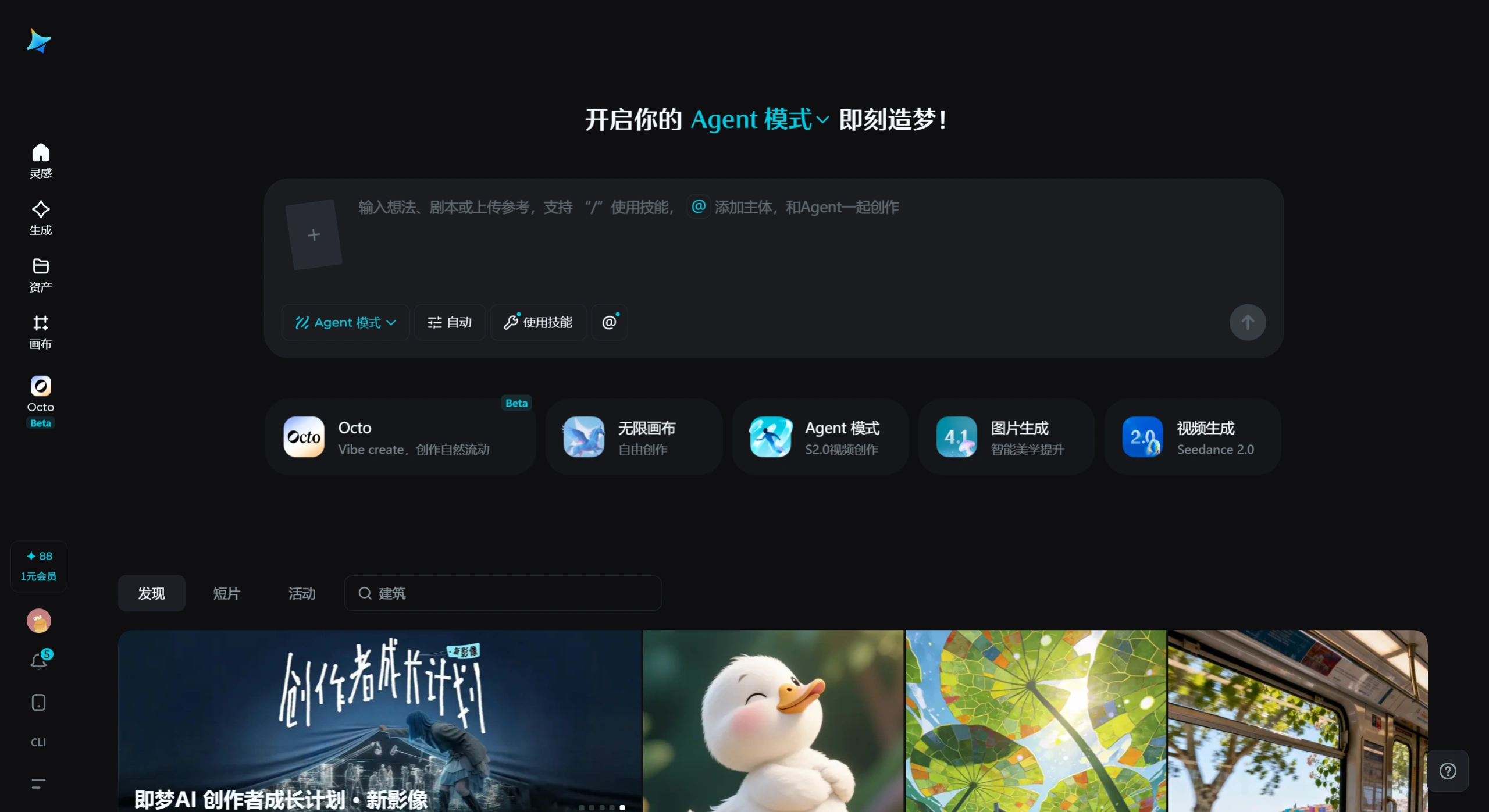
Features
Image Generation
Supports text-to-image, image-to-image, and reference image generation, with the ability to switch between various artistic styles and realistic styles
Can generate clear Chinese characters and supports localized features such as dialect voiceover
The latest version, Seedream 5.0 Lite, supports online real-time retrieval and intelligent logical reasoning
Video Generation
Supports text-to-video, image-to-video, and first/last frame control
Allows control over camera movement (push in/pull out/rotate/pan) and speed (slow/normal/fast)
Video duration can be set to 5 seconds, 10 seconds, or longer; the lip-sync feature supports up to 9 seconds of lip-synced video
Intelligent Canvas Editor
Multi-layer editing, inpainting (local repaint), one-click image expansion, object removal, background removal, style consistency
Supports lossless upscaling, downscaling, and moving to inspect details—no need to export to other software
Motion Mimicry & Digital Humans
Upload an image and a reference video to generate a dynamic video of about 30 seconds, with a high degree of motion reproduction
The OmniHuman digital human model supports dynamic digital human generation and includes a digital human cloning authentication mechanism
Story Creation Mode
Automatically generate storyboards from text or reference images, and batch import storyboard images to convert them into videos
Built-in AI narrative tool "Octo," which provides the Vibe Create creation mode
Prompt Assistance
Integrated with DeepSeek, it can automatically generate detailed prompts based on simple requirements
Use Cases
Short video creation: Quickly generate vertical-screen footage in TikTok/Douyin style, seamlessly fitting into the Jianying workflow
Advertising design: Create product promotional images, dynamic posters, and advertising videos, reducing the cost of producing materials
Social media operations: Batch-generate accompanying images, covers, and dynamic content to increase account posting frequency
Education and training: Convert abstract knowledge into intuitive images or videos to create vivid teaching materials
Artistic creation: Generate sketches and creative elements to help artists quickly validate ideas
E-commerce image sets: Efficiently generate and edit product display images, model shots, and scene images
Pros and Cons
Strengths
Accurate understanding of Chinese prompts; generated images can include clear Chinese characters
Fast generation speed; the free version outputs at roughly 3.2 times the industry average
Comprehensive feature coverage—from image to video, from generation to editing—all in one platform
Deep integration with the Jianying ecosystem, ideal for short video creators
Daily free credits allow you to experience core features without spending money
Weaknesses
The free version exports with a watermark, and resolution and generation speed are limited; removing the watermark requires upgrading to a membership
Performance in complex motion and scenarios requiring high physical simulation (such as fine interactions involving liquids or flames) lags behind some competitors
When motion range is too large, the frame is prone to breaking down or dropping frames
The credit-based system poses obvious limitations for high-frequency creators; long-term high-quality use requires ongoing payment
The international version has reduced functionality, with dynamic features such as video generation not fully available
How to Use
Sign up and log in: Visit jimeng.jianying.com, click "开启即梦" (Start Jimeng) in the top right corner, and log in by scanning a QR code with Douyin or using a phone number verification code
Select a feature: Choose "图片生成" (Image Generation), "视频生成" (Video Generation), or "智能画布" (Intelligent Canvas) from the left menu
Enter your creative requirements:
Image: Enter a prompt, select a model (e.g., Seedream 5.0), precision level, and aspect ratio
Video: Upload first-frame/last-frame images or directly enter a text description, then select camera movement and speed
Generate and refine: Click "立即生成" (Generate Now); you can regenerate, re-edit, or extend the duration of the result
Export: Select the resolution and whether to remove the watermark (members can remove the watermark), then download the output
FAQ
Does the free version include a watermark? By default, yes. Premium members or certain creator accounts can disable the watermark in export settings.
What is the difference between the international version and the domestic version? The international version currently mainly opens up image generation and canvas editing, with no credits consumed; the domestic version supports the full feature set, including video generation and motion mimicry, and consumes credits based on generation type.
What is the maximum duration of generated videos? The basic version generally offers 3 to 6 seconds; the paid version can extend to 10 seconds or more, with some models supporting 15 or 30 seconds.
Is commercial use allowed? The Pro/Business version supports watermark-free export and commercial licensing; the free version is limited to personal use only.
How do I remove unwanted elements from a generated image? Use the "移除物件" (Remove Object) feature in the Intelligent Canvas—select the area with the brush and the AI will automatically repair the background.
Jimeng AI Web Version vs. Mobile Version Comparison
| Comparison Dimension | Jimeng AI Web Version | Jimeng AI Mobile Version (App) |
|---|---|---|
| Access Method | Browser access to `jimeng.jianying.com`, no installation required | Download and install from the app store; supports iOS/Android |
| Intelligent Canvas | Full features: multi-layer editing, inpainting, one-click image expansion, object removal, background removal, style consistency, lossless upscaling | Significantly simplified features, retaining only basic image expansion; unable to perform multi-layer collaborative control or edge preservation |
| Core Generation Features | Text-to-image, image-to-image, text-to-video, image-to-video, camera movement control, motion mimicry, intelligent super-resolution, lip-sync, story mode | Basic features such as text-to-image, image-to-image, and text-to-video are available, but some advanced options are missing (e.g., model switching, motion mimicry, intelligent super-resolution, and other advanced features) |
| Model Version | Supports full model switching (Seedream 3.0/5.0, Seedance 2.0, etc.) with rich parameter settings | Some new models (e.g., Seedream 3.0) may first be released in gray-scale testing on the App side, with the web version lagging behind | Large screen display, mouse and keyboard operation, supports shortcuts, high information density, suitable for fine-tuning | Touchscreen gesture operation, simple and intuitive interface, larger buttons, smooth swiping and tapping, beginner-friendly |
| Performance | Relies on high-performance cloud computing, suitable for 4K high-definition and long video generation; affected by network latency | Fast local response, but limited by device performance (memory/storage); complex tasks may crash or fail |
| Offline Capability | Must be online throughout; unusable when disconnected | Can cache some content, but lacks true offline creation capability |
| Social Sharing | Requires download before sharing, with slightly more steps | Supports one-click sharing to platforms like Douyin and WeChat, more convenient |
| Voice Input | Requires external microphone or manual input | Built-in voice recognition, supports voice input to generate content |
| Data Sync | Account interoperability with phone version; real-time project data sync | Real-time sync with web version; supports cross-device continuation of creation |
| Use Cases | Fixed office/creation environments, complex projects, batch processing, deep editing, professional design | Fragmented time, mobile scenarios, quick inspiration capture, lightweight creation, instant sharing |
| Plugin Extensions | Does not support third-party plugins | Does not support third-party plugins |
| Membership Benefits | Fully unlocks 4K output, long videos, commercial authorization, watermark removal | Same membership system as web version, but with different layout for some feature entries |
Jimeng AI Web Version vs. Competitors
| Comparison Dimension | Jimeng AI | Kling AI | HappyHorse |
|---|---|---|---|
| Generation Quality | High image/video quality, strong Chinese semantic understanding, natural motion effects | 1080P cinematic quality, realistic physical simulation, excellent details | Tops the Artificial Analysis dual charts, top-level visual consistency and motion naturalness, excels in visual impact and atmosphere |
| Generation Speed | Fast, free version efficiency approximately 3.2 times the industry average | Slightly slower, high-quality output focuses on details | Extremely fast, a single H100 can generate 5 seconds of 1080P video in only 38 seconds, with inference in only 8 steps |
| Feature Richness | Text-to-image/video, canvas editing, lip-sync, motion imitation, story mode | Start/end frames, multi-reference, camera movement, special effects, AI try-on | Text-to-video, image-to-video, video editing, native audio-video synchronized generation, but currently lacks canvas editing and motion imitation |
| Ease of Use | Clean interface, prompt-driven, easy to get started | Relatively complex operation, has a certain learning curve | Open-source and can be deployed locally, also usable via Alibaba Cloud Bailian online; has certain technical barriers |
| Chinese Support | Excellent, can generate clear Chinese characters and dialect dubbing | Basic support, slightly inferior to Jimeng | Extremely strong, accurate Chinese semantic understanding, supports Mandarin and Cantonese lip-sync |
| Cost | Daily free credits, basic version offers high value | High credit consumption, no credit refund on failure, high cost | Open-source and free for commercial use, cloud pay-as-you-go (720P starts at about 0.44 yuan/second), significant enterprise bulk discounts |
| Ecosystem Integration | Can be embedded in Jianying/Pro editing workflows, open API | Independent platform, average API openness | Integrated with Alibaba Cloud Bailian platform, supports API access to self-developed systems and Agent platforms |
| Controllability | Multi-dimensional control over start/end frames, camera movement, speed, and prompts | Strong control over start/end frames and multi-reference | Good adherence to camera movement, shot size, and style instructions; supports multi-aspect-ratio adaptive, but long narratives require manual transitions |
Related News:
Jimeng AI Digital Human Tutorial Guide: Make Pictures "Come Alive"
Jimeng AI Tutorial: Create Cat Cooking and Doing Chores Videos in 3 Minutes Easily













