
 Script Planner Assistant▸
 AI Apps
 AI News

Krea Video: Personalized AI Video Generation Tool
Krea Video: Personalized AI Video Generation ToolIntroduction
Krea Video is a brand-new video903093 generation tool launched by Krea ai. It combines keyframe images and text prompts to help users create personalized videos. Users can precisely control the visual effects and narrative style of the video content by flexibly moving, adjusting keyframe images and text prompts on the timeline.
In addition, Krea Video also supports different aspect ratios, increase or decrease motion effects, as well as create loop, improving creative freedom and save production time and resources. Krea Video also strengthen brand consistency, through predefined template ensure video content and style consistent with brand requirements.
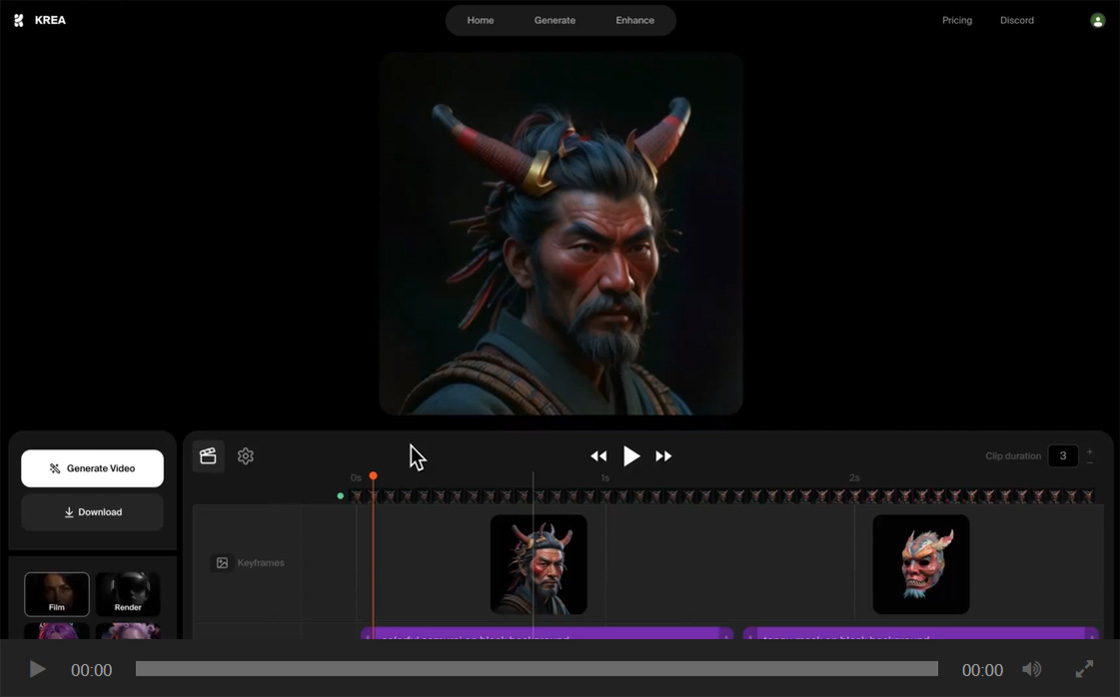
Krea Video Features:
Combine keyframes and text prompts: By inserting keyframes and text prompts on the timeline, users can flexibly define the visual effects and content of the video.
Precise control over video content: keyframe images let users accurately define visual effects at different timepoints, while text prompts describe video content and style.
Enhance creative freedom: By adjust the timeline, creators can freely design video content, achieve diverse visual effects and narrative methods.
Save time and resources: Simplify production process, reduce repeated labor, quickly generate customized videos.
Strengthen brand consistency: text prompt ensure video content and style consistent with brand requirements, improve visual coherence.
Krea Video 使用步骤:
1. Create Project: open Krea Video interface, select “Video” to start a new project.
2. Set Keyframes: insert keyframes on the timeline, define visual effects at each timepoint.
3. Set Text Prompts: add text prompts on the timeline, describe content and style within the time segment.
4. Adjust Timeline: drag keyframes and text prompts, adjust their position in the video, set video duration.
5. Adjust Generation Settings: change the settings for generated video, customize video aspect ratio, motion effects, loop and other parameters.
6. Generate Video: click the generate button, first create a low-resolution preview version, confirm the effect then generate high-resolution video.
视频生成 Highlights:
Custom prompts: each image can correspond to different prompts, increase creative flexibility and control.
Custom Start and End Frames: users can now define the start and end frames of the video, provide more personalized options for creation.
High-Resolution Video Generation: the new feature can automatically up-res the generated video, improve the quality of the final work.
Krea Video is currently in beta, Krea Max can experience it first. Visit URL: krea.ai.











