Script Planner Assistant▸
 AI Apps
 AI News

Xiaohongshu Web: A Full-Featured Content Consumption & Creative Platform
Xiaohongshu Web: A Full-Featured Content Consumption & Creative PlatformIntroduction
The Xiaohongshu web version officially launched in February 2023. At first, users nicknamed it the "official slacking-off tool." Today its features are fairly mature—you can both browse and publish content on it. Rather than a simple port of the app to desktop, it has been redesigned for PC scenarios, complementing the mobile experience in areas such as browsing, content creation, and data analytics.
Official main site: https://www.xiaohongshu.com
You can browse public content even without logging in. After signing in, your favorites, follow list, private messages, and drafts sync in real time with the mobile app, with multi-device feedback typically under 8 seconds.
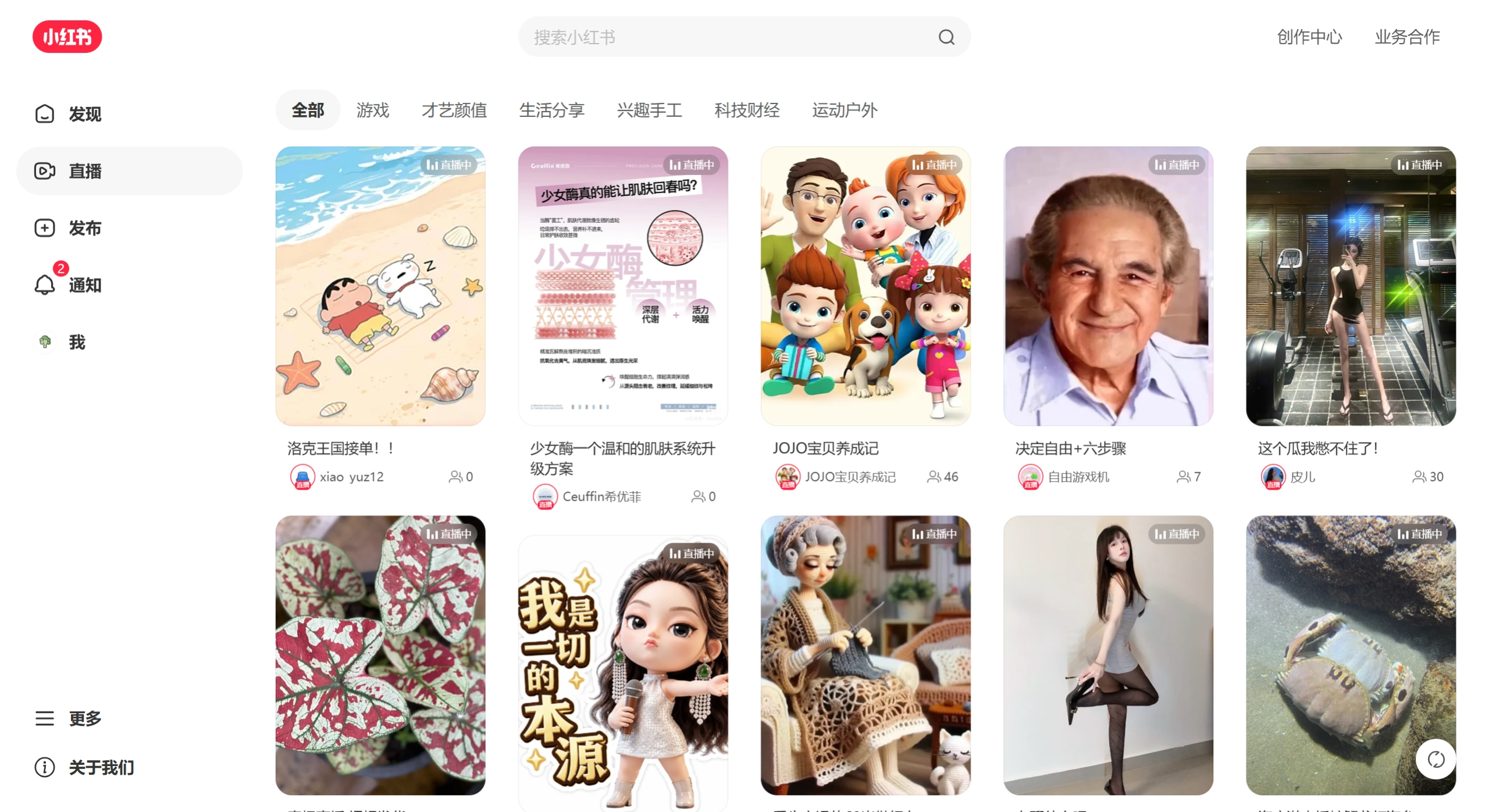
Entry points for different scenarios
| Scenario | URL | Description |
|---|---|---|
| Content discovery (default) | https://www.xiaohongshu.com/explore | Browse public content in a waterfall layout; no login required |
| Official homepage | https://www.xiaohongshu.com | Redirects to the Discovery page or login page |
| Creator Service Center | https://creator.xiaohongshu.com/login | Blogger backend for publishing notes and viewing data |
| Professional / Enterprise Account Platform | https://pro.xiaohongshu.com/ares/login | Blue-V accounts, shop, and team management |
| PC Live Streaming | https://www.xiaohongshu.com/zhibo/login | Web-based entry point for pushing live streams |
Features for regular users
Content browsing experience
The web version uses a two-column waterfall layout, showing roughly 10 notes per screen in either image-left/text-right or card-style format. At 2K resolution and above, the card spacing and font size still feel comfortable.
Infinite scroll loads continuously, with per-page content loading under 1.2 seconds and virtually no stutter while scrolling. Images use WebP compression, shrinking file size by around 38% while preserving detail, so high-resolution galleries render their first frame faster. Videos automatically play at 1080P on Wi-Fi and drop to 720P on mobile networks. The player offers playback speed adjustment and zoom.
Search and discovery
The search bar at the top supports semantic search. Entering a long-tail query like "small apartment balcony makeover" directly matches notes containing real-world comparison photos, with no need to manually filter by tags. The results page can be sorted by "Hottest / Newest / Most Favorited," and related keywords are suggested alongside.
Interaction features
After logging in, you can like, favorite, comment, and follow. On a note's detail page, the comment section can be sorted by popularity or time, and low-quality replies can be collapsed with one click so they don't get in the way of the better discussions.
Visuals and sync
Light and dark modes follow your browser theme automatically. The dark mode's grayscale background and text contrast are tuned to be easy on the eyes for extended viewing. Favorites, follows, private messages, and drafts sync in real time between mobile and web.
Creator Service Center
The Creator Service Center web version is the PC-side management dashboard Xiaohongshu provides for content creators, with far more capabilities than the regular browsing side.
Core features
Content management: Publish image-and-text or video notes directly, with multi-image upload and fine-grained layout. Drafts are saved in the cloud and can be edited anytime. Scheduled publishing is supported, with the system auto-scheduling. Published notes can be batch-managed, edited, deleted, or pinned.
Data Center: View account metrics (follower growth trends, follower demographics, profile views) and content metrics (per-note views, completion rate, engagement, shares; video notes also show average watch time). It also analyzes traffic sources—how much comes from recommendations, search, and follows. 7-day and 30-day period comparisons help you gauge your baseline versus individual posts.
Interaction management: Centrally manage all comments—quickly reply, delete, or pin. Send and receive private messages, set up quick replies, and handle @-mentions.
Commercial services: Brand partnership invitations (subject to eligibility), product showcases/goods橱窗, live stream announcement setup, and live stream data review.
Account settings: Change avatar, nickname, bio; apply for real-name verification and creator verification; security settings and multi-device management.
Advantages of the web-based backend
Compared to the mobile app, the web version is more efficient in these scenarios: large-screen precision tasks (text editing, image layout, and video upload are better suited to keyboard and mouse); richer data dimensions for in-depth analysis; and smoother batch operations (managing multiple notes, replying to comments in bulk, scheduling).
Professional account and enterprise operations platform
Brand merchants can use the Professional Account Platform (https://pro.xiaohongshu.com), whose main features include: Blue-V verification and profile customization, shop/store linking and auto-reply, sub-account role-based management, and profile traffic and conversion data dashboards.
Differences between the web version and the app
| Dimension | Web version | App |
|---|---|---|
| Content browsing | Large-screen waterfall with high information density per screen, ideal for immersive reading | Fragmented scenarios, one-handed operation, highly portable |
| Search experience | Semantically enhanced search with more comprehensive filtering dimensions | Basic search plus voice input |
| Note publishing | Supports image and video notes, scheduled publishing, suited to long-form editing | Capture, photo editing, and templates are more convenient; ideal for instant sharing |
| Data analytics | Full-dimensional Data Center with export support for in-depth review | Basic data in the Creator Center, easy to view |
| E-commerce loop | Browse products; some purchase actions require jumping to the app | Complete e-commerce, payment, and logistics tracking |
| Live streaming | Supports PC-side push streaming (requires the streaming companion app) | Complete interactions, tipping, and in-cart purchases |
| Social features | Full support for DMs, comments, and follows | More complete group chats, voice messages, location sharing, etc. |
Who the Xiaohongshu web version is for, and use cases
Regular users
Browsing content on a large screen during work breaks (i.e., "slacking off")
Quickly searching for guides and tutorials, then organizing them on a computer
People who don't want to look down at a phone screen for extended periods
Content creators
Bloggers who write long-form image-and-text posts and need complex layouts
Growing accounts that need to analyze data and refine topic selection
Those running matrix operations who need scheduled publishing and bulk comment management
Brands and merchants
Day-to-day operations of Professional Accounts with ongoing data monitoring
Team collaboration for account management
Push streaming for live commerce
Frequently Asked Questions
Q: Do I need to log in to use the web version?
A: You can browse public content without logging in; likes, favorites, comments, direct messages, and creator backend features require login.
Q: Can I post notes on the web version?
A: Yes. Through the Creator Service Center (creator.xiaohongshu.com), you can post image-and-text and video notes, and scheduled publishing is also supported.
Q: Is data shared between the web version and the mobile app?
A: Fully synced. Favorites, follows, drafts, direct messages, and other statuses are synced in real time.
Q: Why are some features missing from the web version?
A: Some features, such as the complete e-commerce purchase flow, certain live-streaming interactive features, and group chats, are still prioritized on the app. The web version focuses more on content consumption and creator management.
Q: What login methods does the web version support?
A: Phone number verification code, WeChat QR code scan, and Weibo authorization are all supported.
Last updated: May 31, 2026Related Articles: