
 Script Planner Assistant▸
 AI Apps
 AI News

Xiaowei Assistant – WeChat's Desktop AI Productivity Tool
Xiaowei Assistant – WeChat's Desktop AI Productivity ToolIntroduction
WeChat has launched a desktop productivity aitool called Xiaowei Assistant (小微助手). It supports flexible search input methods and a wide range of search targets, including applications, files, system functions, and settings, aiming to help users efficiently find the information or functionality they need.
In addition, Xiaowei Assistant also offers a variety of practical tools, such as WeChat translation, clipboard management, and JSON Cube, as well as the ability to quickly access preset shortcuts through simple mouse operations. The "Circle" feature in Xiaowei Assistant allows users to share and use various data and services with friends or organization members, supports text-based conversational interactions, and can be bound to conversational services such as the WeChat Conversational Open Platform, Hunyuan Large Model, or ChatGPT model. This tool supports both Windows and Mac operating systems.
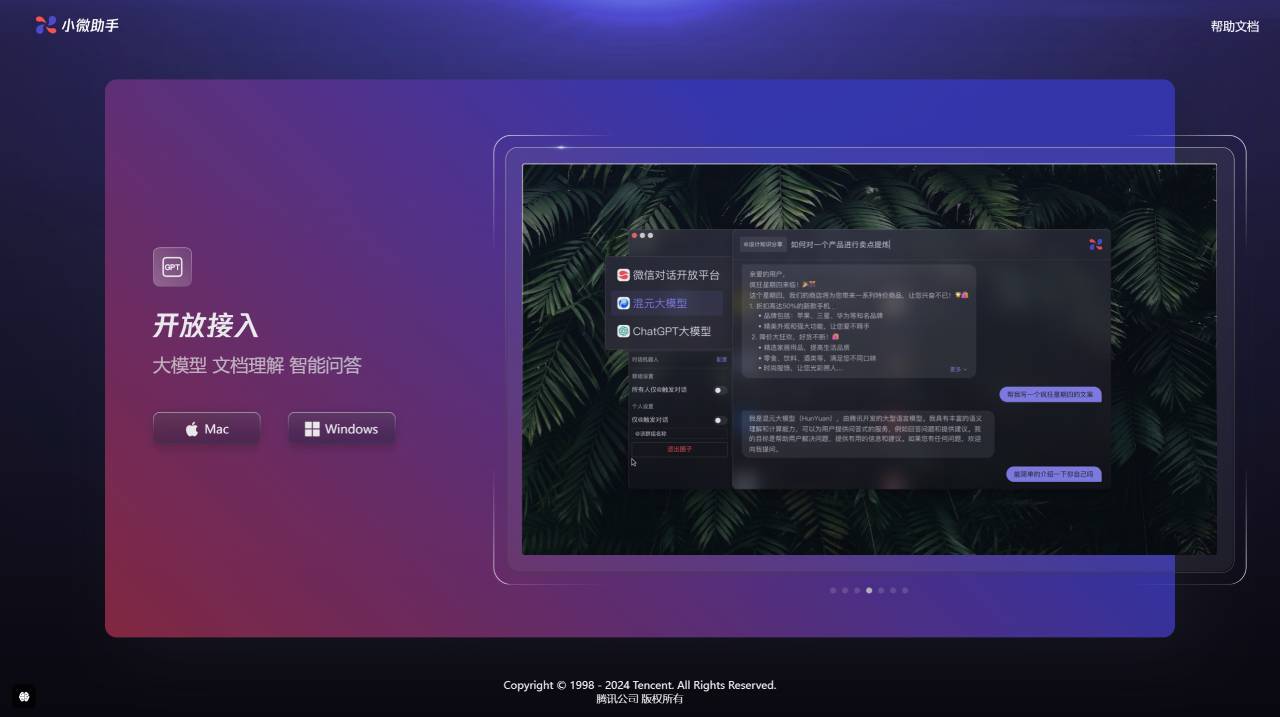
WeChat Xiaowei Assistant Features:
WeChat Xiaowei Assistant is a desktop productivity AI tool that provides flexible search input methods and extensive support for various search targets, enabling users to efficiently find the information or functionality they need.
I. Search Functionality
Input Methods: Supports searching using Chinese characters, pinyin, initials, or any combination of them.
Search Targets:
Application Search: Quickly locate and launch local applications.
File Search: Includes searching files in specified directories, with support for custom search directories.
System Functions and Settings: Such as changing the system theme, managing volume settings, etc.
Web Bookmarks: Especially quick search and access to Chrome browser bookmarks.
Conversational Retrieval: Use natural language for question queries and command execution.
II. Applications and Tools
WeChat Translation: Translates selected text with automatic language detection.
Clipboard Management: Automatically records and manages clipboard content, supporting long-term storage and categorization of content.
JSON Cube: Provides instant parsing and editing of JSON data.
Flash Note (闪念胶囊): Quickly record inspirations and information in text and image form.
Other Practical Tools: Including timestamp conversion, base conversion, Base64 encoding, and password generation.
Fingertip Assistant (指尖助手)
Shortcut: Quickly launch the Fingertip Assistant by long-pressing the right mouse button or using a keyboard shortcut.
Customizable Functions: Users can set quick-access functions according to personal needs.
Circle Feature (圈子功能)
Shared Space: Allows users to share and use various data and services with friends or organization members.
Functions and Roles:
Administrator: Can share applications, web pages, Q&A data, and configure conversational services.
Member: Can quickly search and use content and conversational services within the Circle.
Resource Sharing: Administrators can share applications, web page links, Q&A data, and more within the Circle.
Conversational Services: Circles can be bound to conversational services such as the WeChat Conversational Open Platform, Hunyuan Large Model, or ChatGPT model, providing text-based conversational interactions.
Enhanced Interaction: Content within Circles supports keyword search and conversational retrieval.
Supported Conversational Services
WeChat Conversational Open Platform
Hunyuan Large Model
ChatGPT Large Model
Conversation Mode Operations
After entering "@" in the search box and selecting a Circle, users can input questions in the conversation window and send them.
The conversation window supports basic editing operations, such as line breaks (Shift+Enter) and creating new sessions.
The conversation window can be detached into a separate window, and supports expanding, managing, and searching the session list.
Download Link
WeChat Xiaowei Assistant Download:https://xiaowei.weixin.qq.com/next















