Script Planner Assistant▸
 AI Apps
 AI News

Douyin Watermark Remover – Online Video Parser
Douyin Watermark Remover – Online Video ParserIntroduction
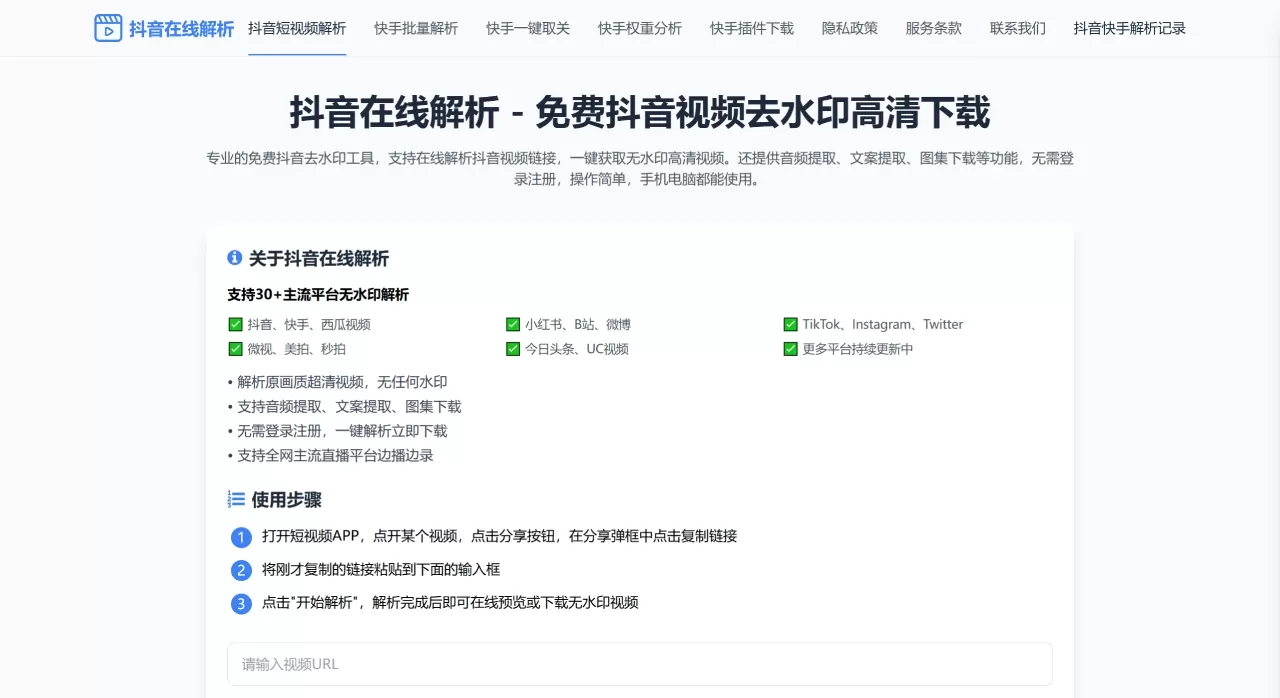
Douyin Online Parser is a free online Douyin watermark removal video download tool under Yunganji (Cloud Gathering). Just open it in a browser—no app installation, no account registration. The workflow is short: copy the link, paste to parse, and download directly.
Beyond Douyin, it also supports 30+ platforms such as Kuaishou, Xiaohongshu, Bilibili, Weibo, TikTok, Instagram, and Twitter. Its features go beyond watermark removal—it also offers audio extraction, caption recognition, image album downloads, and live recording, making it a lightweight short-video素材 processing site.
Why Choose Douyin Online Parser
Zero barriers: No registration, no software installation, no learning curve—three steps to download.
Cross-device compatibility: One URL works on both mobile and desktop, with no device limitations.
Broad platform coverage: 30+ platforms handled in one place—no need to switch between different tools.
Comprehensive features: Watermark removal, audio extraction, caption scraping, image album downloads, live recording—one site covers multiple needs.
Completely free: No hidden charges, no feature restrictions, no ad interruptions.
Core Features
Video watermark removal download: After pasting the link, the server fetches the original watermark-free file from the platform, maintaining the same quality as the original video without additional compression.
Multi-platform compatibility: Works with 30+ platforms including Douyin, Kuaishou, Xigua Video, Xiaohongshu, Bilibili, Weibo, TikTok, Instagram, Twitter, Weishi, Meipai, Miaopai, Toutiao, and UC Video—covering all major domestic short-video and social platforms.
Audio extraction: Separates the background music or voiceover from the video and saves it as an audio file, perfect for building a BGM素材 library.
Caption extraction: Automatically recognizes subtitles or spoken captions in the video—no manual typing required.
Image album download: For Douyin's image-text mode, supports batch image downloading without long-pressing to save each one individually.
Live recording: Some mainstream live-streaming platforms support recording while streaming, ideal for scenarios requiring live content archiving.
Usage Tutorial
Copy the link: Open Douyin or another app, find the video you want to download, tap Share → Copy Link.
Paste and parse: Open dy.qunganji.com, paste the link into the input box, and click "Start Parsing".
Download and save: After parsing completes, preview online, and once confirmed, click the download button.
Use Cases
Self-media素材 organization: When creating mashups, roundups, or commentary videos, large amounts of watermark-free素材 are needed.
E-commerce operations: Save competitor or influencer带货 videos to analyze scripts and visual structures.
Teaching/training: Download knowledge-based videos from platforms and embed them into ppt or courseware.
Personal collection: Save favorite videos or music locally for anytime viewing.
Audio collection: Extract trending BGM for use in your own video creations.
FAQ
Q: What should I do if parsing fails?
A: First check whether the link is complete. Some apps add extra text when sharing links—copy only the plain link portion. If it still fails, the platform may have updated its anti-scraping mechanism; try again at a different time.
Q: Will the downloaded video's quality degrade?
A: No. The tool fetches the original file from the platform, so the quality matches the HD version you see in the app, with no additional compression.
Q: Do I need to register an account?
A: No. Just open the website and use it—no personal information is collected.
Q: Does it support batch parsing?
A: Currently, the web version mainly supports single-item parsing. If you need to process a large number of videos, batch tools like Huoyun Watermark Reminder (available as WeChat mini-programs) may be more suitable.
Q: Can the downloaded videos be used commercially?
A: The tool itself only provides the download capability; copyright issues depend on the original video. We recommend using them only for personal study, collection, or scenarios where authorization has been obtained, to avoid infringement risks.
Douyin Watermark Removal Online Parser vs. Competitors
| Product | Form | Cost | Supported Platforms | Core Strengths | Main Drawbacks |
|---|---|---|---|---|---|
| Yunganji · Douyin Online Parser | Web | Free | 30+ platforms | Zero barriers, cross-device compatibility, no installation required | No batch processing, depends on network stability |
| Yes Watermark Remover | WeChat Mini-Program | Free | Mainstream platforms | 0.2-second ultra-fast parsing, local processing, ISO27001 certified | Must be used within the WeChat ecosystem |
| Huoyun Watermark Remover | WeChat Mini-Program | Free | 22 platforms | Batch processing of 50 items concurrently, 99.6% 4K quality retention | Must be used within the WeChat ecosystem |
| Hongzao Watermark Remover | WeChat Mini-Program | Free | Mainstream platforms | Strong stability, adapts to dynamic watermarks, zero ads | Must be used within the WeChat ecosystem |
| Dalao Watermark Remover | WeChat Mini-Program | Free | 130+ platforms | Live video parsing specialist, complex watermark ai recognition | Must be used within the WeChat ecosystem |
| HitPaw Watermark Remover | Desktop/Mobile APP | Partially paid | Multiple platforms | Long video optimization, refined processing | Requires download and installation, batch features require subscription |
| SoftOrbits Remover | Desktop software | Partially paid | Multiple formats | Manual frame selection + smart fill, professional-grade restoration | Large size (120MB), steep learning curve |
| Kapwing Tool | Web | Free version limited | Mainstream platforms | Integrated video editing functionality | Cloud-based processing raises privacy concerns, lacks 4K support |